

You start selling on Amazon with the Individual plan because it feels safe. No monthly subscription. Low commitment. Simple enough to get a few listings live and learn the dashboard.
Then the friction starts. Every sale carries that per-item fee. You want to run Sponsored Products, but you can't. You want cleaner reporting, but the useful data sits behind the Professional tier. You want to manage listings faster, but manual work starts eating time you should spend sourcing, pricing, and fixing weak ASINs.
That's the moment where the professional selling plan on amazon stops being a pricing question and becomes a business model question. Are you testing the platform, or are you building an operation?
Most new sellers don't need a huge software stack on day one. They do need to understand what they're giving up by staying on the Individual plan too long. If you're still learning fundamentals, start with the basics and tighten your process first. EntreResource has a solid walkthrough on Amazon seller basics if you need that foundation before deciding on your account structure.
Your First Big Decision as an Amazon Seller
A lot of sellers hit the same wall in roughly the same way.
They list a few products, get some traction, and assume the next step is just sourcing more inventory. It usually isn't. The limiting factor is account capability. The Individual plan works for testing demand. It doesn't work well once you need speed, data, and distribution.
One common pattern looks like this. A seller starts with a handful of retail arbitrage or online arbitrage finds, ships a small batch into FBA, and gets enough sales to feel encouraged. At that point, they want to do three things: advertise the winners, expand the catalog, and identify which search terms bring in buyers. The Individual plan blocks or limits all three.
The first serious upgrade on Amazon isn't inventory. It's infrastructure.
That's why I look at the Professional plan as the first real fork in the road. Sellers who stay too long on Individual often think they're saving money, but they're really delaying access to the tools that make decision-making sharper. They keep reacting to sales instead of managing a system.
The better way to think about it is simple. The Individual plan is for proving you can sell. The Professional plan is for proving you can operate.
What this decision actually changes
- Your cost structure shifts: You stop thinking in one-off transaction fees and start thinking in monthly operating overhead.
- Your workflow changes: Bulk tools and integrations become possible instead of doing everything listing by listing.
- Your growth options expand: Advertising and better reporting give you levers to improve underperforming products.
If you want casual sales, stay casual. If you want a business you can scale, this is the first upgrade that matters.
Professional vs Individual Plan A Side-by-Side Comparison
A seller with five SKUs and a few sales a week can survive on the Individual plan. A seller trying to run ads, track search terms, sync software, and manage a growing catalog will hit the ceiling fast.
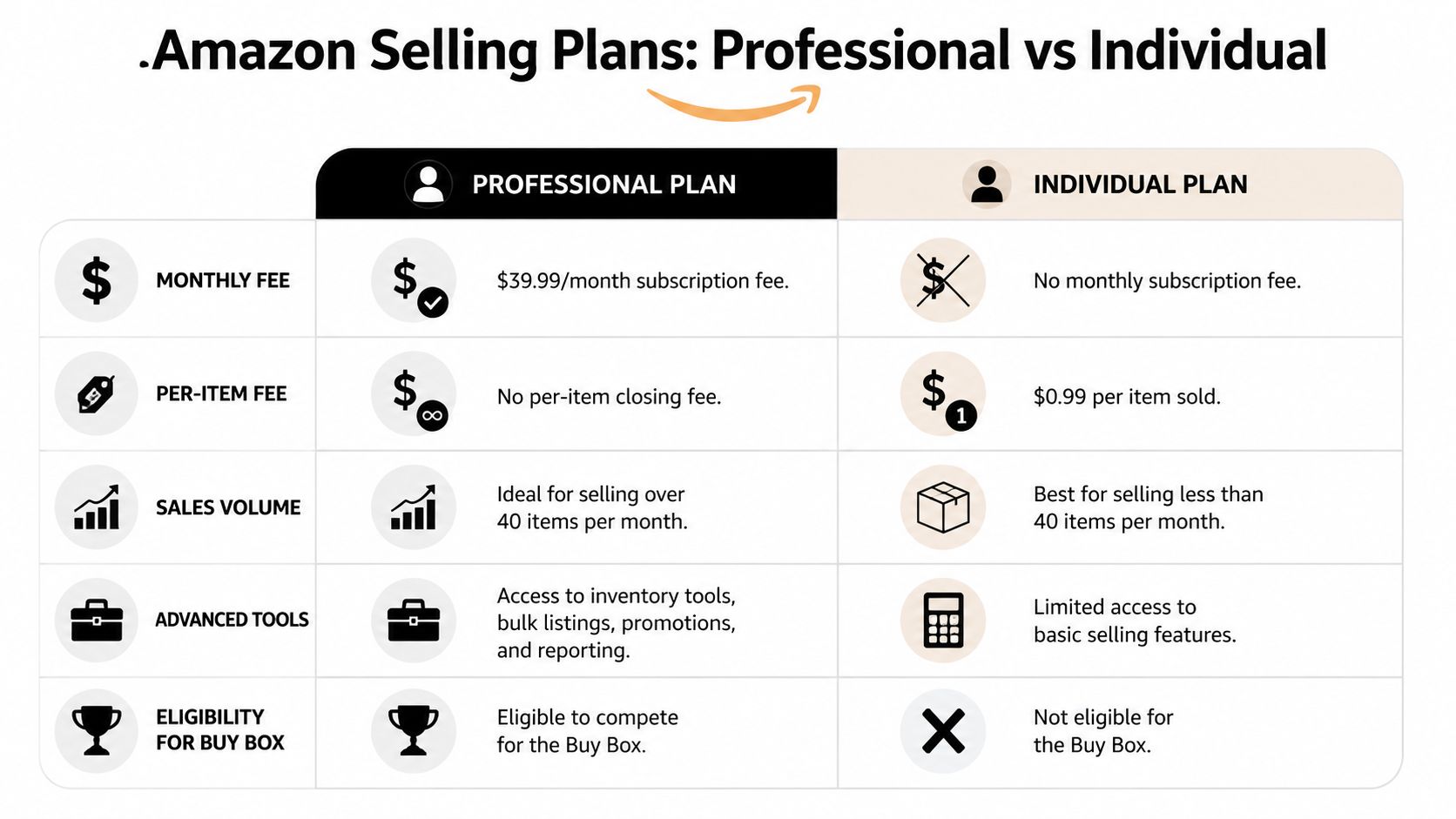
Operational capacity is the difference. One plan lets you list and sell. The other gives you the systems Amazon reserves for sellers building a repeatable business.
Amazon Individual vs. Professional Selling Plan
The feature differences below are based on Amazon plan details and standard Professional-plan capabilities noted in earlier source material.
| Feature | Individual Plan | Professional Plan |
|---|---|---|
| Monthly cost | No monthly subscription fee | $39.99 per month |
| Per-item fee | $0.99 per item sold, plus referral fees | No per-item fee, plus referral fees still apply |
| Best fit | Casual selling, testing products, low volume | Sellers building a catalog, running FBA, or planning to grow |
| Advertising access | No meaningful access to Amazon's ad stack | Access to Sponsored Products and other ad options |
| API access | Not available | Available for software integrations and automation |
| Search and keyword data | Limited | Access to better search and performance insights |
| Bulk listing tools | Manual, one listing at a time | Bulk uploads and batch edits |
| Advanced reports | Basic account visibility | Deeper business and advertising reporting |
What actually changes in day-to-day operations
The fee difference gets attention because it is easy to explain. The workflow difference matters more.
On the Individual plan, a lot of work stays manual. Listing updates take longer. Reporting is thinner. Software connections are off the table. That setup can work for a seller flipping a few items each month, especially if there is no need to advertise or restock the same products.
The Professional plan changes the account from a simple selling profile into something you can run like an operation. Ads help test demand and defend rankings. API access lets accounting, repricing, inventory, and analytics tools connect to the account. Better reports help identify whether a listing has a traffic problem, a conversion problem, or a pricing problem.
That is where the $39.99 starts to look less like a fee and more like infrastructure.
The practical trade-off
The Individual plan keeps overhead low, which is useful early. It also limits how far the business can go before time, missing data, and manual work start slowing everything down.
For resale, liquidation, or occasional one-off inventory, that may be fine.
For private label, wholesale, replens, or any model where you plan to reorder winners, the Professional plan usually makes more sense because it gives you tools that support scale instead of forcing you to manage growth by hand.
The Break-Even Point When to Upgrade Your Plan
The fee math on this decision is straightforward.

The Professional selling plan reaches cost parity with the Individual plan at precisely 40 units sold per month. That's because the monthly subscription is $39.99 and the Individual plan charges $0.99 per item sold, so $39.99 ÷ $0.99 = 40.4 units according to Seller Assistant's break-even analysis.
The cleanest way to think about it
This is the line that matters:
- Below 40 units a month: the Individual plan may cost less on a pure per-item basis.
- At around 40 units: the plans are effectively at parity.
- Above 40 units: the Professional plan reduces your per-unit selling cost on the subscription side.
That calculation excludes referral fees because referral fees apply to both plans. The actual difference here is the monthly subscription versus the per-item charge.
Why many sellers misread this
The mistake is treating the Professional plan like a fee penalty instead of fixed overhead.
Once you switch, that monthly charge should sit in your mind next to software, prep costs, and other operating expenses. It's not something to fear on each sale. It's something your catalog absorbs.
Practical rule: If your sales volume is consistently above the break-even point, stop thinking transaction by transaction and start modeling your account like a real business.
That mindset changes how you price products and how aggressively you test inventory. On the Individual plan, every extra sale adds another per-item charge. On the Professional plan, the subscription is already paid, so adding volume doesn't increase that part of your selling cost.
What works in practice
The sellers who use this well do two things:
- They allocate the monthly fee across active ASINs instead of obsessing over the account-level charge.
- They judge the plan against net profit behavior, not gross revenue or vanity sales.
If you're hovering under the break-even point and still not using the Professional-only tools, waiting can make sense. If you're crossing it consistently, the math already answered the question.
Unlocking Growth with Professional-Only Features
A lot of sellers upgrade as soon as the math works. The better reason is that the Individual plan puts a ceiling on how far you can scale your operation.
The Professional plan gives you the tools to run the account like a business system instead of a manual side project. That matters once you have multiple ASINs, regular replenishment decisions, or any intention to grow beyond basic listing and order management.
Advertising starts to matter as soon as competition gets real
Once other sellers are competing for the same search terms, organic rank alone is not a plan. Professional sellers can run Sponsored Products, Sponsored Brands, and other ad formats that help launch offers, defend branded traffic, and keep proven listings visible.
Paid traffic does not fix a bad offer. It does give you control. You can test search terms, see which targets convert, and support products that deserve more visibility.
That feedback loop is one of the biggest differences between casually selling on Amazon and actively building a catalog.
If you're still learning how placement, fulfillment quality, and conversion rate affect visibility, reading about mastering Amazon Buy Box factors helps. The Professional plan works best when your offer quality is strong enough to capitalize on the traffic you pay for.
API access is what makes scale manageable
New sellers often overlook API access because it sounds technical. In practice, it becomes important the moment account work starts eating too much time.
API connectivity lets approved software pull data from your account and push updates back into your workflows. That means fewer manual exports, fewer spreadsheet patches, and fewer preventable mistakes.
What API access changes in day-to-day operations
- Inventory monitoring gets tighter: Better tools can catch stock risks, listing issues, and sync problems earlier.
- Reporting gets easier to use: You can pull the numbers that matter into one dashboard instead of hunting through separate menus.
- Repetitive work gets standardized: Listing updates, stock syncs, and routine reporting become more consistent.
For a seller with one or two products, that may sound optional. For a seller managing a growing catalog, it saves time and reduces error rates. That is where the monthly fee starts looking less like overhead and more like infrastructure.
Reporting improves the quality of your decisions
Professional sellers also get access to stronger business reporting, advertising reports, and search term data that help explain how shoppers find and buy. That changes how you diagnose problems.
A seller with reporting can spot a weak keyword path, a traffic drop, or a conversion issue before making changes. A seller without it often rewrites titles, swaps images, or cuts price based on guesswork.
That difference shows up in execution. Better reporting will not create demand on its own, but it helps you test the right fix first. Over time, that leads to cleaner decisions on pricing, inventory, ad spend, and listing optimization.
The value of the Professional plan is not status. It is control. It gives you the systems needed to advertise, measure, automate, and scale without managing the whole business by hand.
How to Enroll and Upgrade to a Professional Selling Plan
Once you've decided to move, the process itself is usually simple. The bigger issue is making sure your account setup and workflows are ready to use the upgrade properly.

If you're opening a new seller account
Have your business information ready before you start. In practice, that usually means legal identity details, payout information, tax-related information, and whatever documentation Amazon asks for during verification.
A clean setup matters because rushed applications create avoidable delays. Make sure the details you enter match your supporting documents.
If you're upgrading an existing Individual account
Inside Seller Central, go to your account settings and look for the service or plan management area. That's where sellers typically change from Individual to Professional.
A few practical notes matter here:
- Your access changes quickly: Once the plan changes, the Professional tools start becoming available through your account workflow.
- Your process should change with it: Don't upgrade and then keep operating like you're still on the Individual plan.
- Check your software stack right away: If you plan to use external reporting or automation, this is the time to connect it.
For sellers planning to use integrations immediately, it helps to understand how teams are automating Amazon SP API reporting so the upgrade turns into actual reporting advantages instead of unused account access.
A simple rollout plan
Don't try to activate every Professional feature on the same day. Start with the most effective moves.
- Enable the account change
- Confirm access to the reporting areas you need
- Set up advertising only for products you already trust
- Connect any reporting or inventory tools
- Review your listing workflow for bulk management opportunities
Upgrade with a reason. The monthly fee pays off when it supports faster decisions, cleaner operations, or stronger demand generation.
That's the standard worth following. The account type alone doesn't improve the business. The systems you build after the upgrade do.
Optimizing Your Professional Account from Day One
The worst way to buy the Professional plan is to treat it like a badge.
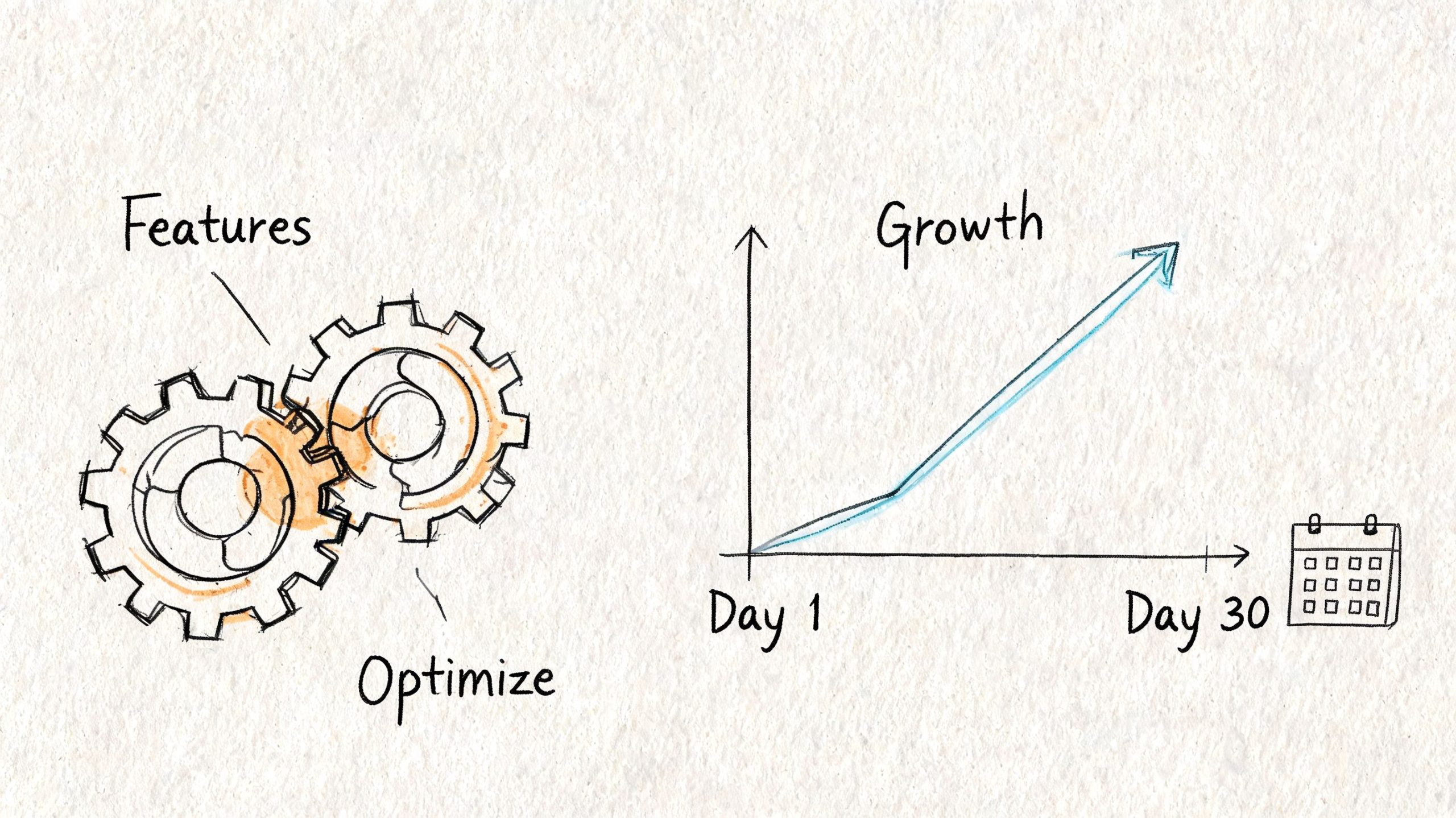
The right way is to use the first month to build habits that weren't possible on the Individual account. That means using the new visibility and account controls immediately, not "someday when things get busier."
One major blind spot for sellers is category access and international expansion. Sources often mention that Individual sellers can't sell in restricted categories, but they don't quantify how many categories are restricted or explain the approval process under the Professional plan. Those same sources also lack guidance on how the fee structure works across international marketplaces, which creates a real knowledge gap for sellers planning geographic expansion, as noted in this discussion of Professional plan gaps.
Your first-month checklist
Use the opening weeks to tighten operations.
- Review business reports early: Start checking traffic and conversion behavior on your strongest ASINs. You're looking for obvious mismatches between impressions, clicks, and sales so you know where listings need work.
- Test paid traffic selectively: Don't spray ad spend across the whole catalog. Start with products that already have stable supply and a decent listing foundation.
- Set up bulk workflows: If you manage multiple SKUs, move repetitive listing edits and catalog maintenance into a more scalable process.
- Explore gated category opportunities: If your business model includes Beauty, Grocery, or other restricted areas, the Professional account gives you the opening to assess those paths more seriously.
- Document account health routines: As the account becomes more valuable, suspension risk matters more. Keep your policy and performance monitoring disciplined, and review practical prevention steps around Amazon account suspensions.
What to prioritize first
Not every feature deserves equal attention.
Start with visibility
Business reports and search data help you understand what buyers are doing. That's your baseline. Without it, ad campaigns and listing changes are harder to judge.
Then build repeatable workflows
Bulk tools and integrations save time, but they matter most after you know what should be standardized. Clean up naming, SKU organization, and inventory processes before layering on more complexity.
Keep global expansion in the planning bucket
If you want to sell in other Amazon marketplaces, don't assume the U.S. pricing structure answers every question. This is one of those areas where sellers need to verify the current marketplace-specific rules directly before expanding, because the public guidance often leaves gaps.
Better tools don't help much if your account is still run on guesswork, scattered files, and reactive decisions.
Use the Professional plan to become more systematic. That's where the value compounds.
Is the Professional Plan a Requirement for Serious Sellers?
A new seller can get away with the Individual plan for a while. A seller trying to build a repeatable Amazon business usually hits its limits fast.
The issue is not the monthly fee. It is the growth ceiling. Once you need Sponsored Products to drive launch velocity, reporting to spot weak listings, or API access to connect inventory and repricing tools, the Individual plan stops being a cheap starting point and starts slowing down decisions.
The break-even math matters, but serious sellers should look past the fee line. If you sell enough units each month, the fixed subscription can cost less than paying per item. More important, the Professional plan gives you the systems that help you grow beyond manual work. That is why experienced sellers often upgrade before the math is perfectly even on paper.
I look at it this way. The Individual plan is for testing whether Amazon can work for you. The Professional plan is for building a business that can survive growth. Those are different goals.
That distinction matters even more if you are deciding what kind of Amazon operation you want to run long term. If you are still comparing marketplace models, this guide to Amazon Seller Central vs Amazon Vendor Central differences helps frame the bigger decision.
So, is the Professional plan required for serious sellers? In practice, yes. Not because Amazon forces the upgrade on day one, but because serious selling requires tools, control, and scale that the Individual plan does not provide.
Frequently Asked Questions
Can you start on the Individual plan and switch later
Yes. That's a normal path. Many sellers test the platform with Individual first, then move to Professional once they need stronger tools or their volume justifies the fixed monthly overhead.
Should you upgrade before you hit break-even
Sometimes. If your strategy depends on advertising, API access, or advanced reporting, the operational upside may matter more than waiting for the fee crossover. If you're still validating products and don't need those tools yet, waiting can be reasonable.
Does the Professional plan lower referral fees
No. Referral fees apply across both plans. The meaningful fee difference is the monthly subscription versus the per-item charge.
Is the Professional plan worth it for FBA sellers
Usually, yes. FBA sellers tend to care about catalog management, keyword visibility, automation, and ad access sooner than casual sellers do. Those needs line up with what the Professional plan provides.
What about restricted categories
This is one area where sellers need to be careful. Public explanations often say the Professional plan is relevant for restricted categories, but they don't give enough detail on how many categories are gated or how long approval takes. Treat category access as something to verify directly inside Amazon's current approval workflow rather than assuming the account upgrade alone solves it.
What if you want to sell internationally
This is another area with gaps in public guidance. Some sources note U.S. marketplace pricing, but they don't fully explain how fees and plan structure apply across multiple Amazon marketplaces. If geographic expansion is part of your model, confirm current marketplace rules before you build sourcing or inventory plans around assumptions.
If you're building beyond hobby-level selling, the Professional plan is usually the account structure that lets your systems catch up with your ambition. For more practical Amazon FBA and ecommerce playbooks, check out EntreResource and subscribe to the Weekly 5 for concise tactics that are useful.