

You're usually trying to find an Amazon store for one of three reasons.
You found a product and want the rest of the brand's catalog. You're researching a competitor and need their full assortment, not just one ASIN. Or you clicked around for five minutes and realized Amazon doesn't make this nearly as obvious as it should be.
That frustration is normal. Amazon has multiple surfaces that look similar but aren't the same thing: a Brand Store, a seller profile, and a regular product listing. If you mix those up, you can spend a lot of time searching for something that either isn't there or is hiding behind a path Amazon expects shoppers to use.
If you want to learn how to find an Amazon store efficiently, the trick is to stop relying on a single method. The easy routes work sometimes. The practical routes work more often.
Why Finding an Amazon Store Isn't Always Simple
Amazon feels like one storefront, but it behaves more like a giant network of listings, brand pages, ads, and seller entities. Public estimates put Amazon at more than 300 million global active customers, with roughly 60%+ of product sales coming from third-party sellers according to these Amazon marketplace statistics. That scale is exactly why store discovery gets messy.
A shopper may think, “I know the brand name, so I'll just search it.” Sometimes that works. Sometimes Amazon shows product results, sometimes ads, sometimes a brand byline, and sometimes nothing that clearly leads to the full store. That isn't user error. It's how the marketplace is structured.
What people usually mean by Amazon store
The phrase “Amazon store” commonly refers to one of these:
| Page type | What it is | What it's good for |
|---|---|---|
| Brand Store | A branded, curated destination built inside Amazon | Seeing a brand's catalog, bundles, and category structure |
| Seller Profile | A public seller-facing page tied to the merchant account | Checking seller identity and some marketplace info |
| Product Listing | A single detail page for one item | Evaluating one ASIN, offers, reviews, and variations |
The confusion starts when a seller has product listings but no real Brand Store. Or when a seller profile exists, but the shopper expects a branded storefront experience.
Practical rule: If your goal is catalog research, don't stop at the product page. A single ASIN rarely tells you whether the seller has a proper store, a thin catalog, or just one winning product.
Why the store can feel buried
A Brand Store is often available through native Amazon surfaces, but not always in the way users expect. Search can surface products before stores. Brand names can vary from packaging names. Some sellers also rely more on external traffic than internal search.
That's why the right question often isn't just “Where is the store?” It's “What kind of page am I looking for, and which discovery path is most likely to expose it?”
Using Amazon's Native Navigation Features
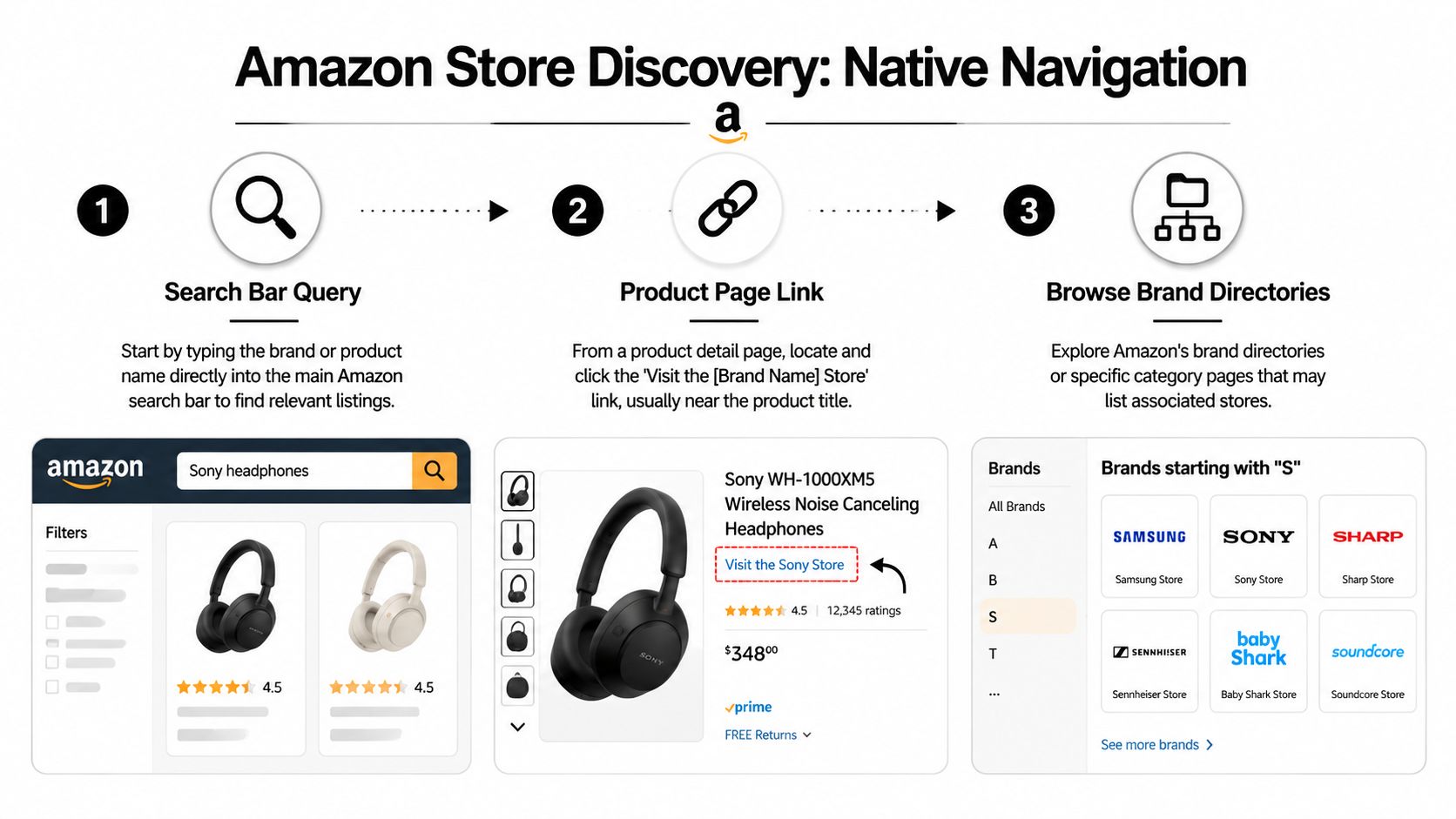
If you want the fastest on-platform route, start with Amazon's own navigation. Amazon says shoppers can discover Brand Stores through search results, product detail pages, Amazon ads, and the brand byline near the product title, and that each store gets a unique URL for direct access and external promotion in its Brand Stores best practices guide.
Start with the product detail page
The most reliable method is usually the product page for a branded item. Open a listing sold by the brand you care about and look near the title.
You're looking for a clickable brand element such as “Visit the [Brand] Store” or the hyperlinked brand byline. If that link exists, click it first. It's cleaner than searching by brand name because it uses Amazon's own relationship between the ASIN and the store.
This works well when:
- The brand is established and has built a Store
- The listing is branded clearly with consistent naming
- You already have one confirmed product from that brand
It works poorly when:
- The seller is a reseller, not the brand owner
- The brand naming is inconsistent across listings
- The page only exposes a seller name, not a Store link
Search Amazon like a buyer, not like a researcher
A lot of sellers overcomplicate this. If you know the exact brand, search the brand name in Amazon's main search bar first. Then review results for branded tiles, sponsored brand placements, or listings that clearly carry the store link.
Don't search broad product phrases if your real goal is the brand destination. Search the brand name plus flagship product, then click into the strongest listing and use the byline route.
A simple workflow looks like this:
- Type the brand name into Amazon search.
- Open a top branded result that looks official.
- Check near the title for the store or byline link.
- Click any sponsored brand placement that appears obviously tied to that brand.
The shortest path is usually one branded product page, not ten search result pages.
Don't ignore Sponsored Brands ads
Amazon also uses ads as a store-discovery layer. A Sponsored Brands placement often sends traffic to a Store instead of a single product page. If you search a category term and see a branded banner featuring multiple products, that's often a direct route.
It is notable that some stores are easier to find through paid placements than organic store visibility. If a brand invests in ads, the ad may be the easiest doorway into the store.
Finding Stores with URL Patterns and Google Search
When Amazon navigation doesn't surface the store, stop depending on Amazon's internal search. Go around it.

A practical reference from Onramp notes that a storefront URL can often be found in Seller Central and commonly follows the pattern www.amazon.com/shops/yourshopname in its guide to finding an Amazon storefront URL. That pattern gives you a useful clue even when you don't control the account.
Use the shops URL pattern
If you know the brand or public shop name, test likely variations of the store URL. You won't always guess it correctly, but it's often faster than waiting for Amazon search to cooperate.
Try:
- The exact brand name as one string
- A shortened public-facing brand name
- The seller's display name if it differs from packaging
- Variations without punctuation if the brand uses symbols
The goal isn't blind guessing. It's narrowing the likely storefront slug based on how the brand presents itself publicly.
Use Google to expose buried pages
Google often indexes Amazon store and seller surfaces differently than Amazon exposes them internally. That makes Google useful when Amazon search is noisy.
Search combinations like:
- site:amazon.com brand name amazon shop
- site:amazon.com brand name storefront
- site:amazon.com/shops brand name
- site:amazon.com seller name amazon store
This is especially useful when the brand has external mentions, social links, or creator pages that point back to the Store. If you're interested in how discoverability is changing more broadly, this piece on winning in AI search environments is useful context because storefront visibility increasingly depends on how entities and pages connect across platforms, not just one internal search engine.
When you need the seller behind the listing
Sometimes you're not starting with a brand. You're starting with a merchant on a product page. In that case, the seller identity matters more than the brand search term.
A solid next step is to pull the seller ID and trace the seller from there. This walkthrough on how to find any seller ID on Amazon is useful if you need to move from one listing to the broader merchant footprint.
Here's a quick visual if you want another angle on the search process:
What works and what wastes time
| Method | Good use case | Limitation |
|---|---|---|
| Manual URL testing | You know the exact brand identity | Fails if the store slug uses a different name |
| Google site search | Amazon search is weak or cluttered | Results vary by indexing and phrasing |
| Seller ID research | You need the merchant catalog, not just the brand page | Can lead to seller surfaces that aren't true Brand Stores |
Leveraging Browser Extensions and Research Tools
If you're doing this once, manual searching is fine. If you're evaluating multiple brands, resellers, or private label competitors, manual searching gets slow fast.
Professional Amazon research usually shifts from “Can I find this store?” to “Can I find it repeatedly, without wasting clicks?” That's where browser extensions and product research tools help. They often extract seller data directly from the product page, reveal the merchant behind an offer, and shorten the path to the broader catalog.
Why tools change the workflow
The true value isn't convenience. It's consistency.
When you use a research stack, you stop depending on whether Amazon chose to surface a neat “Visit the Store” path that day. Instead, you pull the identifiers on the page and work from those. In practice, that means less guesswork when a listing is crowded with variations, multiple sellers, or partial brand information.
Some sellers use larger suites like Helium 10 or Jungle Scout for this kind of page-level analysis. Others prefer lighter browser-based tools for faster checks.
What to look for in a storefront-finding tool
A useful tool should do at least one of these well:
- Expose seller identity clearly so you can move from one listing to the merchant behind it
- Surface product-page metadata without forcing you to inspect page code manually
- Help distinguish brand vs seller when the page structure is ambiguous
- Reduce repeat clicks when you're reviewing many listings in a row
One lightweight option in that workflow is this Amazon Brand Detector extension, which is built to identify brand information directly from Amazon pages. That's not the same as a full catalog intelligence suite, but it fits the job when your bottleneck is identifying who owns or controls the listing surface you're seeing.
If you research competitors weekly, tools stop being a luxury. They become the difference between structured analysis and random clicking.
The trade-off is simple. Tools save time, but they don't remove judgment. You still need to know whether you found a Brand Store, a seller profile, or just another listing path.
The Rise of Off-Amazon Storefront Discovery
A lot of storefront discovery now starts somewhere other than Amazon.
That's easy to miss if you're thinking like a marketplace operator instead of a shopper. Buyers often see a product in a reel, a YouTube roundup, or a creator's “favorites” post first. The Amazon store is the destination, but it isn't the first touch.
Influencity notes that finding Amazon influencers and their storefronts often means checking Instagram and YouTube first, then using hashtags like #FoundItOnAmazon and #AmazonFinds to locate the storefront in bios, posts, or linked profiles in its guide on finding Amazon influencers and their storefronts.
Why this matters for sellers and researchers
If you're trying to find a creator storefront, Amazon's internal search may not be the best starting point at all. The creator's social handle is often more stable than whatever naming convention appears inside Amazon.
That changes the process:
- Search the creator name on Instagram or YouTube
- Check bio links, link hubs, and pinned content
- Look for creator hashtags tied to Amazon
- Then follow the outbound link into the storefront
This also explains why some storefronts feel “hard to find” on Amazon but easy to reach from outside it. They weren't built primarily for discovery through Amazon search. They were built as landing pages for social traffic.
Brand stores and creator storefronts are not the same thing
This distinction matters. A brand store usually reflects a company's curated catalog and merchandising structure. A creator storefront reflects a person's recommendations, themed lists, or affiliate-driven selections.
If you work across marketplaces and brand-owned channels, it helps to understand that storefront structure is part of a broader ecommerce visibility problem. For a wider view of that issue, this comparison of top ecommerce platforms for SEO is useful because it shows how discoverability changes when the platform controls more or less of the search experience.
If your target is specifically a creator path, this guide on finding an Amazon influencer storefront is a practical companion.
Some of the easiest Amazon storefronts to find are discovered off Amazon first. That sounds backwards until you remember how people actually shop now.
Troubleshooting Why You Still Cannot Find a Store
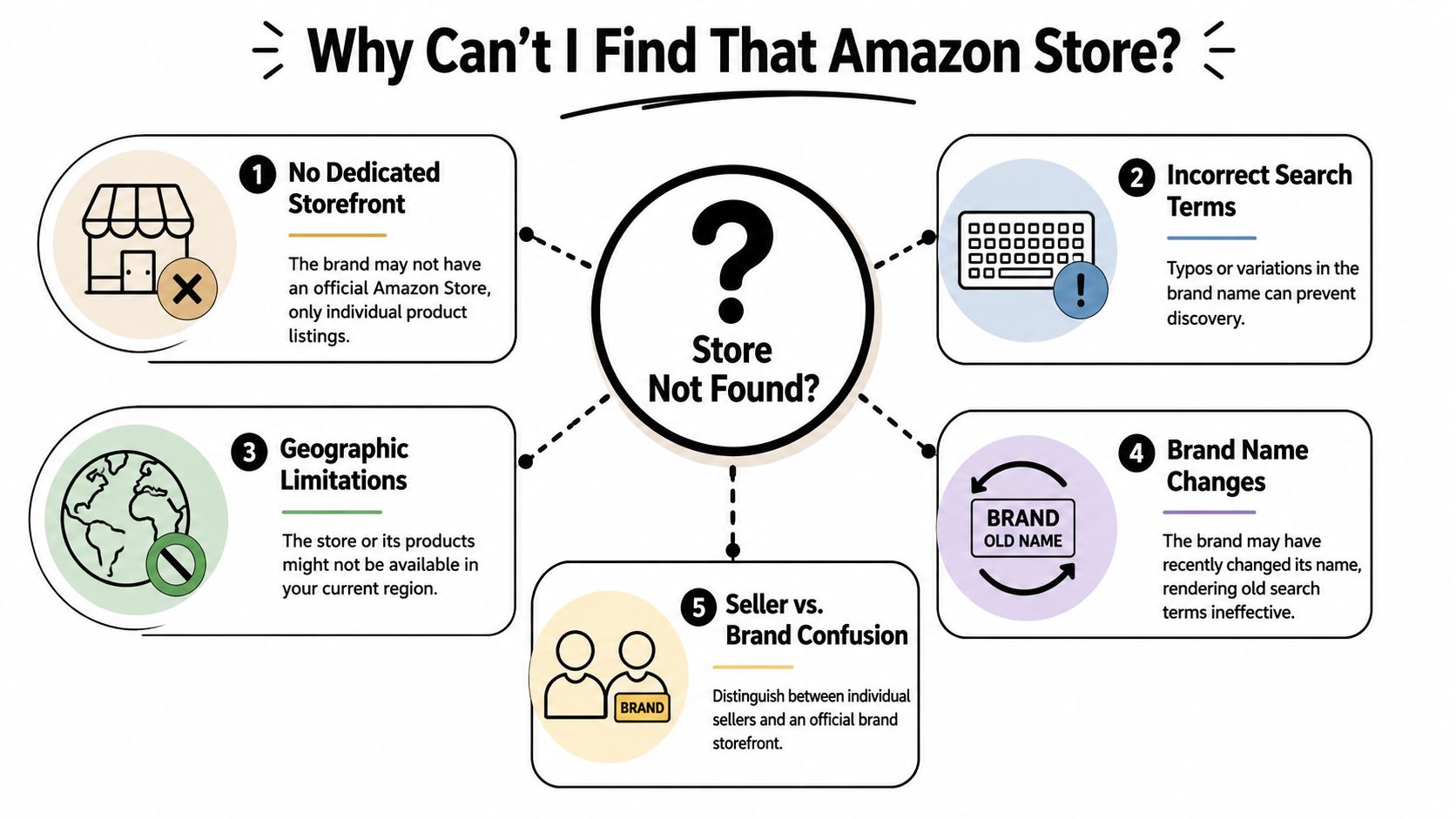
Sometimes the answer is simple. There is no real store to find.
A recurring problem in storefront searches is that people assume every seller has a curated Brand Store. That isn't true. SellerSprite highlights that even sellers can struggle to surface their own storefronts through Amazon search, and that the core confusion often comes from mixing up a seller profile with a Brand Store, or from visibility issues caused by incomplete setup in its article on finding Amazon storefront seller information.
The most common failure points
If you still can't find the store, check these possibilities first:
- It's only a seller profile. The merchant may sell on Amazon without having a branded storefront experience.
- The brand setup is incomplete. The store may exist weakly or not be surfaced well.
- You're searching the wrong name. Seller display name, brand name, and storefront name aren't always identical.
- The listing belongs to a reseller. You may be tracing the merchant, not the actual brand owner.
- The store isn't the traffic destination. Some brands push buyers into product pages or external funnels instead.
A quick diagnostic table
| Symptom | Likely cause | Better next move |
|---|---|---|
| No “Visit the Store” link on product page | No Brand Store or weak listing connection | Check seller identity and search externally |
| Search shows products but no store | Amazon is ranking listings over brand destination | Use Google site search or a direct URL pattern |
| You found a page, but it looks plain | It's probably a seller profile | Confirm whether it has store navigation and curated categories |
Brand Store versus seller profile
A true Brand Store usually feels like a mini-site inside Amazon. It has category tiles, merchandising sections, and a branded layout.
A seller profile is more functional. It identifies the merchant, but it usually won't give you the same curated browsing experience. If what you found looks sparse and transactional, that's probably not the store you were hoping to analyze.
Don't treat “seller found” as “store found.” Those are often different destinations with different research value.
When the store exists but remains hard to surface
This is the awkward middle case. The store may exist, but Amazon search doesn't present it clearly. That can happen when the brand relies too heavily on one discovery path, has naming inconsistencies, or hasn't connected its strongest products to the store in a way that's easy for shoppers to follow.
That's why the best workflow uses multiple entry points. Product page first. Search second. External search third. Social discovery if the brand is creator-led.
Frequently Asked Questions
What's the difference between an Amazon seller profile and an Amazon Brand Store
A seller profile is tied to the merchant account. It helps identify who is selling. A Brand Store is a curated shopping destination for the brand. If you want to browse a catalog cleanly, the Brand Store is the better target.
How do I find an Amazon store in another country marketplace
Search inside the correct regional Amazon marketplace first. A brand may have a store in one marketplace and not another, or the naming may differ slightly. If native search fails, use a Google site search focused on that country-specific Amazon domain.
What if I only have the seller's business name
Start by searching the business name on Amazon and Google with terms like “shop,” “store,” and the relevant product category. If that doesn't work, find one confirmed product listing tied to that seller, then trace the seller identity from the page and work outward from there.
Why do some Amazon stores show up through social media faster than Amazon search
Because some storefronts are built to receive traffic from creators, influencers, or external campaigns. In those cases, the social profile or video description is often the shortest path to the store.
If you're doing competitor research, the fastest habit is simple: find one confirmed product, verify whether you're looking at a brand or a seller, then use two discovery paths instead of one. That cuts most of the wasted time out of finding an Amazon store.