
Amazon doesn't charge you immediately for a pre-order. In most cases, Amazon charges your card a few days before the item's release date or when it ships.
That timing catches a lot of people off guard. You click pre-order for a video game, book, collectible, or business supply, see the order confirmation, and assume the money is already gone. Then nothing happens on your card statement, at least not in the way a normal purchase would. If you're an entrepreneur buying inventory, test products, or launch-day stock, that gap matters because it changes how you budget and when cash leaves your account.
The short version is simple, but the operational logic is where people make mistakes. Amazon's system is built around authorization first and capture later, and once you understand that, the timing makes more sense for both personal buying and e-commerce cash-flow planning.
Understanding Amazon's Pre-Order Payment Timing
You place a large pre-order for a product launch, check your bank account, and the money is still there. That feels like extra breathing room, but it can create planning mistakes if you treat that balance as available cash.
For most Amazon pre-orders, the payment is not fully collected when you place the order. Amazon usually waits until the item is close to release or ready to ship. From a buyer's perspective, that prevents Amazon from taking money months before fulfillment. From an operator's perspective, it lets Amazon match payment collection to actual inventory movement.
That timing matters if you buy for resale, bundle planning, or launch-week stock. The order date tells you you have made a commitment. The release window is what usually matters for cash flow.
Why entrepreneurs get tripped up
A casual buyer may only care about whether a charge will appear today or later. A seller has a different problem. You may have ten pre-orders across different release dates, one payout incoming, and supplier payments due in the same week. If those Amazon charges hit together, your cash position can tighten fast.
I see the same mistake often. Someone logs the order mentally as already paid because Amazon accepted it, then gets surprised when the actual charge posts near release and overlaps with other operating expenses.
Common problem areas include:
- Launch inventory planning: You reserve units early, but the actual cash leaves later than expected.
- Card management: A card that worked at checkout can fail closer to release if it expires, gets replaced, or hits a limit.
- Budget control: Your team treats the pre-order as settled, while the bank account still shows funds that will likely disappear later.
Practical rule: Treat the pre-order as committed spend the day you place it. Treat the release period as the likely point when cash actually leaves your account.
Why Amazon handles it this way
Amazon is managing two risks at once. It needs to confirm that you have a valid payment method, and it wants to collect money closer to the point when it can fulfill the order. That reduces failed shipments, cuts down on premature charges for delayed items, and keeps the payment tied to real inventory allocation instead of an early reservation.
For business buyers, that distinction matters more than the simple answer of "Amazon charges when it ships." It explains why your card may look fine at checkout, yet still fail later, and why pre-orders can distort cash forecasting if you only watch settled transactions.
The key point is simple. A pre-order confirmation means the order is in place. It does not mean the final payment has been completed.
Authorization Holds vs Actual Payment Captures
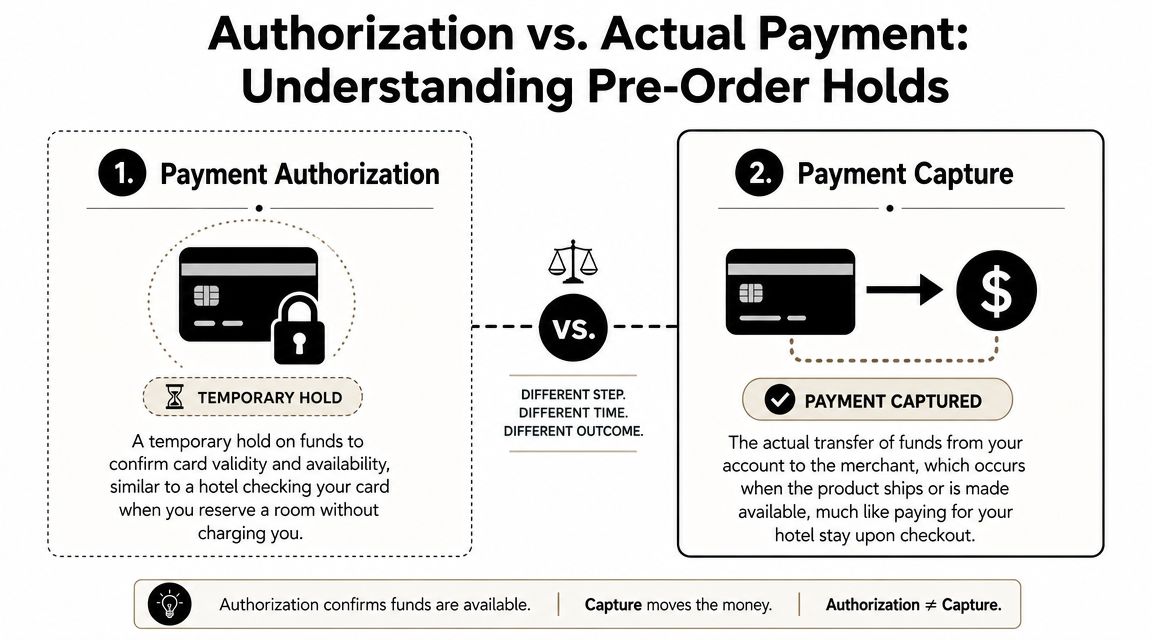
The cleanest way to understand Amazon's system is to compare it to a hotel reservation. The hotel may check your card when you book the room, but it usually doesn't take final payment until checkout. Amazon works in a similar way.
What an authorization actually does
An authorization hold is a temporary check. It confirms the card exists, the account is active, and funds or credit appear available. That doesn't always mean Amazon has collected the money.
This is why some buyers see a pending charge that later disappears. The bank recognized the authorization request, but Amazon didn't finalize the transaction yet.
What capture means in plain English
A capture is the transfer of funds. That's when the transaction moves from a check to a settled payment.
For standard Amazon retail orders, the charge is usually authorized at checkout but not captured immediately. Amazon typically completes the actual card charge when the order begins the shipping workflow, which ties the payment event to inventory allocation and fulfillment rather than to the original click to buy (WisePPC's breakdown of Amazon charge timing).
That policy makes sense operationally. If Amazon charged every unreleased or not-yet-allocated item immediately, it would create more refunds, more support issues, and more payment friction when products get delayed, cancelled, or split into different fulfillment timelines.
| Term | What it means | Why Amazon uses it |
|---|---|---|
| Authorization | Temporary validation of your card | Confirms payment method without fully charging too early |
| Capture | Final charge that settles | Lines up payment with shipping or release access |
A pending transaction isn't always a completed payment. For pre-orders, it can just be Amazon checking that the card still works.
Why this matters more for business buyers
If you're running an FBA operation, this system can distort your view of available capital if you're not careful. The order may sit in your Amazon account for weeks while your actual charge lands much later. That's useful when you're pacing inventory buys, but dangerous when you stack too many pre-orders on the same card.
What works is tracking pre-orders in a separate cash-flow bucket. What doesn't work is treating “not charged yet” as “not spent yet.”
Physical vs Digital Pre-Order Charging Timelines
A seller pre-orders 40 units of a new boxed game for a release-week flip. The order sits there for weeks with no settled charge, then the card gets hit just before inventory starts moving. That timing matters because physical and digital pre-orders follow different operational triggers.
Physical goods usually charge near shipment
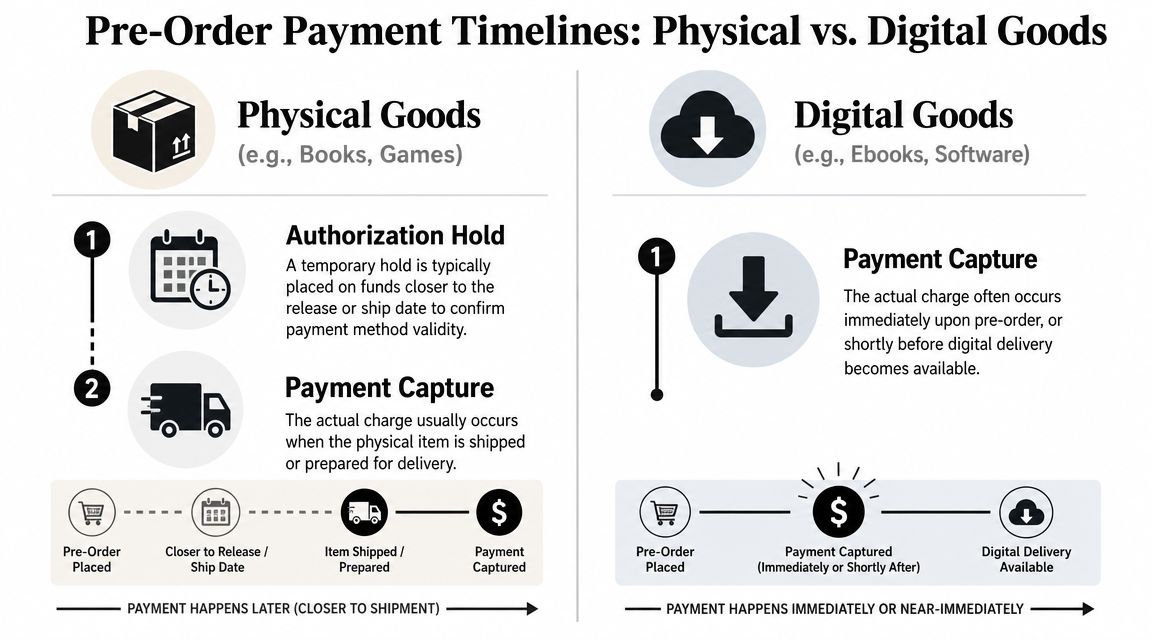
For physical products such as books, collector's editions, electronics, toys, and boxed games, Amazon usually settles the charge close to the shipping event rather than on the day you place the pre-order. In practice, that often means the charge appears shortly before release or as the item enters shipment prep.
From Amazon's side, that timing is logical. Physical inventory has to be allocated, packed, and handed into the delivery network. Charging at that stage reduces the number of completed payments Amazon would need to reverse if release dates slip, stock gets constrained, or an order changes.
For buyers, the practical issue is simple. The charge can post before the package reaches your door.
For resellers, the trade-off is sharper. Cash can leave your account before you can receive the item, inspect condition, create a listing, or recover that spend through sales. If you're pre-ordering launch products to resell, budget for that gap instead of assuming payment and usable inventory arrive at the same time.
Digital goods usually charge around release access
Digital pre-orders usually follow the access date more closely. A Kindle book, digital game, or software title is commonly charged when Amazon releases access, because there is no physical shipment step in the middle.
That makes digital timing easier to model. The billing event is tied more directly to delivery of the content itself, so the release date is usually the clearest budgeting marker.
There is still a practical limit. If the release date moves, the billing window usually moves with it.
Side-by-side comparison
| Item type | Typical trigger | What to watch |
|---|---|---|
| Physical goods | Shipment prep or shipping window | Charge may post before delivery and before you can use or resell the item |
| Digital goods | Release or access date | Charge usually lines up more closely with content availability |
The useful planning habit is to track pre-orders by fulfillment trigger, not by order date. If you're managing household spending, that prevents surprise card activity. If you're buying for FBA, arbitrage, or launch-week resale, it gives you a more accurate view of when cash leaves the business.
If you're coordinating release-week arrivals with receiving hours or home delivery availability, it also helps to know when Amazon stops delivering for the day so your timing assumptions match the final handoff window.
For physical pre-orders, assume the charge can happen before you touch the inventory. For digital pre-orders, assume the charge is tied more closely to release access.
When the Standard Pre-Order Rules Don't Apply
The statement "Amazon charges when it ships" is widely accepted, and further inquiry often ceases there. That's fine until your order falls into an exception. Then the rule feels broken, even though the issue is usually the seller, payment method, or order setup.
Third-party sellers can behave differently
Not every item on Amazon is sold under the same payment flow. For standard Amazon retail orders, the ship-triggered model is common, but third-party marketplace sellers may follow different capture policies and can charge immediately or on shipment depending on their settings and fulfillment model, as noted in the earlier source on Amazon charging behavior.
Buyers often get confused. They think they're buying “from Amazon” because the checkout experience looks the same, but the merchant of record may be different.
Release delays move the billing window
If a product release gets pushed back, the charging window usually moves with it. That's one reason Amazon sends updates when release timing changes. The operational milestone is still release or fulfillment, not your original reservation date.
For entrepreneurs, this can create a hidden planning problem. You may expect the charge in one calendar period, then it slips into the next because the manufacturer or publisher moved the launch.
Payment method choice affects risk
Some payment methods are more forgiving than others. A card that expires between order date and release date is one of the most common avoidable failures. That issue shows up most often on long-lead pre-orders.
Watch for these edge cases:
- Expired card on file: The order sits fine for weeks, then fails when Amazon tries to collect.
- Low available credit: Multiple open pre-orders stack up and collide near the same release window.
- Different seller policy: Marketplace timing doesn't match Amazon retail timing.
Don't assume every Amazon checkout uses the same charging rule. Check whether Amazon is the seller or whether you're buying from a marketplace merchant.
What doesn't work
What doesn't work is placing a pre-order and then ignoring it until launch week. That approach creates failed payments, missed delivery windows, and inventory gaps for sellers who needed the item on day one.
What works is reviewing your open pre-orders before the expected release window and treating them like scheduled liabilities, not casual wish-list items.
Checking Your Pre-Order Status and Payment Method
A common mistake is treating a pre-order like a completed purchase. Operationally, it is closer to a scheduled future charge. If you buy inventory, gifts, or launch-day products through Amazon, that distinction matters because the order can look quiet for weeks and then become a real card event right before fulfillment.
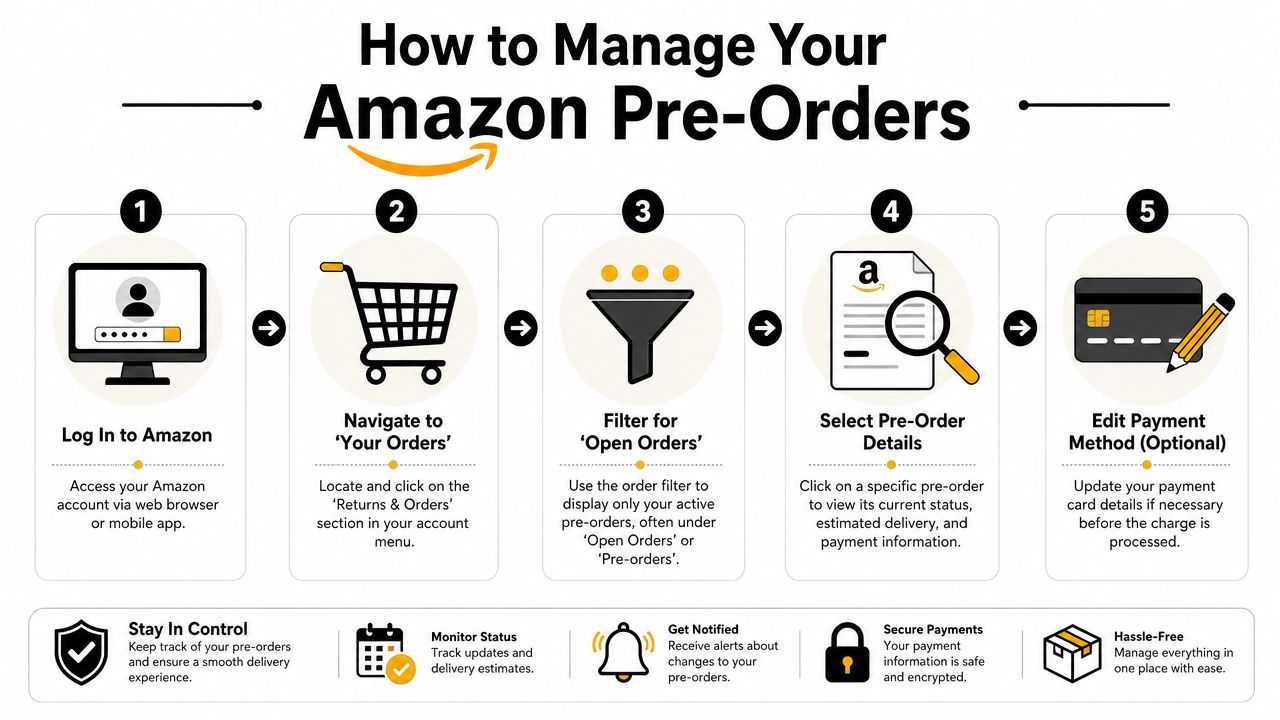
A practical check routine
Use a repeatable review process. For personal buyers, this helps avoid failed payments and delayed delivery. For FBA and arbitrage sellers, it prevents a release-week cash squeeze when several open orders convert around the same time.
Open Your Orders.
On desktop, go to Returns & Orders. In the app, open your account menu and pull up your order history.Find open pre-orders and not-yet-shipped items.
Focus on anything with a future release date or pending fulfillment status.Check the order details.
Look at the estimated delivery window, current release date, and who the seller is. If the seller is not Amazon, review the listing details more carefully because timing and payment handling can differ.Review the payment method on each order.
Confirm the card is still valid, the billing address is correct, and the available credit or balance can cover the charge when Amazon captures it.Fix problems before the release window.
If Amazon shows a payment warning, update the order right away. If you are already seeing an error, this guide on fixing Amazon payment revision issues walks through the usual fixes.
A short walkthrough can make the account navigation easier:
What sellers should track separately
If you use Amazon pre-orders as part of a resale or sourcing workflow, track them outside Amazon too. I prefer a simple sheet because Amazon shows order status well, but it does not show the full cash-flow picture across multiple cards, team buyers, and release dates.
Keep these fields:
- Product name or ASIN: The exact item you reserved
- Expected charge window: Based on the current release timing
- Payment method used: So you know which card could fail
- Planned use: Inventory, product testing, replacement stock, gifting, or personal purchase
- Backup action: Swap card, cancel, or reduce other spending if the charge cluster gets too heavy
That extra tracking is not busywork. It helps you budget for incoming charges, avoid card declines, and decide whether a pre-order still makes sense if the release date shifts or your inventory plan changes.
Your Amazon Pre-Order Questions Answered
Does Amazon's Pre-order Price Guarantee actually help?
Yes, when the item is eligible. Amazon says that if the price drops between order placement and release, the customer should be charged the lowest Amazon price during that pre-order window, as noted earlier in the Business Insider source. For buyers, that removes some of the hesitation around ordering early. For sellers buying launch products, it can reduce the need to keep checking for price dips.
What happens if my payment fails when Amazon tries to charge it?
Usually, Amazon asks you to update the payment method. If you wait too long, you risk delay or cancellation. This is one of the most common problems with long-gap pre-orders because the original card looked fine at checkout but isn't valid at capture time.
Can I cancel a pre-order before it ships?
In many cases, yes. The earlier Business Insider guidance notes that buyers can usually cancel before shipment if needed. That's another reason Amazon prefers delayed capture for unreleased items. It leaves room for release changes, customer edits, and order management before fulfillment starts.
Why do I sometimes see a pending charge that disappears?
That's usually the authorization side of the process, not the final settled charge. The bank may show the card check, then remove it if Amazon hasn't captured the payment yet.
If you want more practical walkthroughs on Amazon account issues, order quirks, and seller-side questions, browse these broader Amazon questions and answers for entrepreneurs.
If you run an online business and want more practical guides like this, EntreResource publishes hands-on content for Amazon sellers, affiliate marketers, and digital entrepreneurs who care about execution over theory.