

If you're staring at stranded FBA inventory, a batch of online arbitrage buys that didn't fit Amazon's fee math, or returns that are still perfectly sellable, Facebook Marketplace is one of the fastest channels to put those products back in front of buyers. Most sellers treat it like a place to unload an old desk. That's the mistake.
Marketplace launched on October 3, 2016 as a mobile-only feature inside the Facebook app, and Facebook had 1.79 billion monthly active users at that point, which made the launch a major social commerce turning point from day one (U.S. Chamber). For entrepreneurs, that matters because the audience was already there before the selling tools got serious.
The practical question isn't whether Marketplace works. It's how to setup facebook marketplace in a way that matches the stage you're in. A casual seller can post one item from a personal profile in minutes. A real operator needs a cleaner structure, tighter listings, safer fulfillment, and eventually a catalog workflow through Commerce Manager. Those are different setups, and mixing them up is where sellers waste time.
Why Facebook Marketplace is an Untapped Channel for Entrepreneurs
A familiar seller scenario looks like this. You have a few cartons of profitable inventory on paper, but the channel changed underneath you. Amazon fees ate the margin. eBay moved too slowly. Your Shopify store could sell the units, but paid traffic would cost more than the spread. Inventory sits, cash gets trapped, and the problem is no longer sourcing. It is distribution.
Facebook Marketplace solves that problem differently than the usual sales channels. It already has buyer attention, local demand, and social proof built into the platform. For entrepreneurs, that matters more than another generic listing tool. Capital One Shopping notes that Facebook Marketplace reaches more than a billion monthly users and operates across over 100 countries, which makes it large enough to treat as a real sales channel for clearance inventory, open-box units, arbitrage leftovers, and fast local turns.
The opportunity is bigger than flipping used household items.
Where it fits for side hustles and real businesses
For a casual seller, Marketplace is a quick way to turn old inventory into cash. For an operator, it fills a gap that other channels handle poorly. It works especially well for inventory that is still sellable but no longer belongs in your primary system.
A few categories stand out:
- FBA cleanup: stranded inventory, removals, and slow movers that cannot support storage fees and fulfillment costs
- Online arbitrage overflow: products with demand, but not enough margin to justify relisting across multiple marketplaces by hand
- Local-first products: furniture, tools, exercise equipment, home goods, and other bulky items where pickup protects margin
- Brand and reseller clearance: customer returns, shelf pulls, old packaging, discontinued SKUs, and seasonal leftovers
I have seen Marketplace work best when sellers stop treating it like a side tab inside Facebook and start using it as a margin recovery channel. That shift changes how you price, how you photograph inventory, and how you decide whether to list from a personal profile or build a business setup around a catalog.
It also pairs well with community demand. Niche groups, local buy/sell circles, and founder communities often create the first wave of buyers for a product category. If you want to build that network, these Facebook groups for entrepreneurs are a practical place to start.
Why experienced sellers still leave money on the table
The usual Marketplace advice is built for one-off sellers. It shows how to post a chair, answer a few messages, and meet in a parking lot. That is useful, but it does not help a seller who needs repeatable throughput.
Opportunity starts when you treat Marketplace as part of your channel mix. A personal profile setup is faster and works fine for testing demand or moving small batches. A business setup takes more work, but it gives you cleaner operations once volume rises. That usually means using Commerce Manager, syncing a catalog, standardizing listings, and separating personal activity from customer conversations.
That transition is where many entrepreneurs stall. They know how to list. They have not yet built the system behind the listing.
Gaining Access and Your First Steps

A lot of sellers get stuck before they ever publish a listing. They create a fresh Facebook account, go looking for Marketplace, and the feature isn't there. Or they can browse but not sell. Or they're in a region where the setup options look different.
That's not unusual. Most setup guides fail to address critical eligibility barriers. They don't explain minimum account age requirements, verification thresholds that prevent new accounts from listing, or geographic restrictions where Marketplace is disabled. This is a critical gap for international sellers, dropshippers, and those in emerging markets where availability varies (eligibility gap overview).
Start with the right account expectation
If you're setting up Marketplace to flip a few items, a personal profile is the simplest entry point. The basic workflow is straightforward:
- Open Facebook and click the Marketplace icon.
- Choose to create a new listing.
- Upload photos.
- Add title, description, price, condition, and category.
- Publish.
That basic listing flow is part of what made Marketplace accessible early on. But for entrepreneurs, the bigger decision is whether personal-profile selling is enough.
Use a personal profile when:
- You're testing demand: One-off flips, local deals, or product-market fit checks.
- Your inventory is thin: A handful of items, not a repeatable catalog.
- You need speed: Fast listing creation matters more than systemization.
Use a business setup when:
- You already run e-commerce elsewhere: Shopify, BigCommerce, or another catalog-based store.
- You manage repeat inventory: Same SKUs, replenishable items, or large product sets.
- You need cleaner operations: Catalog syncing, shop structure, and better reporting.
What to do if Marketplace access is missing
When sellers ask why they can't see Marketplace, the answer usually falls into one of three buckets: account trust, account type expectations, or geography. You won't always get a clear explanation inside Facebook itself.
A practical checklist helps:
- Check your profile completeness: Sparse new accounts tend to run into more friction.
- Look on both mobile and desktop: Interface placement can differ.
- Confirm your region settings: Marketplace availability can vary by location.
- Avoid creating multiple throwaway accounts: That may create more trust issues, not fewer.
- Decide your end goal early: Personal listing and business-scale selling are related, but they aren't the same setup.
Practical rule: Don't build your Marketplace workflow on a brand-new account if you're planning to use it for serious selling.
If you want a visual walkthrough before you click around inside your own account, this quick setup video is a useful companion:
The first structure that makes sense
For most entrepreneurs, the cleanest path looks like this:
| Seller type | Best starting point | Why it works |
|---|---|---|
| Casual flipper | Personal profile listing | Fastest way to test local demand |
| Reseller with repeat stock | Personal profile first, then business tools | Lets you validate categories before adding complexity |
| Existing store owner | Business Page and Commerce Manager | Better fit for catalogs, syncing, and scale |
The mistake is trying to force a business workflow onto a casual setup, or staying casual after volume starts to build. Once you feel the pain of manual posting, messaging chaos, and inventory mismatch, it's time to move up a level.
Crafting High-Converting Marketplace Listings
A casual seller can get away with a quick photo and a vague title. A seller trying to move repeat inventory cannot. Once you start listing returns, retail arbitrage finds, or the same SKU in multiple conditions, Marketplace rewards clear structure. It punishes lazy listings with low click-through, bad messages, and wasted time.
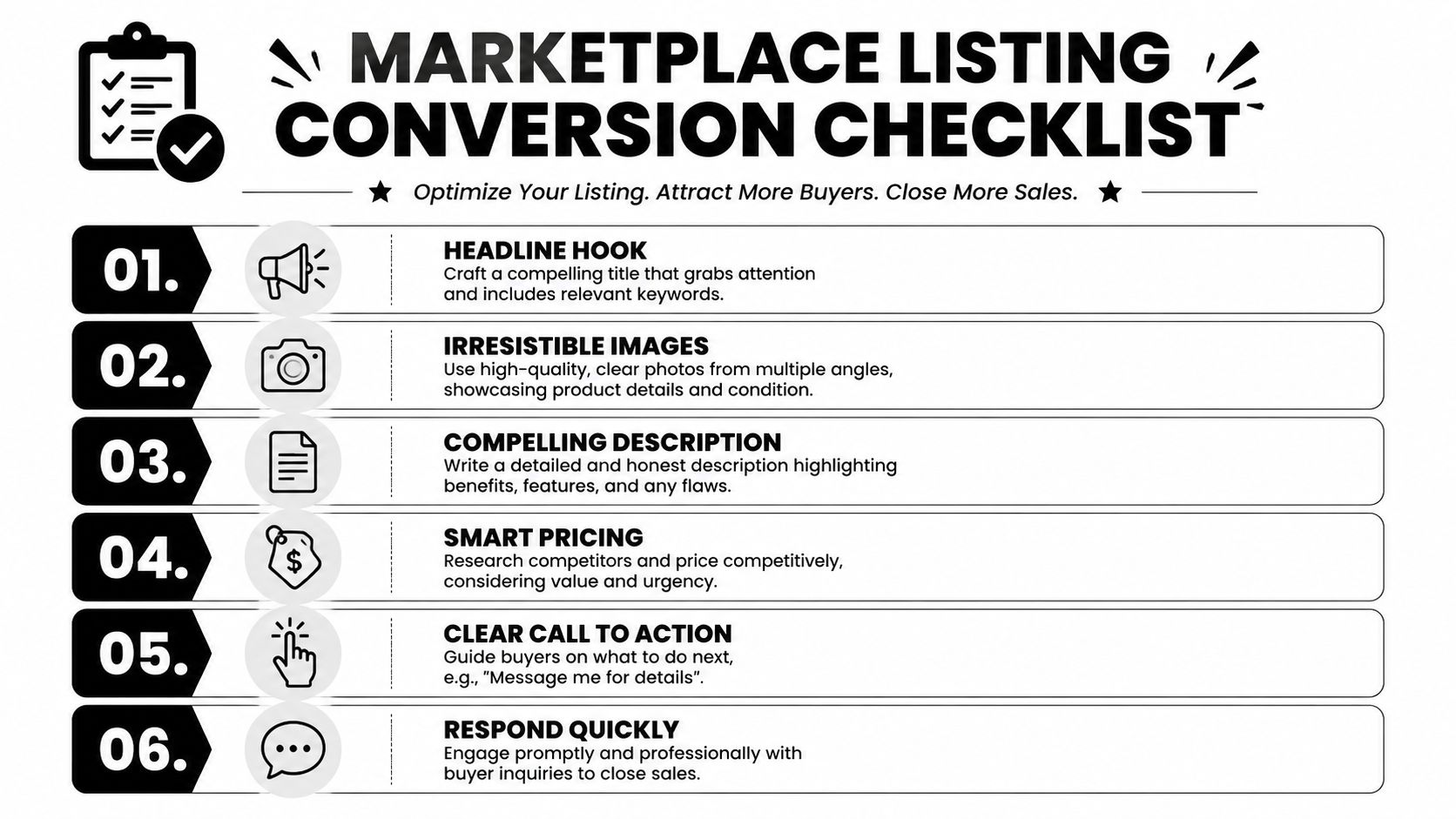
Your listing has one job first. Get the right buyer to click. The second job is filtering out the wrong buyer before they message.
Write titles for search and inventory control
Marketplace search is blunt. Buyers type brand, model, size, color, and condition. Give the algorithm those terms, and give yourself a title format you can repeat across dozens of listings without creating chaos.
Compare these:
- Weak title: Used Air Fryer
- Better title: Ninja Air Fryer 5 Qt Black Used Good Condition
- Weak title: Shoes
- Better title: Nike Air Max Men's Size 11 Black Running Shoes New Without Box
A repeatable title formula works:
Brand + model + item type + size/color + condition
That format does more than help search. It also keeps your operation clean when you cross-list, refresh inventory, or move the same product from a personal selling workflow into Commerce Manager later. Sloppy titles are manageable at five listings. At fifty, they become an inventory problem.
Build the photo stack like proof
Photos do the selling work that descriptions rarely do. Facebook Marketplace lets sellers add multiple images, and Meta's own guidance for Marketplace sellers stresses using clear, accurate product photos because image quality affects buyer response and trust (Meta for Business Marketplace best practices).
Use the image order on purpose:
- Primary image: Bright, clean hero shot with the product filling the frame.
- Angle shots: Front, side, back.
- Close-ups: Tags, labels, ports, serials, material texture.
- Condition proof: Scuffs, dents, corner wear, damaged packaging.
- Scale context: In hand, on a shelf, on a table, or worn if appropriate.
- Included items: Charger, manual, inserts, extra parts, original box.
The first image carries the listing. It shows up in feeds, search results, and category pages, so it needs to answer a buyer's first question fast: "Is this the exact item I want?"
For apparel and accessories, presentation affects the quality of messages you get. Clean flat lays work. Better model imagery often works better. If you need faster creative without booking a shoot, an ai fashion model generator can help standardize apparel visuals across multiple listings.
Descriptions should reduce messages, not create them
Marketplace descriptions fail when they force the buyer to ask basic questions. That burns time, especially once you start running this like a sales channel instead of a weekend decluttering app.
A good description covers the facts buyers use to decide whether to act:
- Exact item: Brand, model, size, color, dimensions
- Condition: New, open-box, shelf pull, used, refurbished, customer return
- What is included: Accessories, packaging, inserts, missing parts
- Flaws: Scratches, stains, torn box, tested or untested status
- Fulfillment terms: Pickup, shipping, delivery radius, bundle options
Short is fine if it is complete. For repeat inventory, consistency matters more than flair. I keep a simple template by category and swap in item-specific details. That approach scales better than rewriting every listing from scratch.
Category choice affects who sees the listing
Wrong category placement kills otherwise good listings. A stroller listed in a broad household category will usually attract fewer qualified buyers than the same item listed where parents are already searching. The same goes for electronics, sporting goods, and branded fashion.
For resale inventory, category discipline matters even more because it helps you compare performance across similar products. If ten listings in the same product line underperform, you can diagnose the issue faster when the setup is consistent.
Price with room for the actual sale
Pricing on Marketplace is part search strategy, part negotiation strategy. If you list at your true minimum and turn on offers, you invite low-value conversations. If you list too high, you lose the click.
A practical rule is simple. Know your floor before you publish. Include enough margin to cover fees, packaging, and shipping if you plan to offer it later. If you are still dialing in fulfillment costs, this guide to the cheapest way to ship something with UPS, FedEx, and USPS helps you set prices that still leave room for profit.
One setting worth testing
The Allow Offers toggle works best in categories where negotiation is already expected, such as furniture, used gear, and open-box items. It works less well for tight-margin replenishable products.
That trade-off changes as you grow. Casual sellers often use offers to get rid of items fast. Business sellers need a tighter process. If your inventory is repeatable and your margins are thin, fixed pricing usually creates cleaner conversations and better operator sanity.
Managing Payments Shipping and Local Meetups
A lot of Marketplace sellers learn this the hard way. Getting the message is easy. Getting paid, getting the item delivered, and getting through the handoff without confusion is where profit gets protected or lost.

Shipping versus local pickup
The right fulfillment method depends on what you sell and how repeatable your process needs to be.
For a casual seller clearing out furniture or oversized home goods, local pickup usually makes more sense. You skip packing, avoid carrier claims, and turn inventory into cash faster. For a business seller running repeatable SKUs, test buys, or arbitrage inventory, shipping is usually the better long-term setup because it expands reach and gives you a process you can document.
Facebook supports shipping on eligible Marketplace listings, and Meta explains the shipping workflow, label use, and checkout requirements in its Marketplace shipping guidance for sellers. That matters because there is a real operational difference between occasional shipping and building a listing flow you can repeat across dozens or hundreds of products.
Use a simple filter before you publish:
| Product type | Better option | Reason |
|---|---|---|
| Small branded item | Shipping | Easier to standardize, protect, and sell beyond your zip code |
| Bulky home goods | Local pickup | Freight-like costs and damage risk can erase margin |
| High-urgency liquidation | Local pickup | Faster handoff and quicker cash recovery |
| Repeatable replenishable SKU | Shipping | Better fit for systems, templates, and catalog-level selling |
The mistake is trying to force every item into both models. That creates extra messages, unclear expectations, and more buyer drop-off.
Set meetup rules before the first reply
Local deals work best when the listing answers the operational questions up front. Buyers who are serious will follow clear instructions. Buyers who want endless back-and-forth usually become no-shows.
A local listing should state:
- Meeting format: Public meetup or pickup
- General area: Share the neighborhood or part of town first
- Payment method: Cash or the exact method you accept
- Timing window: Same day, evenings, weekends, or by appointment
- Claim policy: First confirmed buyer gets it, not first person to message
Short and specific works.
If you want fewer wasted trips, do not hand out your full address before the buyer confirms a time. For higher-volume local selling, I prefer one or two standard meetup spots with parking and easy visibility. That cuts down on coordination and keeps the process consistent across listings.
If the buyer will not confirm a place and time, the transaction is still a conversation, not a sale.
Shipping needs a cleaner system
Shipping looks easier than it is. The actual risk is not printing the label. The risk is underpricing delivery, using weak packaging, or letting address problems hit after the order is placed.
For shipped orders, keep three things tight:
- Packaging standards. Use the same box sizes and packing routine for similar items.
- Address checks. Catch buyer corrections before the label is created. If that starts happening often, set up a process to manage shipping address changes.
- Margin discipline. Low-ticket items can look profitable until postage and materials eat the spread.
If you are shipping outside Marketplace tools or comparing rates for merchant-fulfilled orders, this guide to the cheapest way to ship something with UPS, FedEx, and USPS is useful for setting price floors that still leave room for profit.
What changes as you move from side hustle to operator
Local pickup is often the fastest path for one-off flips. Shipping is usually the better path for a seller who wants Marketplace to behave like a real channel instead of a pile of individual conversations.
That shift matters. A casual seller can afford to improvise each transaction. A business seller needs repeatable rules for payment, fulfillment, buyer communication, and exception handling. Once inventory starts repeating, every unclear handoff becomes an operating cost.
Clean listings help you get the sale. Clean fulfillment is what lets you keep scaling it.
Scaling Beyond Single Listings with Commerce Manager
Manual listing breaks first.
Once you have repeat inventory, Marketplace stops behaving like a classifieds app and starts acting like an operations problem. Copying titles by hand, re-uploading the same photos, and marking items sold one by one works for garage-sale volume. It fails fast when you are running replenishable SKUs, online arbitrage finds, or excess FBA inventory you want to move across another channel.
What changes when you move to Commerce Manager
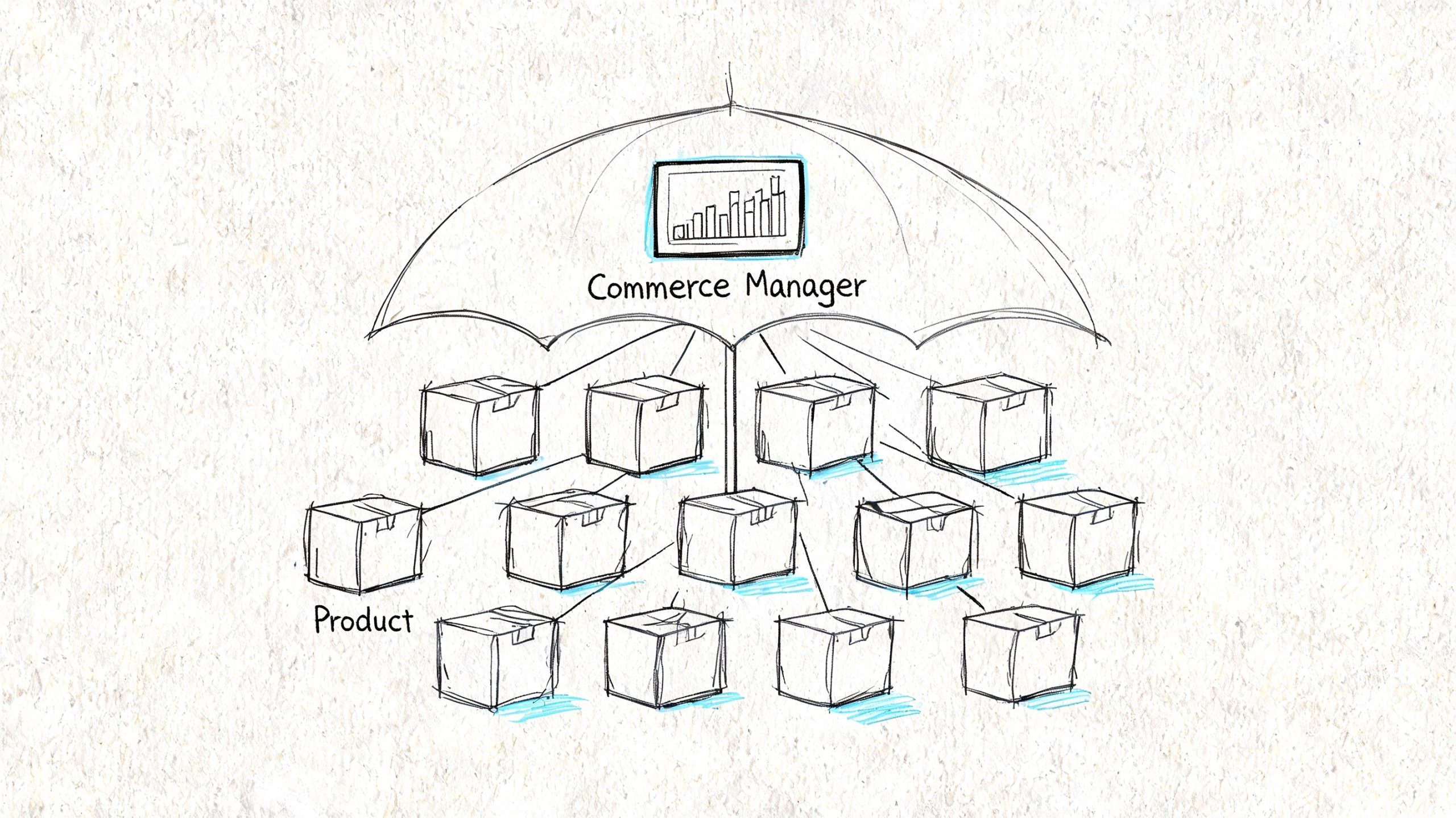
Commerce Manager is the point where a seller stops posting single items and starts managing a catalog. Meta’s own setup documentation centers this workflow around catalogs, shops, and connected data sources, rather than one-off Marketplace listings (Meta Commerce Manager documentation). If you already sell on Shopify, BigCommerce, WooCommerce, or another platform that can feed a catalog, Marketplace can plug into the stack you already use instead of becoming a separate manual job.
The progression is straightforward:
- Create your shop and Commerce Manager account.
- Connect a product catalog from your store platform, feed, or supported partner.
- Review product data before sync. Titles, images, variants, pricing, and availability all carry downstream.
- Route buyers to the right checkout experience if your setup uses website checkout.
- Turn on Marketplace as an additional surface where eligible items can appear.
That shift matters for operators. Catalog sync cuts duplicate work, reduces stock mismatches, and gives you one place to manage products that sell across your site, shop surfaces, and Marketplace.
Why this setup fits arbitrage and FBA-style sellers
Personal listings are fine for testing demand. They are weak for repeated inventory.
If you buy closeout lots, run OA leads, or rotate through replenishable products, value lies in control. Catalog-based selling lets you keep photos, titles, pricing rules, and availability tied to the source system instead of rebuilding every listing from scratch. Shopify’s guide to Facebook and Instagram sales channels reflects that same model. Products are managed in the store and pushed into Meta sales surfaces from there (Shopify sales channel setup guide).
Three benefits show up quickly:
- Faster listing throughput: New products can move from your store catalog into Marketplace without another full manual build.
- Cleaner inventory control: Stock updates have a better chance of staying aligned across channels.
- Better scaling discipline: The catalog becomes the source of truth, which matters once multiple people touch listings, pricing, or fulfillment.
For sellers planning paid traffic later, this setup also makes promotion easier because the same product feed can support both organic distribution and product-based ads. If you plan to put budget behind proven SKUs, review this Facebook ad campaign overview before you build promotions around a messy catalog.
The trade-offs sellers should know
Commerce Manager adds structure, but it also exposes weak product data. Bad titles sync everywhere. Broken variants sync everywhere. If your images are inconsistent, Marketplace inherits the same problem.
Catalog limits and configuration rules also matter more than casual sellers expect. Meta’s catalog documentation outlines item limits that depend on catalog type and setup method, which is one reason serious sellers should decide early how they want inventory organized (Meta catalog requirements and limits). Another common mistake is choosing the wrong catalog at the start. Meta notes that shop and catalog relationships have setup constraints, so changing direction later can mean rebuilding pieces of the system instead of flipping a simple switch (Meta shop and catalog setup help).
My rule is simple. Clean the catalog first, then sync it.
For a side hustler, manual listings can still be the fastest path to test a product. For a business operator, Commerce Manager is what turns Marketplace from a pile of individual posts into a channel you can effectively run.
Promoting Listings and Analyzing Performance
A lot of sellers stall here. They get a few messages, make a few sales, and keep treating Marketplace like a classifieds board. The operators who scale it treat each listing like a product page with a feedback loop.
Marketplace gives you enough signals to spot where a listing is breaking. Clicks show whether the packaging works. Saves usually mean the item is interesting but not convincing yet. Messages tell you the buyer sees a path to purchase. If you already moved into Commerce Manager and synced a catalog, this is the stage where Marketplace stops being a side-hustle experiment and starts acting like a channel you can manage.
What to check before you spend money
Low clicks usually point to weak presentation. The first image may be flat, the title may lead with the wrong keyword, or the price may look off compared with similar listings in your area.
Good clicks with weak message volume usually mean the offer creates hesitation. Condition details may be vague. Bundled items may be unclear. Shipping, pickup radius, or return expectations may feel risky to the buyer.
High message volume with poor close rates usually means the listing is not the problem. Operations are. Slow replies, inconsistent meetup instructions, unclear payment rules, and weak follow-up kill a lot of deals that looked healthy at the listing level.
My review cycle is simple:
- Clicks are low: Replace the cover image first, then rewrite the first 5 to 8 words of the title.
- Saves are high but messages stay flat: Tighten the price, add condition proof, and show exactly what is included.
- Messages are strong but buyers disappear: Standardize replies, confirm terms early, and remove friction from payment or pickup.
- A SKU keeps getting traction: Put budget behind that item, not the whole catalog.
When promotion actually works
Paid promotion helps winners scale faster. It does not rescue weak listings.
That distinction matters more for sellers shifting from casual listing to business operation. If a product already gets saves, repeat questions, or steady message volume, extra reach can make sense. If nobody clicks, promotion usually just buys more proof that the listing needs work.
Sellers already running paid traffic should line Marketplace promotions up with the rest of their Meta setup. This Facebook ad campaign overview is useful if you want your Marketplace tests, retargeting, and catalog-based ads to support each other instead of competing for budget.
The practical goal is simple. Review listings weekly. Cut the weak ones faster. Refresh the maybes. Put time and ad spend behind SKUs that already show buyer intent. That is the shift from selling old inventory one post at a time to running Marketplace like a real acquisition and sales channel.