

If you publish content every week, hire a dedicated freelance editor on retainer. If you publish occasionally, hire per-project instead. Either way, the fastest path from decision to delivery runs through the shortlist and the evaluation checklist below, both built so you can move from “I need an editor” to a signed contract in one sitting.
TL;DR:
- Agencies suit campaigns needing scripting and several assets, but take 1 to 3 weeks; subscription services deliver in 24 to 72 hours with less customization.
- The mean wage is about $40.13 hourly, but commercial and motion graphics work cost more; fixed project pricing can better reward efficient narrative edits.
- Pay for a test using 5 to 10 minutes of footage, then score technical quality, storytelling, and responsiveness consistently across candidates.
- Put ownership of final files, deliverables, and a cap of two or three revision rounds in the contract; agree on feedback windows before editing begins.
Table of Contents
- The realistic ways to hire a video editor
- How to choose the right editor: criteria, questions, and trust checks
- Where to find video editors online
- Evaluate portfolios and run a test edit
- Rates and pricing models: what you’ll actually pay
- Workflow and deliverables to require from day one
- Finalize the hire and onboarding checklist
- Qualifications and skills that actually matter
- What turnaround and revisions should look like
- Matching the editor to your project and business goals
- Red flags to watch for before you sign anyone
- Managing a remote editor without the back-and-forth headaches
- Hiring habits that scale content production
- Want to train someone in-house instead of hiring right now?
- FAQ
- Sources
The realistic ways to hire a video editor
You have four workable paths, and each one fits a different publishing rhythm.
A freelance editor on retainer suits creators and businesses publishing weekly or more. You lock in priority turnaround and a consistent style, usually for a set number of hours or deliverables per month. A freelance editor per-project works well for one-off launches, a single sales video, or a quarterly highlight reel where ongoing commitment doesn’t make sense. A full-service agency fits businesses that need a complete production pipeline, not just editing, including scripting, motion graphics, and strategy. A subscription editing service suits teams that want fast, predictable turnaround without managing a freelancer directly. Frame.io for Business notes that subscription and retainer arrangements reduce per-video friction for regular publishers and can be more cost-effective than repeated one-off hires.
| Approach | Best for | Pricing model | Typical turnaround | Typical deliverables | Workflow/tools | Experience level |
|---|---|---|---|---|---|---|
| Freelancer (retainer) | Weekly or biweekly publishers | Monthly flat fee or hour block | 2-4 days per video | Final cut, captions, thumbnails | Premiere Pro, Frame.io | Mid to senior |
| Freelancer (per-project) | One-off launches, single campaigns | Per project or per finished minute | 3-5 days | Final master, web version | Premiere Pro or DaVinci Resolve | Varies widely |
| Agency | Businesses needing full production | Project packages, retainers | 1-3 weeks | Full campaign assets | Internal pipeline, client portal | Senior teams |
| Subscription service | Teams wanting fast, hands-off turnaround | Monthly subscription tiers | 24-72 hours | Standard template edits | Proprietary dashboard | Mixed, templated |
A few quick trade-offs worth weighing before you commit:
- Retainer freelancers cost more per month but save you from re-training a new editor every project.
- Per-project freelancers keep costs low but mean you repeat onboarding each time.
- Agencies deliver polish and scale but at the highest price point and least flexibility on turnaround.
- Subscription services are the fastest to start but limit customization and creative range.
If you run a weekly podcast or YouTube channel, the retainer freelancer is your pick. If you need one strong sales video for a launch, go per-project. If you’re producing a full brand campaign with multiple asset types, the agency route makes more sense.
How to choose the right editor: criteria, questions, and trust checks
Choosing well comes down to six criteria: storytelling instinct, technical skill, niche experience, communication habits, turnaround reliability, and price fit. Weigh storytelling and niche experience heaviest if your content lives or dies on narrative pacing, like YouTube or documentary work. Weigh technical skill heaviest for commercial or motion-graphics-driven projects.
Here’s a practical sequence for the interview itself:
- Ask them to walk you through one edit decision in their portfolio and why they made it. Good answers reference pacing, audience retention, or emotional beats, not just software steps.
- Ask how they handle a client who keeps requesting new revisions outside the original scope. Strong candidates describe a clear revision policy, not vague flexibility.
- Ask what their current turnaround time looks like for a typical project. Reliable freelancers give you a specific range, not “depends.”
- Ask which software they work in daily. According to representative job description guidance for video editors, responsibilities typically include organizing footage, editing sequences, synchronizing audio, and preparing final deliverables, so expect fluency with at least one major NLE.
- Ask for two references from past clients, ideally in your content category.
Before you sign anyone, run this trust checklist:
- Request a portfolio with at least one before/after clip showing raw footage next to the finished edit.
- Confirm they can supply two contrasting samples: a quick raw-to-final cut and a more polished, high-production piece, which reveals their range.
- Ask for a short paid test edit using your own footage or a sample brief.
- Request one or two client references you can actually contact.
- Confirm their revision policy in writing before the first project starts.
Pro Tip: Pay for the test edit, even a small flat fee. Unpaid tests filter out serious professionals and attract people with nothing better to do.
Where to find video editors online
Different sourcing channels serve different needs, and picking the wrong one wastes a week of outreach.
- Open marketplaces like Upwork host a large volume of freelancers at every skill level, which means fast sourcing but inconsistent vetting. According to Upwork, marketplaces vary widely in how thoroughly candidates are screened compared to curated platforms.
- Curated freelancer platforms pre-vet talent, which costs more upfront but saves you screening time, a good trade if you’re hiring under deadline pressure.
- Creative communities such as niche Facebook groups, editor-focused Discord servers, and LinkedIn posts in your industry tend to surface editors who already understand your content type.
- Film school job boards and alumni networks are worth checking if you need motion graphics or narrative-heavy editing, since many strong junior editors post there before building a public portfolio.
- Agencies and subscription services skip the sourcing step entirely. You pay for curated talent management instead of doing it yourself.
When reaching out directly in creative communities, lead with specifics: the type of content, your typical video length, and your budget range. Vague posts like “looking for an editor” get buried. A post that says “need a 10-minute YouTube explainer edited weekly, $300-500 per video” gets real responses fast.
Pick marketplaces when speed matters more than vetting. Pick curated platforms or communities when fit matters more than speed. Pick an agency or subscription service when you’d rather manage one point of contact than a roster of freelancers.
Evaluate portfolios and run a test edit
A strong portfolio review and test edit together tell you more than any interview question. Look for:
- Pacing control, meaning cuts that match the energy of the content rather than dragging or rushing.
- Audio quality, including clean dialogue levels and music that supports rather than competes with narration.
- Color consistency across a single project, since mismatched tones between clips signal rushed work.
- Motion design samples, if your content needs titles, lower thirds, or animated graphics.
- A before/after clip, showing raw footage next to the final cut so you can see what the editor actually added.
For the test itself, give a short, clearly scoped brief: supply 5-10 minutes of raw footage, state the target length, state the platform (YouTube, Instagram Reels, a sales page), and define what success looks like, whether that’s pacing, a specific tone, or hitting a runtime. Compensate for this test. A 3-part scoring rubric backed by the kind of structured hiring guidance found in job description resources for video editors keeps your evaluation objective:
- Technical execution: Are cuts clean, is audio balanced, is color consistent? Pass threshold: no visible jump cuts or audio clipping.
- Storytelling effectiveness: Does the edit hold attention and support the message? Pass threshold: you’d publish it with minor tweaks.
- Responsiveness: Did they ask clarifying questions and deliver on time? Pass threshold: delivered within the agreed window with no chasing required.
Pro Tip: Score every candidate on the same rubric sheet side by side. Scattered notes make it easy to let gut feeling override a weaker edit.
Rates and pricing models: what you’ll actually pay
Four pricing models dominate the industry: hourly, per-project, per-finished-minute, and monthly retainer. Hourly suits quick, undefined tasks like a rough cut review. Per-project suits one-off deliverables with a clear scope. Per-finished-minute suits ongoing series where you want cost to scale predictably with output. Retainers suit regular publishers who want priority access and consistent style.
The mean hourly wage for film and video editors is about $40.13, with a mean annual wage near $83,470, according to BLS wage data for film and video editors. Freelance rates vary around that figure based on experience, niche, and turnaround speed, with commercial and motion-graphics-heavy work typically commanding more than straightforward talking-head edits.
Cost climbs with three main factors:
- Tighter turnaround windows, since rush work commands a premium.
- Heavier use of motion graphics, color grading, or custom audio design.
- Unlimited or loosely defined revision rounds, which is why a capped revision policy protects your budget.
For negotiation, pay for test projects rather than expecting free work, cap revisions at two or three rounds in the contract, and offer a retainer discount in exchange for guaranteed monthly volume. Per-project or per-finished-minute pricing tends to align incentives better than hourly billing for narrative or content-driven work, since hourly billing can unintentionally reward slower editing.
Workflow and deliverables to require from day one
Set expectations in the contract, not after the first draft lands. Frame.io is the standard tool for this. It integrates directly into Premiere Pro, letting your editor upload sequences for review while you leave timecoded comments that appear as markers right inside the timeline, according to Adobe’s documentation on Frame.io review workflows. That means feedback like “cut this at 1:42” lands exactly where it belongs instead of getting lost in a text thread.
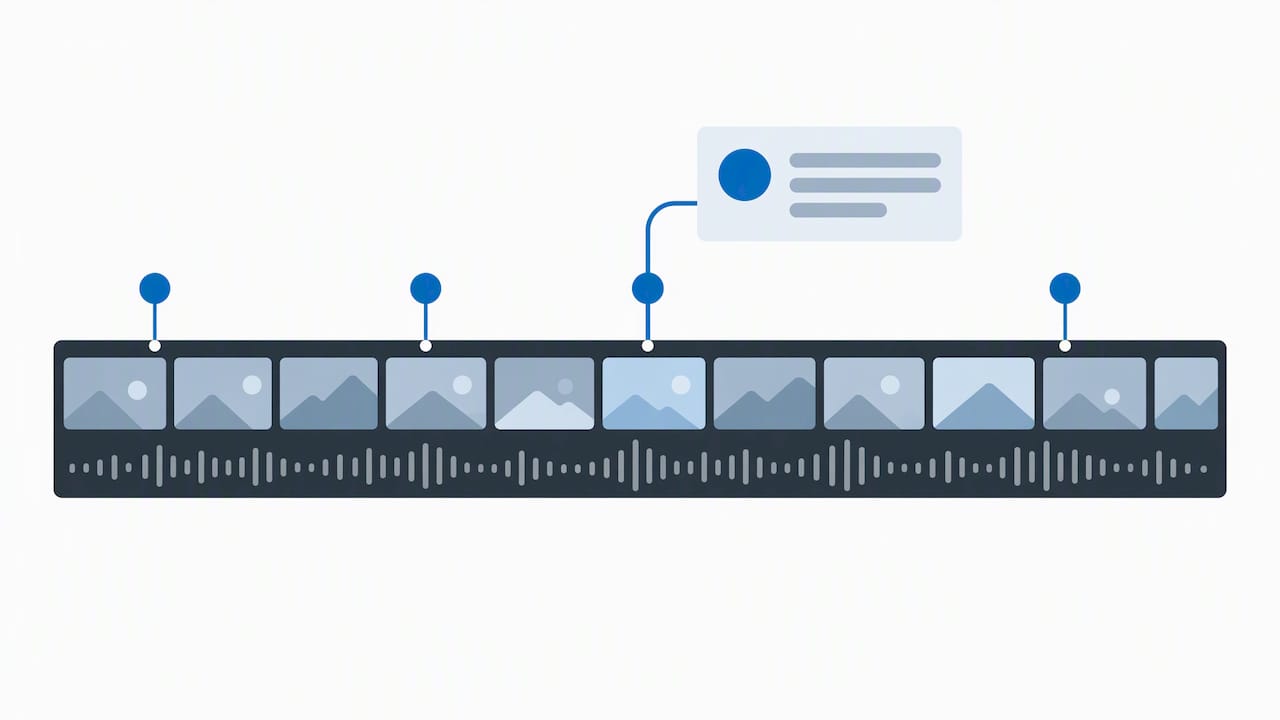
Version control matters just as much. Frame.io supports an “Export New Version” workflow that updates the review link with version numbers, so you’re never confused about which cut is current, a point confirmed in Adobe’s Frame.io integration guide.
Require these deliverables up front:
- A final master file in the native resolution and frame rate you shot in.
- A web-optimized version sized for your actual publishing platform.
- Editable project files if you might need in-house tweaks later.
- Captions or subtitles, especially for social-first content.
- A clear revision policy capped at two or three rounds, written into the contract.
If your editor is helping with screen-recorded tutorials or course content, our guide to editing screen recordings covers the specific pacing and clarity standards worth holding them to.
Finalize the hire and onboarding checklist
Once you’ve picked your editor, run through this sequence before the first real project starts:
- Draft a contract covering scope of work, payment terms, IP assignment confirming you own the final files, and a capped revision policy.
- Send your brand style guide, including fonts, colors, intro/outro templates, and any brand voice notes.
- Hold a short kickoff call to walk through your first project brief, expected turnaround, and preferred communication channel.
- Set a milestone schedule for the first project: rough cut date, feedback window, final delivery date.
- Agree on a decision point, usually after two or three projects, for whether to scale the relationship into a retainer.
Keep the kickoff agenda tight: review the brief together, confirm asset access (raw footage, music licenses, brand assets), and agree on the feedback turnaround window, typically 24 to 48 hours on each side so neither party stalls the project.
Qualifications and skills that actually matter
Software fluency is table stakes, not the differentiator. Expect comfort with Premiere Pro, Final Cut Pro, or DaVinci Resolve, since those cover the vast majority of professional workflows. What separates a good editor from a great one is storytelling instinct: knowing when a cut should breathe and when it should snap. Color and audio skills matter almost as much. A flat, uncorrected clip or muddy dialogue track undercuts even a well-paced edit.
Match the editor’s style to your content type. A YouTube commentary channel needs someone comfortable with fast cuts and meme timing. A corporate training video needs someone who prioritizes clarity over flash. A brand campaign needs motion graphics chops. Ask directly which type of content they edit most often, since a wedding videographer and a podcast clipper have genuinely different skill sets even though both use the same software.
What turnaround and revisions should look like
Typical turnaround runs 2 to 4 days for a short freelance project, 24 to 72 hours for subscription services optimized for speed, and 1 to 3 weeks for full agency campaigns involving multiple deliverables. Rush requests usually carry a premium, so build in buffer time whenever your schedule allows it.
Revision policy should be written into the contract before work starts, not negotiated after you see the first cut. Two to three revision rounds is standard for most project sizes. Define what counts as a revision versus new scope: swapping music or trimming a scene is a revision, but adding new footage or changing the entire structure is new work that should be billed separately. A clear policy here prevents the single most common source of freelancer-client friction.
Matching the editor to your project and business goals
The right editor depends on what you’re actually trying to accomplish, not just what you’re editing. If your goal is audience growth on YouTube, prioritize someone with retention-focused pacing experience and a track record in your niche. If your goal is a polished sales asset, prioritize someone with commercial or direct-response editing experience, since that’s a different skill than entertainment editing.
Business stage matters too. An early-stage creator testing content formats benefits from a flexible per-project freelancer who can pivot style quickly. An established business with a consistent content calendar benefits more from a retainer relationship where the editor already understands brand voice and doesn’t need re-briefing every time.
Budget realistically against your content’s actual revenue impact. A video directly tied to sales or lead generation justifies a higher editing budget than a casual social post, so weight your hiring decision toward quality where the stakes are highest.
Red flags to watch for before you sign anyone
A few warning signs should make you pause before committing:
- A portfolio with no before/after context, meaning you can’t tell what the editor actually contributed versus what came from a template.
- Reluctance to do a short paid test edit, which often signals inconsistent real-world skill.
- Vague answers about turnaround time or revision policy, since professionals who do this regularly have specific, confident answers.
- No willingness to provide any client references, even a brief one.
- Pricing far below the typical range for the stated scope, which often means rushed work, hidden corner-cutting, or someone still learning on your project.
- Poor communication during the hiring process itself. If replies are slow or unclear before you’ve even signed, that pattern rarely improves after.
None of these alone is necessarily disqualifying, but two or more together are worth taking seriously.
Managing a remote editor without the back-and-forth headaches
Clear structure beats constant check-ins. Set a recurring communication rhythm, whether that’s a quick weekly async update or a biweekly call, so neither of you is guessing about status. Use Frame.io or a similar review tool for all feedback so comments stay attached to the exact timestamp instead of scattered across email and chat.
Give feedback in batches rather than firing off reactions as you watch. A single organized round of notes is faster for your editor to act on than five separate messages sent over two days. Be specific: “tighten the pacing between 1:30 and 2:00” works better than “this feels slow.”
Respect time zones and build in a reasonable response window, typically 24 hours, before following up. And confirm receipt of deliverables promptly. Editors juggling multiple clients prioritize based on who communicates clearly and on schedule, so being a reliable, specific client often gets you faster turnaround than being a demanding one.
Hiring habits that scale content production
A few rules have made every editor relationship easier to manage. We never skip the paid test edit, even for editors with strong portfolios, because a portfolio shows their best work and a test shows how they handle your actual footage. We also keep revision rounds capped at two from the very first contract, since open-ended revisions quietly erode both budget and goodwill.
The habit that’s saved the most time is writing the brand style guide once and reusing it for every new hire. It turns a 45-minute kickoff call into a 15-minute one. Treat your style guide and sample brief like onboarding assets you build once, not paperwork you redo every time, and hiring editors stops feeling like starting from scratch each round.
— Nathaniel
Want to train someone in-house instead of hiring right now?
Hiring an editor isn’t the only path to consistent video output. If you’d rather build editing skill inside your own team, or just want a faster way to brief and onboard whoever you bring on, an Instant Course Access for Life option gives you lifetime access to practical, step-by-step training and templates that can help make onboarding an editor, freelance or in-house, faster.
It’s a one-time $97 payment for lifetime course access, and it pairs naturally with everything in this checklist: use the course materials to build your own brand style guide and sample brief once, then reuse them with every editor you hire going forward, whether that’s a freelancer this month or an in-house hire next year. If you’re also building out your broader content strategy alongside your editing hire, our piece on how blogging can propel your business forward is worth a read too.
Check out Instant Course Access for Life and get your onboarding materials sorted before your next hiring conversation.
FAQ
How much should you charge for editing a video?
Rates vary by experience and project type, but film and video editors earn a mean hourly wage of about $40.13 nationally. Per-project or per-finished-minute pricing is often a better fit than hourly for content-driven work, since it rewards efficient, high-quality cuts rather than time spent.
What is the 80/20 rule in video editing?
The idea is that a well-structured rough cut matters more to the final result than late-stage polish.
How to edit video professionally for free?
Free professional-grade options include DaVinci Resolve’s free version, which includes color grading and audio tools comparable to paid software. Pairing free software with a disciplined workflow, clear briefs, and a consistent review process matters as much as the tool itself for a professional result.
Is video editing a high paying job?
Video editing can be a solidly paying career, with a mean annual wage around $83,470 for film and video editors nationally. Pay varies significantly by specialization, with motion graphics and commercial work often commanding more than general content editing.
Sources
- 27-4032 Film and Video Editors
- Enhance your review process with Frame.io
- Video editor job description