

Yes, you can build affiliate income on Pinterest, but it only works when you follow disclosure rules, pick a visual niche, and track your links from day one. These three habits separate the people who turn pins into pocket money from the people who post for months and never see a sale. Switch to a business account, disclose every affiliate relationship clearly, and set up link tracking before you publish your first pin.
TL;DR:
- Validate search demand through Pinterest autocomplete before choosing a niche, and favor lower priced offers because buyers decide faster than they do for costly software.
- Place an unmistakable affiliate disclosure in the first line of every pin description; an image label can support it, but cannot replace written notice.
- Read each affiliate agreement before choosing products, since some programs prohibit Pinterest promotion and platform specific restrictions can put your account or commissions at risk.
- Add UTM parameters before publishing, then compare Pinterest Tag signals with affiliate network reports to identify pins that produce conversions and revenue.
- Publish five to ten pins across two or three destinations during your first month, using different headlines and images to test which creative earns engagement.
Table of Contents
- What Pinterest affiliate marketing actually looks like
- Why Pinterest works for affiliates, and what to really expect
- Step-by-step: launch your first affiliate pin strategy
- Pinterest rules and FTC disclosure: what you must do
- Pin formats and creative tactics that actually drive clicks
- Measuring performance and keeping pins converting
- Our quick-start workflow and the resources behind it
- How Pinterest’s algorithm shapes affiliate content visibility
- Common mistakes to avoid in Pinterest affiliate marketing
- Legal considerations beyond FTC disclosure rules
- When Pinterest fits your affiliate strategy, and when it doesn’t
- Templates and guided support if you want to move faster
- FAQ
- Sources
What Pinterest affiliate marketing actually looks like
Pinterest is a visual search engine, not a social feed, which changes how affiliate content behaves there. A pin is an indexed entry, built from an image or short video plus a link, and it can keep surfacing in search results and recommendations for months after you publish it. That long shelf life is the main reason affiliate marketers gravitate toward the platform.
There are three common paths affiliates use to turn pins into income:
- Direct affiliate pins: the pin links straight to a retailer or affiliate offer page.
- Blog-post pins: the pin links to your own article, which then contains the affiliate links and more context.
- Product or collection pins: a pin showcases a specific item or a themed group of products, often tagged with rich pin data.
Discoverability comes down to the details most beginners skip. The pin title, the description, and the alt text all feed Pinterest’s search index, and the image composition (bright, high-contrast, clearly labeled) determines whether someone stops scrolling long enough to click.
Why Pinterest works for affiliates, and what to really expect
Pinterest users search with intent. They are not scrolling to catch up with friends, they are planning a purchase, a recipe, an outfit, or a home project, which makes the audience naturally receptive to product recommendations. Pinterest reports hundreds of millions of monthly active users worldwide, and that scale means even a narrow niche pin has a large pool of searchers to reach.
Pinterest’s global monthly active user base runs into the hundreds of millions, according to Statista, which is why a single well-made pin can keep generating impressions long after you’ve moved on to new content.
Set your expectations carefully, though. Reaching organic impressions is realistic for a new account within weeks, but converting those impressions into clicks and sales depends heavily on how well your niche and your offer fit together. A pin promoting a $15 kitchen gadget will usually convert faster and more predictably than one promoting a high-ticket software subscription, simply because the buying decision is smaller.
Step-by-step: launch your first affiliate pin strategy
Getting started is less about creativity and more about sequencing. Do these steps in order and you’ll avoid the most common early mistakes.
- Validate your niche before you build anything. Type broad terms into Pinterest’s search bar and watch the autocomplete suggestions and related searches. These reflect what people are actually looking for, and they’re a free, built-in keyword tool.
- Switch to a Pinterest business account. This unlocks analytics, rich pins, and the ability to claim your website domain, which links your pins back to your brand and improves trust signals.
- Claim and verify your domain. This step confirms ownership of your website and makes your pins eligible for extra visibility features.
- Choose affiliate programs that explicitly allow Pinterest promotion. Terms vary by program, so check the affiliate agreement before you build pins around a product line.
- Set up link tracking before you publish anything. Add UTM parameters to every destination URL so you can later tell which pins actually drove traffic and sales.
- Design and publish your first batch of pins. Aim for several pins per destination so you can test different headlines and images against each other.
A few practical notes worth building into that process:
- Many affiliates route pins through their own domain instead of linking directly to the retailer, so they can update the destination later without losing the pin’s accumulated saves and ranking.
- Vertical images (roughly a 2:3 ratio) perform best in Pinterest’s feed because they take up more visual space on mobile screens.
- Scheduling tools help you publish consistently without manually posting every day, which matters because Pinterest tends to reward accounts that post regularly over long stretches rather than in short bursts.
For your first month, five to ten solid pins spread across two or three destinations is a reasonable starting volume. That’s enough to run a real test without burning days on design before you know what resonates. If your destination is a blog post rather than a direct link, make sure that post is actually built to convert; our guide on why blogs don’t make affiliate sales covers the structural fixes that matter most once traffic starts arriving.
Pinterest rules and FTC disclosure: what you must do
Disclosure isn’t optional, and it isn’t a formality. The FTC’s endorsement guidance requires that any material connection, including an affiliate commission, be disclosed clearly and conspicuously, placed where someone will see it immediately rather than buried at the end of a long description. The 2023 update to the FTC’s endorsement guides removed the word “small” from an example about affiliate compensation, making clear that even minor affiliate relationships require disclosure, and the same update’s Example 11 specifically addresses bloggers who earn affiliate commissions.
In practice, that means:
- Put the disclosure in the first line of your pin description, not the last.
- Use a short, unmistakable phrase like “#ad” or “#affiliate” rather than a vague legal paragraph.
- An overlay on the image itself (a small “contains affiliate links” tag) works alongside, not instead of, the written disclosure.
Pro Tip: Write your disclosure before you write the rest of the description, then build the keyword-rich copy around it, so it never ends up as an afterthought.
Beyond disclosure, avoid spammy linking patterns like cloaked redirects to unrelated offers or repeatedly pinning the exact same image, both of which Pinterest’s spam systems tend to flag.
Pin formats and creative tactics that actually drive clicks
Not every pin format suits every offer, and testing formats against each other is how you find out what your audience responds to.
- Single-image pins work well for straightforward product recommendations where the image alone tells the story.
- Carousels suit multi-step content, like “5 tools for a home office,” where each card can highlight a different product.
- Idea Pins and short video fit tutorials, unboxings, or before-and-after transformations where motion adds proof.
- Rich pins pull metadata directly from your website, which keeps pricing and product details current without manual edits.
A simple design checklist keeps your pins consistent:
- Vertical orientation, ideally close to a 2:3 ratio.
- A headline large enough to read at a glance, in a font that doesn’t fight the background image.
- Branding that feels like a creator’s recommendation, not a banner ad.
Descriptions matter as much as the image. Write them the way you’d answer a search query, naming the product, the use case, and the benefit, so Pinterest’s search index has something concrete to match against user queries.
Pro Tip: Create at least three pin variations per destination (different headline, different image crop, different first line) and let two weeks of saves and clicks tell you which one to scale.
Measuring performance and keeping pins converting
Tracking is what turns Pinterest from a guessing game into a channel you can actually optimize. Add UTM parameters to every link, use the Pinterest Tag to see on-platform conversion signals, and cross-reference both against the conversion reports inside your affiliate network dashboard. Cross-platform data from guides like Sprout Social’s affiliate marketing breakdown reinforces a consistent lesson: affiliate programs scale fastest when trackable links and consistent measurement are in place from the start, regardless of which platform you’re using.
Watch a short list of metrics rather than everything at once:
- Impressions and saves, which show reach and resonance.
- Click-through rate, which shows whether the image and headline earn the click.
- Click-to-conversion rate and revenue per 1,000 impressions, which show whether the traffic actually buys.
Owning the redirect on your own domain, rather than linking straight to the affiliate URL, lets you update a pin’s destination later without losing the saves and ranking it already built.
Once a month, review which pins are carrying the weight. Refresh the creative on anything slipping, fix any broken destination links, and pause pins that have had plenty of impressions but no conversions after a reasonable window.
Our quick-start workflow and the resources behind it
We built our affiliate marketing guidance around a straightforward workflow we recommend following: validate the niche, launch a small batch of pins, measure for 30 days, then iterate based on what the data shows.
- Week 1: validate demand using Pinterest search suggestions, then pick one niche and one or two affiliate programs.
- Week 1 to 2: design and publish three pins per destination, varying the headline and image.
- Weeks 2 to 4: track impressions, saves, and clicks weekly, and let the affiliate network’s dashboard confirm actual conversions.
- Day 30: double down on the top performer, retire the weakest pin, and launch a new variation.
If you want a deeper look at building the blog side of this workflow, our piece on how blogging can propel your business forward walks through the content structure that pairs well with pin traffic.
How Pinterest’s algorithm shapes affiliate content visibility
Pinterest’s recommendation system favors fresh, consistently published content over old accounts that post in occasional bursts. Pins that earn saves and close-ups early in their life tend to get pushed into more search results and home feeds, which is why your first batch of pins matters more than it might seem.
The platform has also leaned harder into video and Idea Pin formats in its recommendations over time, which means static images alone may reach a smaller share of the feed than a mix of formats. Accounts that diversify between standard pins, carousels, and short video tend to maintain steadier visibility as the algorithm shifts its preferences.
Seasonal and trend-driven content also gets a visibility boost around relevant periods, so planning pins a few weeks ahead of demand (holiday gift guides before the holidays, for example) tends to outperform publishing reactively. None of this means chasing every algorithm rumor. Consistent publishing, clear descriptions, and multiple pin formats remain the stable foundation regardless of how the ranking signals shift month to month.
Common mistakes to avoid in Pinterest affiliate marketing
A few recurring errors slow down almost every beginner’s progress on this platform.
Pinning only once in a while, then disappearing for weeks, confuses the algorithm’s sense of your account as active and consistent. Linking directly to an affiliate URL without any tracking parameters is another frequent misstep, since it leaves you unable to tell which pin or campaign actually drove a sale. Skipping or burying the affiliate disclosure is a mistake with real consequences, not just a stylistic choice, given the FTC’s clear requirements.
Many beginners also design pins that look like traditional banner ads, heavy text, bright “BUY NOW” buttons, which tends to suppress engagement compared to pins that look like genuine recommendations. Finally, picking a niche with low search volume because it feels less competitive often backfires. Pinterest rewards demand, so a niche nobody searches for will not generate meaningful traffic no matter how well-designed the pins are.
Legal considerations beyond FTC disclosure rules
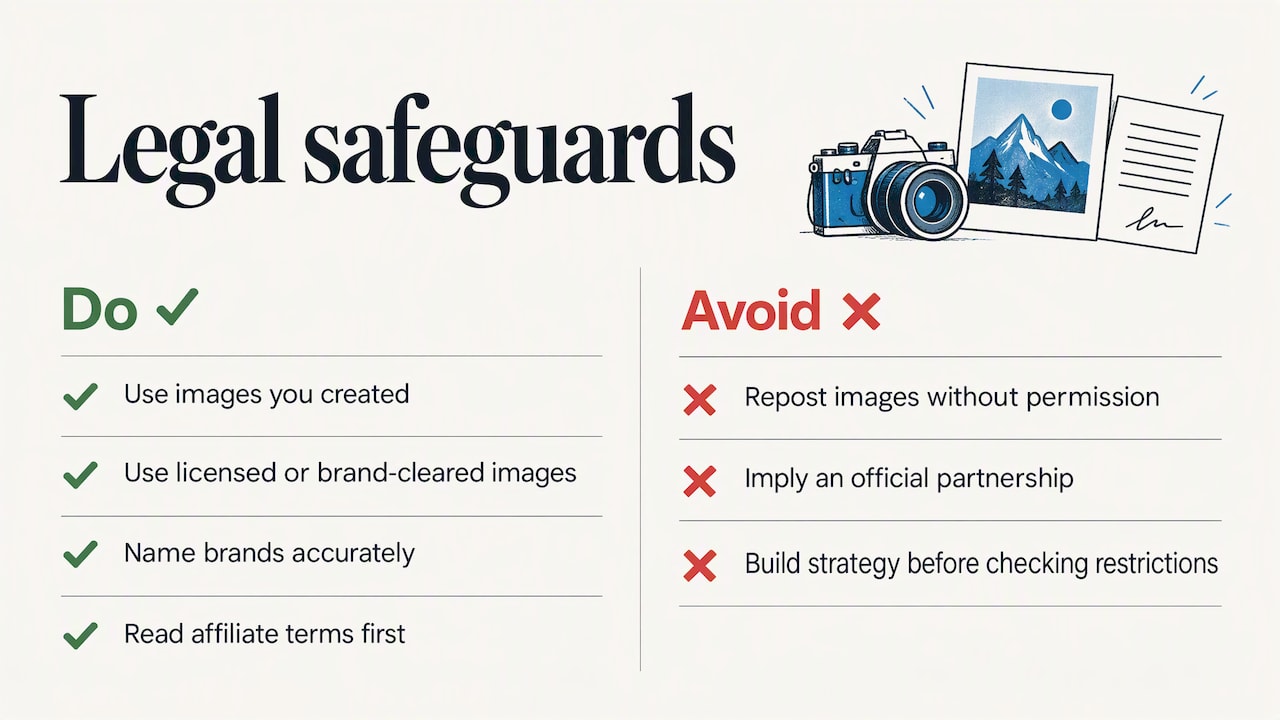
Disclosure is the most talked-about legal requirement, but it isn’t the only one that matters on Pinterest. Using an image you didn’t create, didn’t license, or didn’t get permission to repost can raise copyright issues, even when the original source was another public pin. Stick to images you’ve created, licensed stock photography, or assets a brand has explicitly cleared for affiliate use.
Trademark use needs similar care. Naming a brand or using its logo in your pin description is generally fine when you’re honestly reviewing or recommending its product, but implying an official partnership or endorsement you don’t have can cross into misleading territory. Keep product names accurate and avoid language that suggests you’re an official representative of a brand unless that is actually true.
Affiliate program terms themselves are a legal document, not a formality. Some programs restrict how their links can be used on specific platforms, and Pinterest-specific restrictions do appear in certain affiliate agreements. Reading the terms before building a pin strategy around a given program protects your account and your income from a policy violation you didn’t know existed.
When Pinterest fits your affiliate strategy, and when it doesn’t
Pinterest earns its spot in a strategy when your products are visual, your content can stay useful for months, and you have the time to build a library of pins rather than chase a single viral moment. It’s a weaker fit for offers that need an urgent, direct response, or for technical B2B products where a search-driven, visual browsing audience just isn’t the right match.
If you’re unsure where Pinterest fits for your offer, run a focused 30-day experiment and let the click-through and conversion numbers make the decision for you.
— Nathaniel
Templates and guided support if you want to move faster
We built our courses for exactly the stage you’re at right now: you understand the mechanics, but you want the templates, checklists, and examples already built instead of assembling them from scratch. Our Instant Course Access for Life, priced at $97 one-off, gives you lifetime access to the structured guides and walkthroughs we use ourselves across affiliate marketing, blogging, and related online business paths.
This fits best if you’re a beginner who wants a repeatable workflow rather than another list of tips to piece together. It also helps if you’ve already tried posting a few pins and want a clearer system before scaling up.
- Step-by-step templates for niche validation and pin planning.
- Checklists for disclosure, tracking setup, and publishing cadence.
- Worked examples from real affiliate workflows across several niches.
If you want to see the full breakdown of what’s included, visit Instant Course Access for Life and get started today.
FAQ
Is Pinterest good for affiliate marketing?
Pinterest works well for affiliate marketing because it functions as a visual search engine with shopping-oriented intent, and pins can keep generating traffic for months after publishing. Success depends on choosing a visual niche, disclosing affiliate links clearly, and tracking which pins actually convert.
Can I make money from Pinterest?
Yes, affiliates earn money from Pinterest by linking pins to affiliate offers or to blog posts containing affiliate links, then earning a commission on resulting sales. Earnings vary widely based on niche, product price point, and how consistently you publish and optimize pins.
How many followers do you need on Pinterest for affiliate marketing?
Pinterest doesn’t require a large following to drive affiliate traffic, because its search and recommendation system can surface pins to new users regardless of your follower count. What matters more is consistent publishing, keyword-rich descriptions, and pins designed to earn clicks and saves.
How can I start affiliate marketing as a beginner?
Start by picking a niche with clear search demand, setting up a Pinterest business account, and joining affiliate programs that explicitly permit Pinterest promotion. From there, publish a small batch of pins with tracking links and disclosures, then measure results over about 30 days before scaling what works; our free beginner resources walk through this groundwork in more detail.
Sources
- FTC – Endorsements and testimonials
- Federal Register – Guides concerning endorsements and testimonials (FTC)
- Statista – Pinterest: Monthly active users worldwide
- Sprout Social – Instagram affiliate marketing: strategy guide