
You're probably in one of three situations right now. You have a supplier list full of UPCs and need to match them to Amazon listings. You have a stack of ASINs and need the barcode data for sourcing or inventory work. Or you opened a product page, thought the lookup would take seconds, and found out Amazon's catalog is messier than the converter tools make it sound.
That mess forms the essence of ASIN to barcode work. The lookup itself isn't usually the hard part. The hard part is making sure the barcode belongs to the exact sellable unit, the right variation, the right marketplace, and a listing that won't cause trouble later.
I've found that sellers get into expensive problems when they treat ASINs and barcodes like interchangeable labels. They aren't. If you understand why they differ, you'll make better sourcing decisions, avoid duplicate listing mistakes, and stop feeding bad data into your inventory system.
Why ASINs and Barcodes Are Not Interchangeable
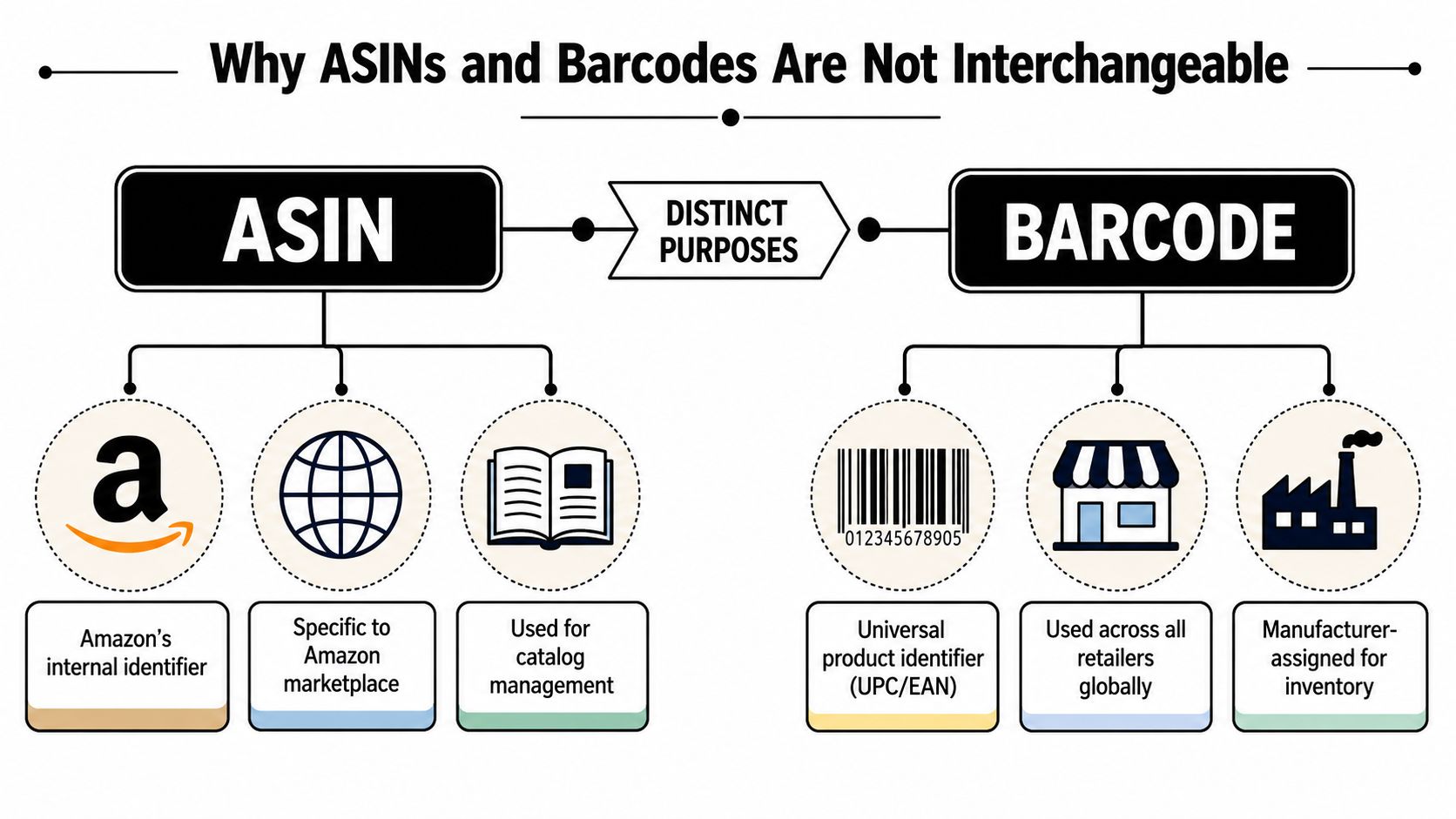
Think of an ASIN like a library's internal catalog number. It tells Amazon which catalog record a product belongs to. A barcode like a UPC or EAN is closer to the ISBN on the book itself. It's meant to identify the product beyond one retailer.
Amazon defines an ASIN as a unique 10-character alphanumeric identifier assigned to each product in its catalog, while UPCs are broader retail barcodes used across sellers and marketplaces. Operationally, that matters because Amazon can map a single ASIN to one or more external barcodes, but the ASIN remains Amazon's native key for listing, search, and variation management, as explained in Avery's breakdown of Amazon ASINs versus UPC barcodes.
What each identifier actually does
If you're selling an existing product, you match the listing through the ASIN. If you're creating a new listing in a category that requires product IDs, Amazon may still expect a valid UPC, ISBN, or other accepted barcode type. Those two identifiers serve different jobs. One controls the Amazon catalog record. The other helps verify the product in broader retail systems.
That's why a clean ASIN to barcode workflow matters in real operations:
- For sourcing: You may find a product on Amazon by ASIN, then need the barcode to check distributor catalogs or retail packaging.
- For listing accuracy: You need to confirm that your physical unit matches the digital listing, not just something close.
- For inventory cleanup: If your spreadsheet mixes ASINs, UPCs, and EANs without clear mapping, your purchasing and replenishment decisions get sloppy fast.
Practical rule: Use the ASIN to find the Amazon record. Use the barcode to verify the physical product.
Where sellers get tripped up
The common mistake is assuming that once you have one identifier, you fully understand the product. You don't. An ASIN can point to a listing structure that includes parent-child variations, marketplace-specific catalog differences, or bundled configurations that don't line up cleanly with one barcode.
If you need a quick refresher on how Amazon structures this identifier, EntreResource has a straightforward guide on what an Amazon ASIN is. That foundation matters before you try to convert anything.
The Manual Method of Finding Barcodes on Amazon
If I only need to check a few products, I start on the Amazon detail page. It's the cheapest method because it costs nothing except attention. It also forces you to look at the exact listing instead of trusting a black-box tool.

A practical manual workflow is to open the product detail page for the exact child ASIN, then inspect the Product Information or Additional Information area for UPC, EAN, GTIN, or manufacturer barcode fields. The key failure point is variation leakage. If you look at the parent ASIN or the wrong child variation, the displayed barcode can belong to a different sellable unit, which Headline MA highlights in its guide to manual ASIN to barcode lookups.
The exact page-level workflow
Here's the process I use when I want the highest confidence from a manual lookup:
Open the listing and select the exact variation
Don't stop at the parent detail page. Choose the exact size, color, pack count, or style you intend to source or list.Confirm the variation changed
Watch for the URL, title, images, and variation selector state. If the page didn't switch cleanly, you may still be looking at the wrong child.Scroll to product details
Check sections labeled Product Information, Additional Information, technical details, or similar fields.Look for identifier fields
Focus on UPC, EAN, GTIN, ISBN, or manufacturer barcode references.Cross-check against the product itself
If you have packaging, compare the code. If you're sourcing, compare against brand or supplier records before you commit.
Why this method fails so often
The page lookup sounds simple, but Amazon's variation structure creates most of the pain. A parent listing can hold several child units with different retail identifiers. If you pull a code from the wrong variation, you can end up buying the wrong inventory, listing against the wrong offer, or shipping a unit that doesn't match what customers expect.
Don't trust a barcode pulled from a listing until you've verified the variation path that produced it.
I'm especially cautious with apparel, supplements, multipacks, and products where the title changes only slightly between children. Those categories are where one wrong click creates bad data.
This walkthrough can help if you want to see the process in action:
When manual lookup is the right move
Manual lookup works well when:
- You're testing a short list: A handful of products doesn't justify a bulk tool.
- You suspect listing issues: Page-level review helps you catch variation mismatches and odd catalog structure.
- You need judgment, not just data: Sometimes the useful answer is that the identifier on the page isn't reliable enough to use.
What doesn't work is trying to do this across a large sourcing sheet. That turns into slow, repetitive catalog work, and the error rate climbs as soon as you rush.
Using Tools for Bulk ASIN to Barcode Conversion
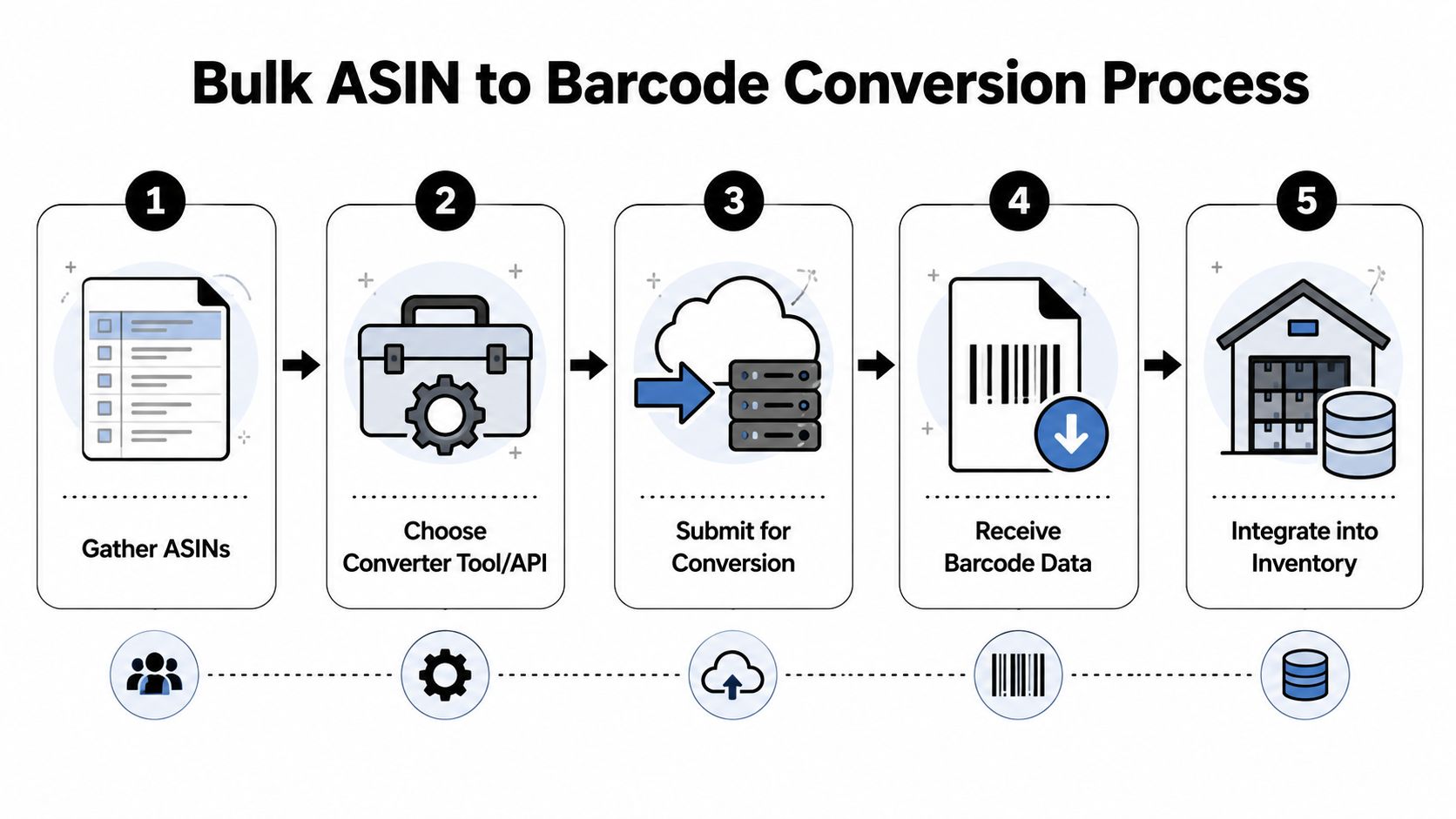
Once you move beyond a small list, manual lookup becomes a bottleneck. Bulk tools exist for a reason. They let you upload a spreadsheet, map the identifier column, run the conversion, and export the results without clicking through product pages one by one.
At scale, the main advantage is throughput. Bulk CSV or XLSX workflows can process large lists in one pass, and tool providers describe handling thousands of codes, with some claiming support for up to 50,000-code processing plus extra output fields like product title and pricing, according to ASINScope's overview of bulk ASIN to UPC conversion workflows.
What the bulk workflow usually looks like
Most tools follow the same pattern:
| Step | What you do | What to watch |
|---|---|---|
| Upload | Add a CSV or Excel file | Clean the identifier column first |
| Map fields | Tell the tool whether the input is ASIN, UPC, or EAN | Wrong mapping ruins the whole job |
| Run conversion | Submit the batch | Expect some unresolved rows |
| Export | Download the populated file | Keep unmatched items in a separate tab |
| Validate | Spot-check problem listings | Don't assume every row is usable |
The time savings are real. The quality control burden is real too.
Tools are fast, not magical
A lot of sellers expect an ASIN to barcode tool to return one perfect answer for every product. That's not how catalog data behaves in the wild. Some listings don't expose the GTIN publicly. Some are suppressed. Some have barcode data that reflects packaging, not the exact online unit you need to source.
That's why I treat bulk converters as a first-pass matcher, not the final authority.
A few practical examples of where bulk tools help:
- Online arbitrage lead sheets: You can enrich a list of ASINs with identifier data before checking retailer matches.
- Wholesale catalog normalization: If your supplier sends mixed barcode formats, a converter can help you align records around one identifier set.
- Internal inventory systems: Teams building reordering logic often need a bridge between Amazon-native identifiers and broader catalog data.
If you're trying to tighten replenishment after you've normalized identifiers, this resource on how to prevent stockouts with AI is worth reading because barcode cleanup and inventory forecasting usually become the same operational project.
When to use APIs instead of spreadsheets
If your team runs recurring lookups, APIs are the next step. Modern identifier services advertise bidirectional conversion across ASIN, UPC, EAN, ISBN, JAN, MINSAN, and GTIN. One provider also states that it returns real-time identifier resolution in milliseconds and includes 100 free monthly credits for testing in its discussion of Amazon product ID conversion and API-based matching.
That matters when you're syncing sourcing tools, listing software, or internal dashboards instead of passing spreadsheets around all week.
Bulk tools save labor. APIs save repeated labor.
For product research on the Amazon side, EntreResource also has a useful walkthrough on how to use the Helium 10 Chrome extension, which fits well when you're pairing catalog lookup with listing-level analysis.
Creating Barcodes for Private Label and Bundles
You source a product, check the catalog, and try to match the ASIN to a barcode. Then the trail stops. That usually means you are no longer doing lookup work. You are doing product creation work.
That distinction matters with private label items, custom bundles, and multipacks you package as their own sellable unit. In those cases, there often is no existing barcode you should reuse. Trying to force a match is how sellers end up with listing conflicts, packaging mismatches, or an identity problem that surfaces during listing review.
Amazon made barcode ownership a stricter compliance issue years ago. In Seller Central, Amazon states that product IDs for new listings must be GS1-approved, and the brand information associated with the barcode should match the brand submitted for the listing, especially for branded products. You can review that policy in Amazon's own UPC and product ID requirements for listings.
Private label means the barcode has to match the brand story
For private label, the clean workflow is simple. Get your barcode from GS1, assign it to one exact sellable unit, and keep the same identifier in your packaging files, listing records, and inventory system.
I would not cut corners here. Cheap UPC resellers can look fine until Amazon or a retail partner checks ownership and sees another company tied to the code. At that point, the problem is no longer technical. It becomes a documentation problem, and those are slower and more expensive to fix.
Use this standard:
- One code per sellable unit: Each size, color set, pack count, or configuration needs its own barcode if it is sold as a distinct unit.
- Match the barcode owner to the brand: If your listing says your brand, the registration trail should support that.
- Keep an internal master record: Store SKU, ASIN, UPC or EAN, pack count, and packaging version in one place so your team does not mix old and current identifiers.
If you are building a branded catalog from scratch, this practical overview of Amazon FBA private label is a useful companion to the barcode side of the process.
Bundles and multipacks fail when sellers treat components as the product
Bundles create more mistakes than standard private label because sellers see valid barcodes on the individual items and assume one of those codes can carry the whole offer. It usually cannot.
Amazon cares about the sellable unit the customer receives. If you combine two products into one packaged bundle, or turn a single item into a 2-pack or 4-pack, you created a different commercial unit. The component barcode identifies the item inside. It does not automatically identify the bundle you assembled for sale.
Here is the operating rule I use:
- Existing single product with an established listing: Match the exact listing and exact unit already in Amazon's catalog.
- New branded product you control: Buy GS1 barcodes and assign them at the unit level.
- Bundle, kit, or multipack you assembled: Treat it as a separate product record with its own identifier strategy and documentation.
The operational reason matters more than the tool choice. Your warehouse needs one scannable code for the carton or unit being picked. Your listing needs one identifier for the exact offer the customer ordered. Your returns team needs that same identifier to know whether the item that came back was the base product, a 2-pack, or a bundle version. If those records drift apart, lookup tools will not save you.
Sellers running both Amazon and DTC often feel this first in operations, not in listing creation. The barcode that seemed good enough for Amazon starts causing confusion once the same product data has to feed another storefront, shipping software, and inventory sync rules. This guide for small business online stores is useful context if you are mapping products across channels and want to avoid creating duplicate identities for the same catalog.
How to Verify Barcodes and Avoid Listing Rejection
Verification is the step too many sellers skip because the lookup felt successful. A code appeared, so they move on. That's exactly how listing problems start.
In practice, one ASIN may map to multiple GTIN-like identifiers, or a clean reverse lookup may fail because listings vary by marketplace, parent-child structure, and brand registry status. There's also repeated seller confusion around cases where a manufacturer barcode links to more than one ASIN, which is why a simple one-to-one answer is often incomplete, as discussed in this analysis of ASIN and barcode mapping edge cases.
The checklist I'd use before listing anything
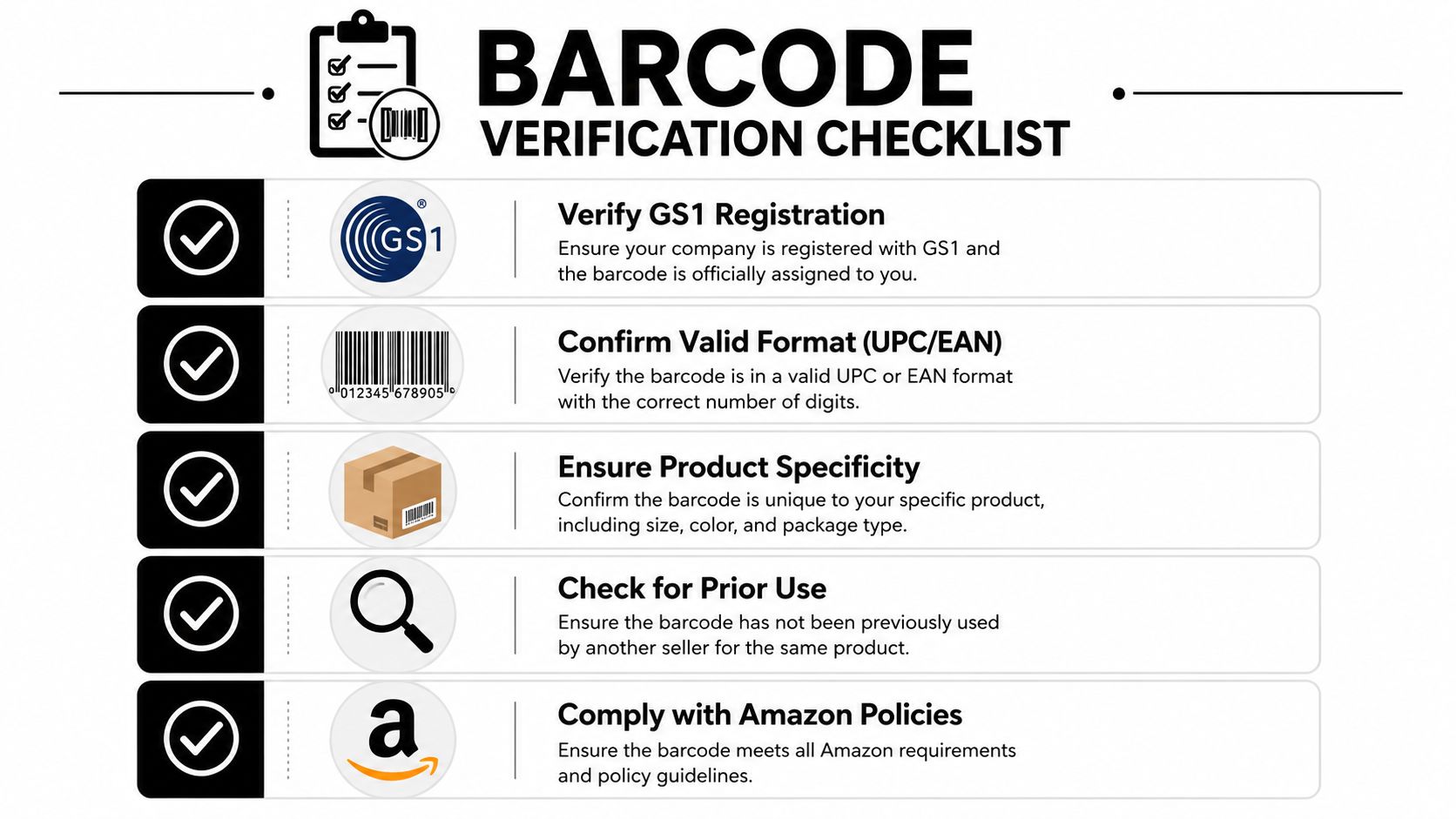
You don't need a complicated process. You need a repeatable one.
- Confirm marketplace fit: A U.S. listing may surface a UPC, while another marketplace may use an EAN representation for the same product family.
- Verify the exact sellable unit: Check variation, pack count, and bundle status before trusting the code.
- Match the brand record: If the barcode will be used for listing creation or product verification, compare it against brand or GS1 records.
- Check for catalog weirdness: If multiple ASINs appear connected to the same barcode, stop and inspect manually.
- Keep evidence: Save screenshots, supplier data, and your lookup notes so you can defend the mapping later.
If a barcode is going to touch sourcing, packaging, or listing creation, verify it twice.
Where sellers lose money
The cost isn't just a rejected listing. Bad barcode data also causes avoidable inventory purchases, prep mistakes, and bundle confusion. If your warehouse labels the wrong unit, or your VA matches to the wrong child ASIN, you can spend days cleaning up a problem that started with one lazy lookup.
I'd rather slow down for a few minutes on verification than unwind a bad listing, stranded inventory, or customer complaints later.
Conclusion Your Path Forward
ASIN to barcode work looks simple from the outside. In practice, it's a catalog control skill.
Use the manual method when you're checking a small number of listings and need confidence on a specific variation. Use bulk tools when you're processing larger sheets and need speed, but treat the output as a starting point, not the final word. Buy legitimate barcode identification when you're creating a private label product or a true bundle that needs its own sellable identity.
The sellers who do this well don't just “convert ASINs.” They verify units, respect marketplace differences, and keep clean records. That discipline protects listings, improves sourcing accuracy, and makes scaling a lot less chaotic.