
You're probably here because someone said “Amazon PO” and you realized that phrase can mean completely different things depending on who's talking.
I see this constantly. A Vendor Central brand thinks it means an order Amazon sent them. An office manager using Amazon Business thinks it means the internal PO number they need for accounting. An FBA seller thinks it means the document they send to a distributor or manufacturer before inventory ever reaches a prep center or fulfillment network.
They're all talking about purchase orders on Amazon, but they're not talking about the same workflow.
That confusion matters because the operational risk is different in each case. In Vendor Central, speed and compliance drive the outcome. In Amazon Business, clean internal tracking matters most. In FBA sourcing, the PO is your control document for inventory, landed cost, and supplier accountability.
Untangling the Amazon Purchase Order
A common failure point starts like this. A brand says it needs help with an Amazon purchase order. Ten minutes later, it becomes clear that one team is talking about Vendor Central chargebacks, another is trying to force an internal PO number into Amazon Business, and the seller handling replenishment means a supplier PO for incoming FBA inventory.
I've seen that mix-up on consulting calls, in Slack threads, and inside companies that should know better. The term sounds simple, but on Amazon it points to three different transactions between three different parties.
The fastest way to clean this up is to ask one question first: who is buying from whom?
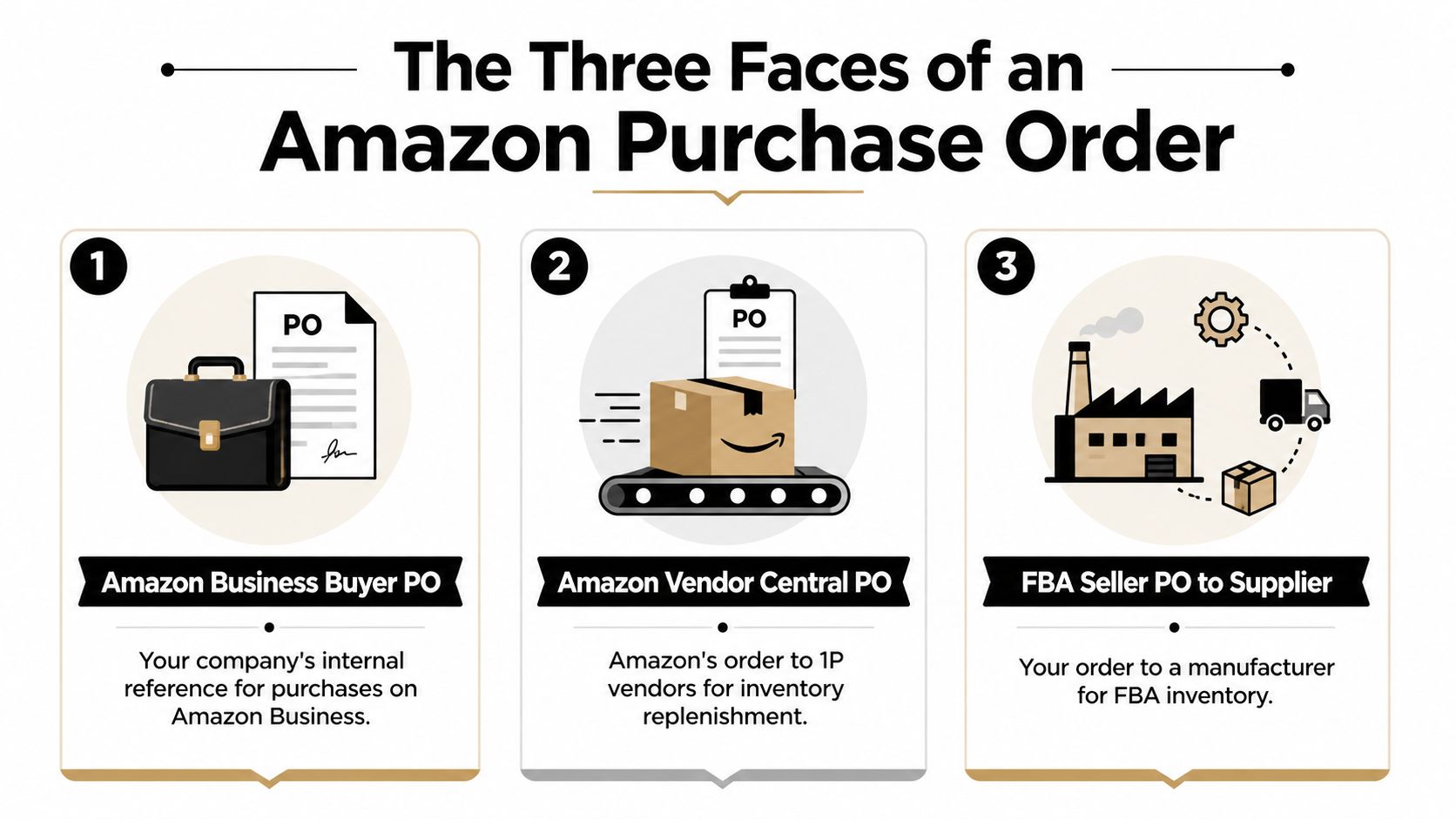
From there, the meaning usually falls into one of three buckets:
- Vendor Central PO: Amazon is buying inventory from you as a first-party vendor.
- Amazon Business PO number: your company is attaching its own internal purchase order number to a business purchase for approvals and accounting.
- FBA seller PO: you are issuing a purchase order to a manufacturer, distributor, or wholesaler before stock is sent into Amazon's fulfillment network.
Those distinctions are not semantic. They change the system you use, the deadlines you care about, and the kind of mistakes that cost money.
In Vendor Central, a bad PO process can lead to shortages, routing problems, or compliance deductions. In Amazon Business, the risk is internal. Missing approvals, messy reconciliation, and accounting friction. In FBA procurement, the PO is your control document for quantity, cost, terms, and receiving accuracy.
For growing sellers, this gets harder to ignore. As noted earlier, Amazon has highlighted how many independent sellers now operate at meaningful scale in its marketplace. Once order volume rises, loose PO habits stop being a small admin issue and start showing up as stockouts, mismatched invoices, and delayed reorders.
The fix is straightforward. Separate the three meanings first, then build the workflow that matches the transaction. Most confusion around "purchase order Amazon" comes from using one label for three different jobs.
The Three Faces of an Amazon PO
The term "Amazon purchase order" describes three different workflows, and each one has a different owner, system, and risk profile. If those get blended together, teams make the wrong operational decisions fast.
I see this confusion all the time. A Vendor Central team assumes a PO is something they issue to a factory. A finance manager using Amazon Business assumes it works like a retail vendor PO. An FBA seller searches "purchase order Amazon" and lands on advice meant for first-party vendors. The label is the same. The job is not.
One term, three workflows
| PO type | Who creates it | What it means | Primary goal |
|---|---|---|---|
| Vendor Central PO | Amazon | Amazon is ordering goods from a first-party vendor | Fulfill Amazon accurately and on time |
| Amazon Business PO number | The buyer's company | Internal reference attached to an Amazon Business purchase | Approval and accounting control |
| FBA seller PO to supplier | The seller | Formal document sent to a supplier to order inventory | Procurement, receiving, and reconciliation |
That distinction matters because each version of a PO drives a different workflow.
In Vendor Central, Amazon sends the order and expects the vendor to respond, ship correctly, and stay compliant with routing and receiving requirements. If you are still sorting out whether your account operates as first-party or third-party, this breakdown of Amazon Seller Central vs Amazon Vendor Central differences helps clarify which PO model applies.
In Amazon Business, the PO number usually serves your company's internal controls. It helps the buyer route approvals, code spend, and reconcile invoices after the order is placed.
In FBA procurement, the seller creates the PO and sends it to a supplier. I use these POs as the control document for unit cost, ordered quantity, packaging expectations, ship window, and destination. Without that document, receiving problems turn into arguments about what was agreed.
What actually changes between the three
The trade-offs are different in each case:
- Vendor Central: speed of review, fill-rate decisions, shipment accuracy, and compliance deductions
- Amazon Business: requester accountability, budget coding, approval flow, and invoice matching
- FBA sourcing: supplier alignment, reorder timing, landed cost control, and receiving accuracy
This leads to costly mistakes when a generic guide treats all three as one process.
A warehouse team fulfilling Amazon retail POs needs one playbook. A procurement team buying through Amazon Business needs another. A seller placing factory orders for FBA needs a third. In practice, that is the gap most articles miss.
One more point matters for operators. In the seller procurement context, the PO is often the clearest written record of what the supplier agreed to produce and ship. Once an FBA business starts working with multiple suppliers or sending inventory to multiple destinations, loose email threads stop being reliable enough for clean reordering, receiving, or dispute resolution.
For Vendors Fulfilling Amazon POs in Vendor Central
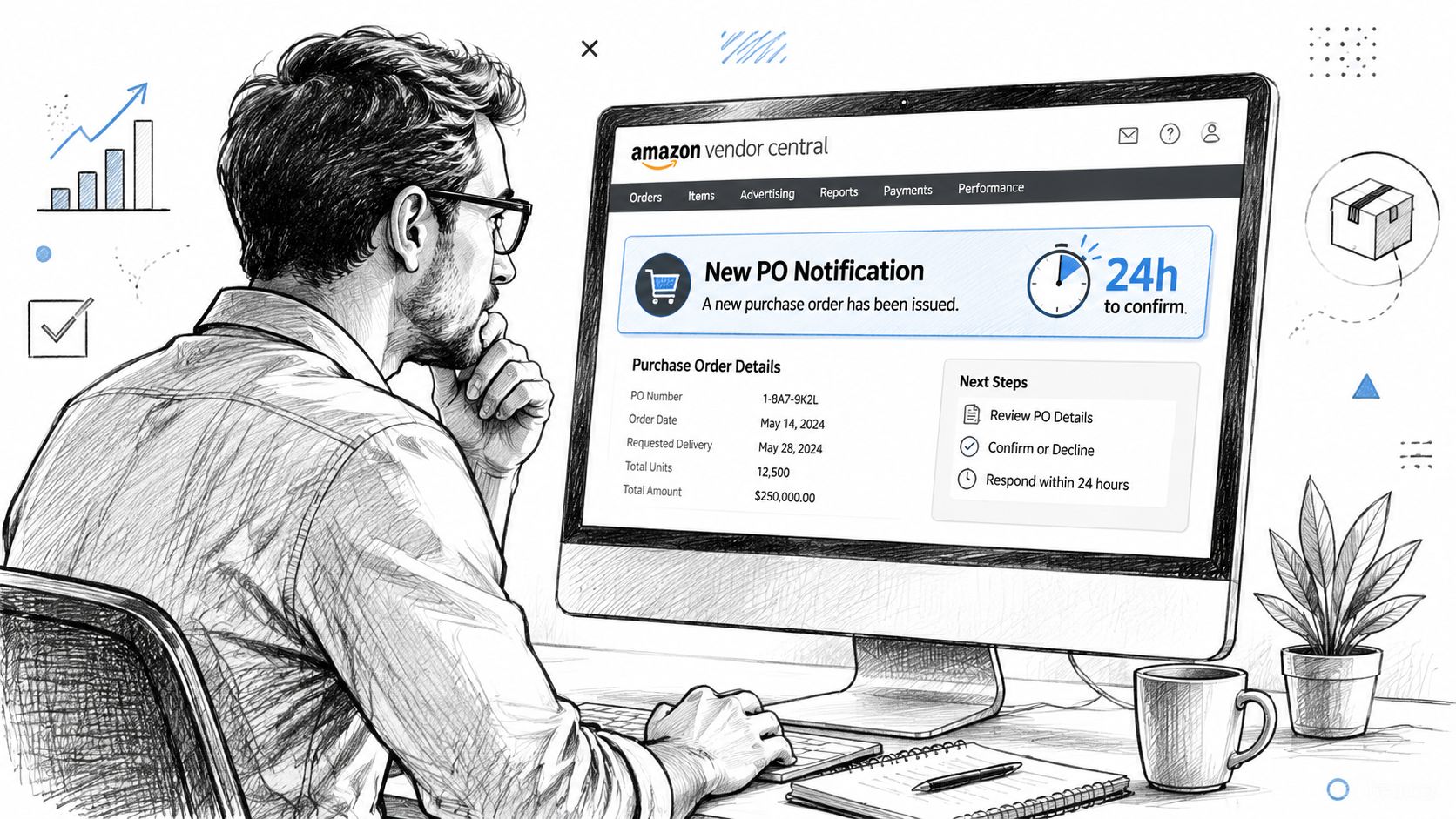
Vendor Central is where the phrase “Amazon PO” feels the most literal. Amazon sends the purchase order. Your team has to decide whether you can fulfill it exactly as requested, partially fulfill it, or reject it.
That decision can't sit in someone's inbox all day.
The first 24 hours matter
A practical Vendor Central workflow is to confirm or reject each purchase order within 24 hours, because Amazon treats the PO as the operating basis for vendor fulfillment and order exceptions. That same lifecycle also depends on fast issue reporting, accurate catalog data, and regular compliance monitoring to prevent downstream errors and shortages, as explained in Amalytix's purchase order glossary.
In plain English, delay creates expensive messes.
When I've worked with Vendor Central accounts, the biggest avoidable problems usually started before the truck moved. The PO sat unreviewed. The catalog had stale data. A quantity exception wasn't flagged early. Then the shipping team was forced to improvise around a bad assumption.
A practical Vendor Central playbook
Use a simple operating sequence:
Review the PO immediately
Check the PO number, ASINs, requested quantities, ship windows, and destination details. Don't assume Amazon's request aligns with your current available inventory.Confirm what you can ship
If the quantity is wrong or the ASIN mapping looks off, escalate it before your team starts building the shipment.Report exceptions fast
The longer a mismatch sits unresolved, the more likely it is to turn into ASN or routing issues later.Lock master data down
Wrong item IDs, outdated case pack details, and catalog inconsistencies can ripple through the whole order.Monitor compliance after submission
A PO isn't “done” because someone clicked accept. It's done when the shipment, data, and receiving all line up.
What tends to go wrong
The failure modes are usually boring, which is why teams underestimate them.
- Delayed confirmation causes coordination problems downstream.
- Incorrect ASIN or item data leads to mismatches at receiving.
- Quantity errors create preventable chargeback exposure.
- Weak internal handoff means sales ops says one thing and warehouse ops ships another.
In Vendor Central, most PO problems start as data problems and end as shipping problems.
A lot of brands also underestimate the strategic difference between first-party and third-party operations. If your team is still sorting out which model fits your business, this comparison of Seller Central vs Vendor Central differences helps frame the operational expectations behind each.
What works better than “checking the portal sometimes”
The vendors who handle Amazon POs well usually do a few simple things consistently:
- Assign one owner per queue so someone is accountable for reviewing and responding.
- Use exception tags internally for quantity, catalog, routing, and availability issues.
- Sync ops and finance before shipment leaves, not after receiving disputes appear.
- Audit recurring problem ASINs because repeat mismatches rarely fix themselves.
What doesn't work is treating Vendor Central POs like ordinary wholesale orders. Amazon's system expects disciplined execution. If your internal process is casual, the friction shows up fast.
For Buyers Using PO Numbers on Amazon Business
For Amazon Business buyers, the PO conversation is much less dramatic. You're usually not managing supplier fulfillment. You're trying to make internal purchasing clean enough for approvals, budgeting, and accounting.
That sounds small until month-end reconciliation hits.
What the PO number does here
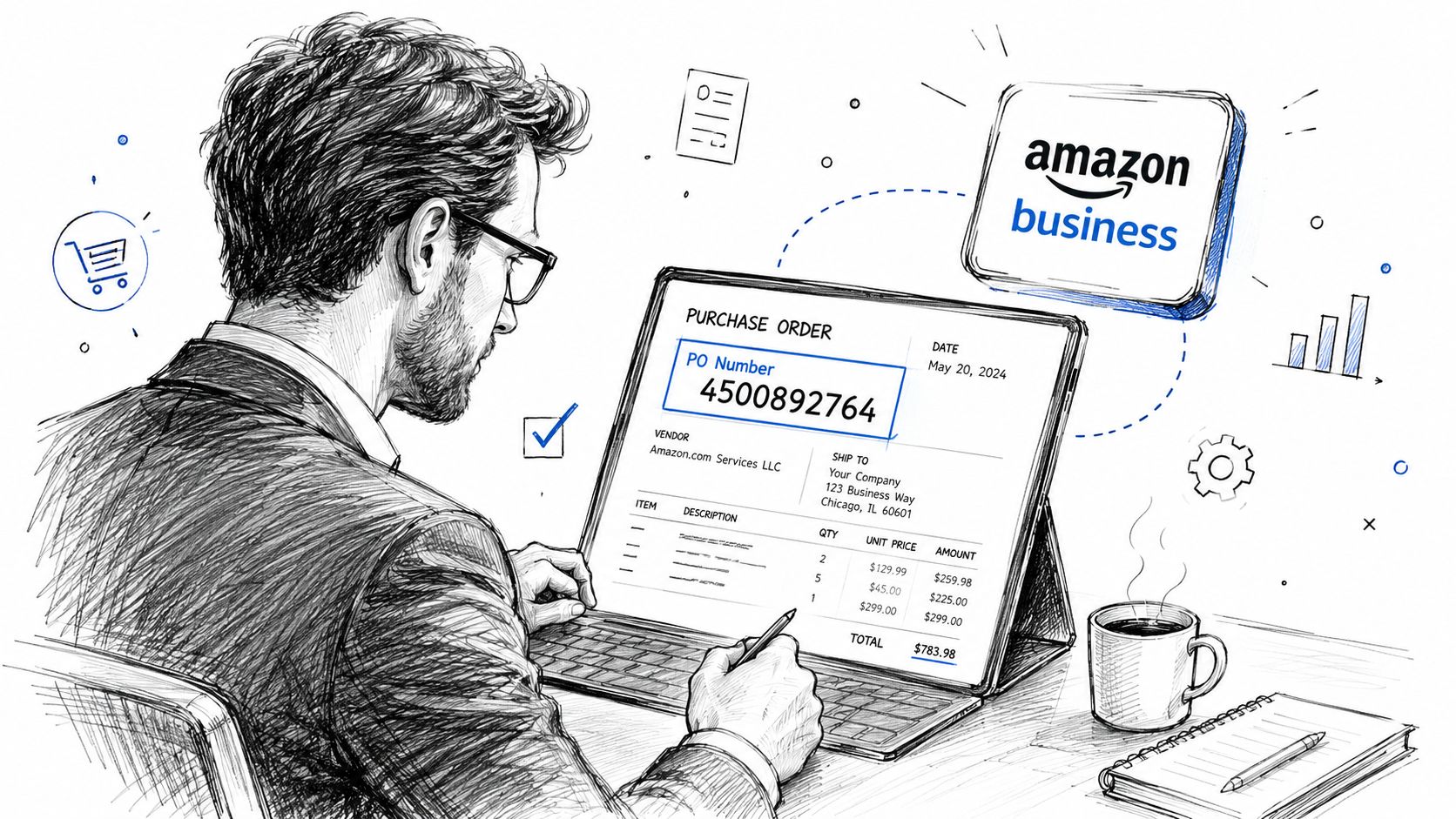
In Amazon Business, the PO number is typically an internal reference your company uses to tie a purchase to a department, project, budget, or approval chain. The point isn't to create a vendor-side fulfillment document. The point is to give procurement and finance a reliable reference.
A common real-world example is an operations manager ordering printers, labels, or office supplies and needing the charge tied back to a cost center. Without a PO number, accounting sees an Amazon charge. With a PO number, accounting sees where it belongs.
A simple working process
This is the approach teams should use:
Set a clear naming convention
Keep it readable. If your finance team can't interpret it, the field won't help much.Require the PO number at checkout
If the field is optional in practice, people will skip it.Match the number across systems
The same reference should appear in your internal request, purchase approval, and invoice review workflow.Train the buyer, not just procurement
The person clicking “Place order” is the one who makes the process succeed or fail.
A PO number on Amazon Business is mainly an accounting control disguised as a checkout field.
Where teams make this harder than it needs to be
The biggest mistake is overengineering it. You don't need a complicated schema if your team is small. You need consistency.
A better setup is usually:
| Situation | Better PO use |
|---|---|
| Team purchases recurring supplies | Use department or team-based reference |
| Project-based buying | Tie PO number to project code |
| Multi-location orders | Include site or location identifier |
What doesn't work is free-form entry. If one buyer types “Marketing,” another types “MKT-01,” and a third leaves it blank, reporting turns into cleanup work.
If you're the person responsible for procurement hygiene, your job isn't to create more process than necessary. It's to create just enough structure that every Amazon Business order can be traced back without a scavenger hunt.
For FBA Sellers Creating POs for Suppliers
A seller realizes on Thursday that a top SKU will stock out next week. The supplier says inventory is available, but the price list in email is two versions old, the prep center address changed last month, and nobody can confirm whether the last reorder included labeling. That is usually the moment "purchase order Amazon" gets confused again.
For FBA sellers, a purchase order has nothing to do with Amazon issuing you a PO in Vendor Central or a buyer entering a PO number on Amazon Business. This version is your own purchasing document for inventory you plan to send through FBA, a 3PL, or a prep partner. If you do not separate those three meanings, advice gets sloppy fast.
Start with replenishment logic
A usable PO starts with the reorder decision. The document is only the record of that decision.
In practice, sellers who define reorder points, lead times, and destination constraints place better buys than sellers who reorder from instinct. I have seen this repeatedly with FBA brands that looked profitable on paper but kept paying for avoidable air shipments, split cartons, and rushed prep because the purchasing trigger came too late.
Check the inputs that affect the buy:
- current sell-through
- supplier lead time
- on-hand inventory
- inbound units already committed
- receiving capacity at FBA, your warehouse, or prep center
- any packaging or labeling requirements tied to the destination
If you run a more structured replenishment cycle, this guide to Amazon inventory management is a useful companion to PO planning because reorder timing and PO quality usually rise or fall together.
What the supplier PO should contain
Supplier POs do not need fancy software. They need precision.
Every PO should identify who is buying, who is supplying, what is being ordered, where it is shipping, what it costs, and which terms govern the order. If any of those fields are vague, receiving errors and invoice disputes get much harder to sort out later.
At minimum, include:
- Your business name and contact details
- Supplier name and contact details
- PO number and issue date
- Ship-to location such as your prep center, warehouse, or 3PL
- Item identifiers including product name, UPC, ASIN, supplier SKU, or your internal SKU
- Ordered quantities
- Unit cost and line total
- Payment terms
- Requested ship date or delivery window
- Freight, tax, prep, or other added charges
- Special instructions for carton labels, case packs, expiration dating, or packaging
I also recommend listing the destination in the exact format your operations team uses internally. "Send to warehouse" creates problems. "Send to Dallas 3PL, Dock B, receiving contact included" gives your supplier something they can act on correctly.
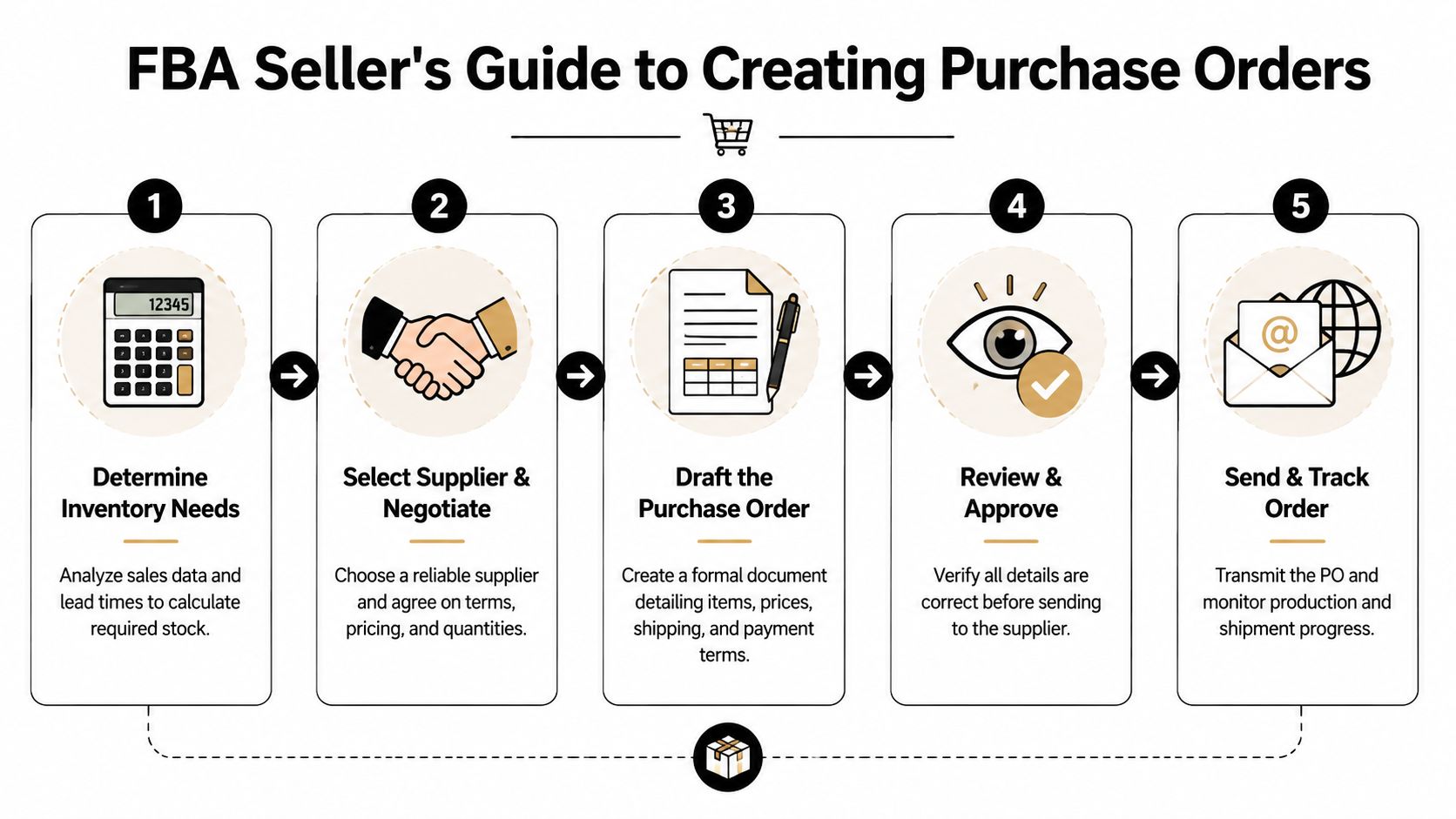
A repeatable workflow for FBA procurement
A simple, repeatable sequence is most effective:
Determine what actually needs to be purchased
Start with the SKU, the quantity, and the reason for the buy. Use sales velocity, seasonality, margin, and lead time. Then test the order against storage limits and cash flow.
That trade-off matters. Buying deeper can lower unit cost, but it can also tie up cash and raise storage risk if demand softens.
If your inventory goes through a prep partner before Amazon, build that step into the PO and timeline. Sellers sourcing into overseas or cross-border workflows often miss this handoff. A practical overview of Australian Amazon prep is useful if that is part of your operation, especially when prep sits between supplier shipment and FBA-ready inventory.
Lock the commercial terms before issuing the PO
The PO should document an agreement, not start one.
Confirm pricing, MOQs, carton packs, lead times, payment terms, shipping method, and destination instructions before you send the document. If the supplier still needs to negotiate core terms after the PO goes out, your team will end up treating multiple versions as if they are all final.
Draft the PO in one standard format
Use one template across suppliers whenever possible. Spreadsheet, ERP, inventory tool, or purchasing app all work if the output is consistent and readable.
Status control matters more than design. Keep every PO in a visible stage such as Draft, Sent, Confirmed, Received, or Closed. I have cleaned up enough inbox-based purchasing systems to say this plainly: if status only lives in email, someone eventually reorders stock that was already on the water.
Review the PO from the receiver's perspective
Before sending, check the details the warehouse or prep center will rely on later:
- Destination address is current
- SKU and barcode references match receiving records
- Quantities match the final quote
- Costs and added fees support landed cost review
- Prep notes are specific enough to follow
- Carton or pallet instructions are included if needed
This step catches expensive mistakes. A wrong destination or outdated SKU mapping can create delays that are much harder to fix once inventory ships.
Send, confirm, and track exceptions
After the supplier receives the PO, get an acknowledgment. Then track confirmed quantity, promised ship date, and any exceptions against the original order.
Do not treat silence as confirmation. Suppliers miss edits, substitute packaging, or partially accept orders all the time. The sellers with cleaner procurement records are usually the ones who reconcile exceptions early instead of discovering them at receiving.
What works in real operations
The strongest FBA teams keep the purchasing process boring. That is a compliment.
These habits hold up well:
- Use one PO for one shipment plan or supplier release
- Keep PO numbering consistent across all vendors
- Match product identifiers across PO, invoice, and receiving records
- Record changes in the PO trail instead of scattered emails
- Close the PO only after units and costs are checked
The failure patterns are predictable:
| Bad habit | What it causes |
|---|---|
| Ordering from email threads without a formal PO | Missing approvals and weak audit trail |
| Using inconsistent product names | Receiving confusion and SKU mismatches |
| Sending goods to the wrong prep or warehouse location | Delays, relabeling, and extra freight |
| Leaving out added charges | Distorted landed cost and margin analysis |
| Treating partial shipments as complete orders | Bad replenishment assumptions |
You do not need enterprise procurement software to fix this. You need a clean distinction between Amazon's PO processes and your own supplier purchasing process, plus a team workflow that gets followed every time.
PO Best Practices for Scalable Operations
A team can get away with loose PO habits at low volume. Then one busy month exposes every weak spot at once. A receiving mismatch holds payment, a buyer uses the wrong SKU, Amazon asks for document backup, and nobody agrees on which version of the order was final.
That pattern shows up in all three Amazon PO contexts, but the fix is not identical in each one. Vendor Central teams need clean execution against Amazon-issued POs. Amazon Business buyers need controls around internal spend and approval. FBA sellers need supplier POs that tie back to replenishment, landed cost, and invoice records.
Scale comes from standard rules, not heroic cleanup.
The controls that hold up under volume
The best PO systems make it easy to answer five questions fast. Who approved the order. What exactly was ordered. Where it was supposed to go. What was received. What exception is still open.
In my own consulting work, the teams that stay organized are rarely using the fanciest software. They are using the same logic every time:
- Use a consistent PO numbering format across buyers, suppliers, and locations
- Keep SKU, ASIN, UPC, and supplier item codes mapped correctly so documents match at every handoff
- Show PO status in one visible place instead of spreading updates across inboxes and chat threads
- Match receiving against the PO before final payment so shortages and substitutions get caught early
- Log revisions clearly so nobody works from an outdated unit cost, quantity, or ship window
One detail matters more than it looks. If finance, warehouse, and purchasing teams all use different references for the same order, reconciliation slows down and disputes get harder to prove.
How experienced operators use POs
Strong operators treat the PO as an operating record. It is the document that ties purchasing intent to physical movement and financial outcome.
That becomes more important as order volume grows. Amazon's system is large, seller operations are often spread across several tools, and small process gaps turn into preventable cost. I have seen this in Vendor Central chargeback reviews, in FBA restock planning, and in Amazon Business approval chains. The order itself is usually straightforward. Margin leaks show up in substitutions, short shipments, duplicate invoices, and delayed exception handling.
Good PO management is good exception management. Clean orders save time, but clean exception handling saves margin.
Two upgrades that usually pay off first
Tie proof of receipt back to the PO
If goods move through suppliers, prep centers, carriers, or store locations, receiving confirmation needs to connect to the original order record. Teams that want a better handoff process should spend time understanding proof of delivery for retailers, especially if disputes tend to start after dispatch.Clean up supplier documents before Amazon reviews them
Sellers often wait until an invoice rejection or verification issue forces the cleanup. That is late. This guide on why Amazon may not accept invoices and how to validate suppliers properly is useful if your PO trail, invoices, and supplier records are not lining up consistently.
Habits that stop scaling
A lot of avoidable friction starts with shortcuts that looked harmless when the catalog was smaller.
- Stop re-entering supplier details manually if templates or systems can store approved defaults
- Stop mixing draft assumptions with final terms in the same PO record
- Stop buying inventory without a confirmed destination and receiving path
- Stop treating invoice matching as a finance-only task when purchasing and receiving created the source data
- Stop closing POs before exceptions are resolved just to make reports look cleaner
If there is one rule to keep, it is this: use a different playbook for each Amazon PO type, but keep the discipline consistent across all of them. Vendor POs, Amazon Business PO numbers, and supplier POs for FBA are not the same process. They do benefit from the same operating standards. Clear ownership, clean records, and fast exception handling.