
You've probably dealt with some version of this already. The shipment leaves your prep center on time, the pallets are wrapped, labels look right, and then the freight carrier tells you Amazon rejected the delivery or moved the appointment. A few days later, your best SKU starts drifting toward a stockout, and nobody gives you a straight answer.
That “black box” is usually amazon carrier central.
Most FBA sellers treat Carrier Central like a carrier-only tool they can ignore. That's a mistake. Even if you never log in yourself, this system controls whether your LTL or FTL shipment gets booked, checked in cleanly, and documented well enough to fix problems when something goes wrong. If you ship pallets into Amazon, you need to understand the rules inside the portal your carrier uses.
Your Guide to Amazon's Inbound Shipping Gatekeeper

Amazon Carrier Central, also called CARP 2.0, is Amazon's unified portal for carriers, vendors, and sellers to schedule and manage deliveries into fulfillment centers, according to SellerSprite's overview of Amazon Carrier Central. In practice, it's the gatekeeper for inbound freight.
If a truck is showing up with palletized FBA inventory, someone has to get that appointment into the system correctly. If they don't, the shipment can stall before it ever reaches the dock. Sellers often see the symptom first, not the cause. You notice delayed receiving, missing freight updates, or inventory that seems stuck in transit. The underlying problem often started upstream when booking data was incomplete or mismatched.
Carrier Central matters because it sits between your shipment plan and Amazon's warehouse doors. Seller Central is where you create the inbound shipment. Carrier Central is where the carrier turns that plan into an actual dock appointment.
Practical rule: If you send LTL or FTL into FBA, treat Carrier Central as part of your workflow even if your carrier is the one clicking the buttons.
That mindset changes how you operate. Instead of waiting for a freight company to “handle it,” you give them the exact data they need, confirm they know Amazon's appointment rules, and verify paperwork before the truck rolls. Sellers who do that usually avoid the messiest inbound problems. Sellers who don't end up reacting to them.
What Is Amazon Carrier Central and Who Uses It
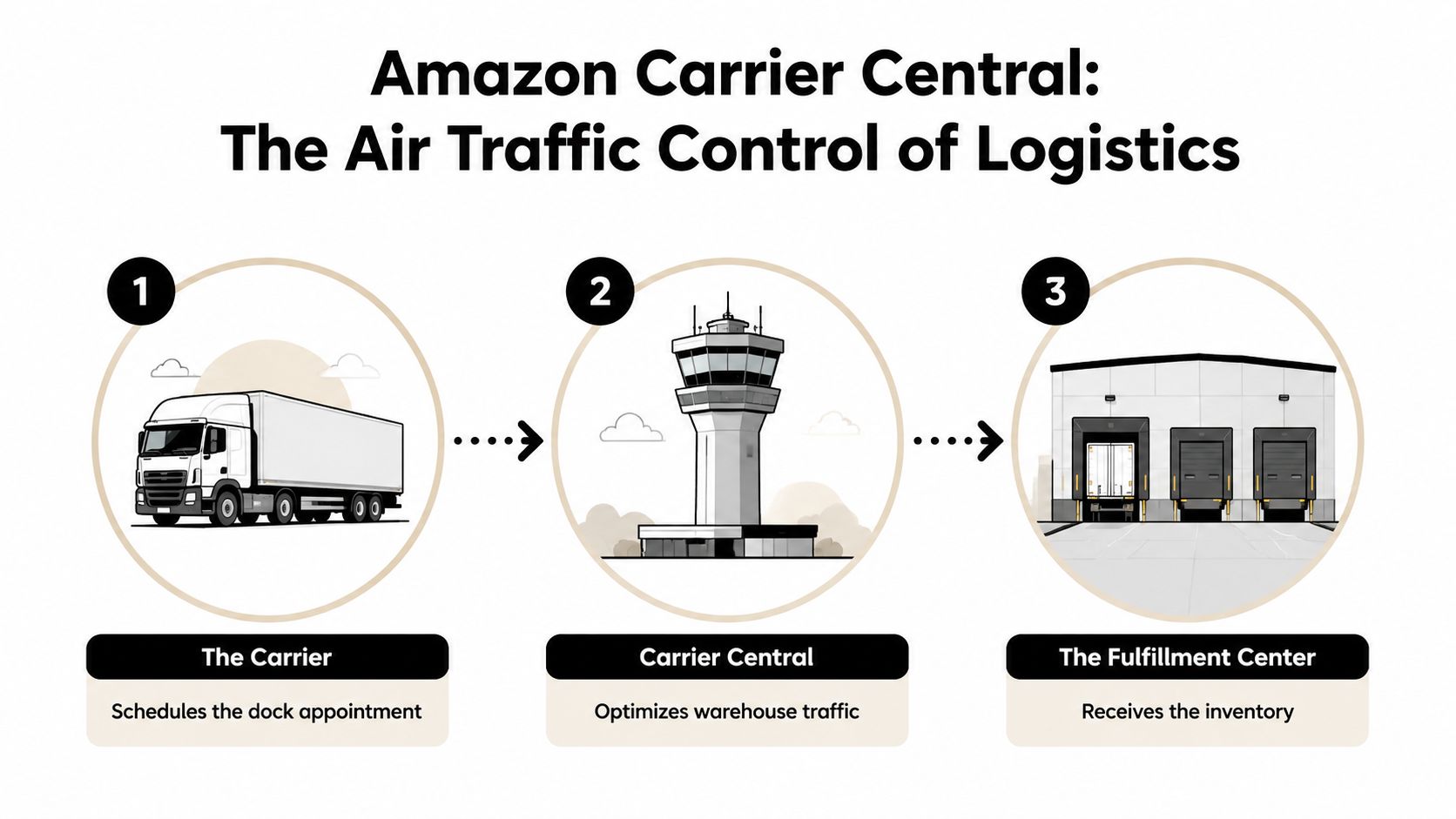
Think of amazon carrier central as air traffic control for Amazon warehouses. Trucks don't just show up and unload when they feel like it. Carriers request a slot, Amazon decides what capacity is available, and the fulfillment center receives inventory in a controlled flow.
The three groups that matter
Carriers are the main active users. They request appointments, manage delivery schedules, and work inside the portal to move freight into Amazon FCs.
Vendors use it when they're shipping under Amazon's wholesale-style workflows. If you're fuzzy on that distinction, this breakdown of Seller Central vs Vendor Central differences is worth reviewing because the operational model changes who controls the shipment.
FBA sellers usually interact with Carrier Central indirectly. That's the part Amazon's documentation tends to leave murky. You create the shipment in Seller Central, but the carrier often handles the Carrier Central side.
Seller Central and Carrier Central do different jobs
A lot of inbound confusion comes from mixing up these two systems.
Use Seller Central to:
- Create the shipment plan: Build the inbound shipment and generate the shipment data Amazon expects.
- Choose shipping method: Decide whether you're using a partnered option or handling freight with your own carrier.
- Produce labels and references: Generate the shipment identifiers your carrier will need later.
Use Carrier Central to:
- Request the dock appointment: The carrier submits the delivery details to Amazon.
- Manage changes: If the appointment shifts, the carrier handles that in the portal.
- Track delivery-side status: The execution piece is managed.
Your carrier lives in Carrier Central. Your inventory data starts in Seller Central. If those two don't match, Amazon treats the shipment like a problem.
Why this matters to private label sellers
Private label sellers usually don't need to become experts in every Amazon system. Carrier Central is different because small mistakes at this stage create expensive downstream issues. One wrong PO list, a missing reference ID, or a sloppy pallet count can delay receiving and leave your replenishment plan exposed.
The practical takeaway is simple. You don't need to become a carrier. You do need to understand the system your carrier uses well enough to spot weak operators before they cost you inventory time.
How Sellers Get Shipments Booked Without Direct Access
The biggest point of confusion is the SCAC question. Sellers hear that Carrier Central is for carriers, see references to carrier credentials, and assume they need direct access to schedule their own inbound freight.
Most FBA sellers don't.

Official materials describe Carrier Central as a portal for carriers, sellers, and vendors, but they don't give practical signup guidance for typical FBA sellers without a carrier SCAC. That gap is documented in Amazon's own Carrier Central manual discussion around access and seller workflows.
Path one uses Amazon's partnered carrier flow
This is the simpler route for most sellers.
If you use Amazon's partnered options inside Seller Central, much of the scheduling burden gets abstracted away. You still need to prepare the shipment correctly, but you're not trying to force your way into a portal designed around carrier accounts. For many operators, this is the cleanest way to avoid access friction.
This route works well when:
- You want fewer moving parts: The workflow stays closer to Seller Central.
- You don't want to vet independent LTL carriers yourself: Amazon's network handles more of the process.
- You value simplicity over flexibility: Especially if your team is still learning palletized inbound shipping.
The trade-off is control. Partnered options can be convenient, but they also narrow your carrier choices.
Path two uses a non-partnered carrier with direct portal access
This is how many experienced sellers and 3PLs run freight when they want more control over routing or carrier relationships.
Here's what happens. You create the shipment in Seller Central. Then you pass the shipment details to your freight carrier. That carrier uses their own Carrier Central account to request the delivery appointment.
What the carrier usually needs from you:
- Amazon Reference IDs: These are essential for matching the load to the inbound shipment.
- PO or shipment identifiers: If the booking data doesn't line up, the appointment can fail.
- Pallet count: Don't estimate loosely.
- PRO number and freight details: The carrier uses this to identify the move internally and in Amazon's workflow.
- Destination FC details and timing information: They can't book a proper appointment without the receiving location and requested date data.
If a non-partnered carrier says “we'll figure it out,” that's not reassuring. A good Amazon carrier asks for exact identifiers before pickup.
What sellers get wrong
The common mistake is assuming booking is the carrier's job alone. It isn't. Booking is a shared data handoff. The carrier enters the appointment, but your shipment plan and documents feed that process.
The second mistake is hiring a freight company that understands trucking but not Amazon. Those are not the same thing. Plenty of carriers can move pallets. Far fewer can move pallets into Amazon cleanly.
A stronger way to handle this is to ask direct questions before the shipment leaves:
- Do you already book Amazon FC appointments through Carrier Central?
- What shipment data do you need from me before pickup?
- Who on your team handles appointment scheduling?
- How do you send me confirmation once the appointment is secured?
If they answer clearly, you're dealing with someone who has done this before. If the answers are vague, expect friction later.
Navigating Core Workflows in Carrier Central
You don't need to log in to understand the workflow. You just need to know what your carrier is trying to do, what data they need from you, and where bad inputs create bad outcomes.
What happens when a carrier books the appointment
When a carrier requests an appointment in Carrier Central, Amazon cross-validates the request against its warehouse systems. After delivery, Electronic Proof of Delivery is searchable in ACC, and claims filed with those shipment details can resolve 40% faster, according to Getida's explanation of Amazon Carrier Central workflows.
That matters because Carrier Central isn't just a calendar. It's tied to how Amazon checks inbound freight against expected data.
A typical booking flow looks like this:
- You finalize the shipment in Seller Central.
- Your carrier receives the shipment identifiers and freight details.
- The carrier enters the appointment request in Carrier Central.
- Amazon validates the request against fulfillment center capacity and shipment data.
- The carrier receives the appointment or a revised slot.
The fields that usually cause trouble
Some data points are operationally small but practically critical.
- Amazon Reference ID list: If this is incomplete, the load may not match cleanly inside Amazon's system.
- PRO number: This is one of the key freight identifiers your carrier uses. If you need a refresher on transport paperwork, it helps to understand types of bill of lading before you start troubleshooting carrier documents.
- Pallet count: Amazon expects the booked load to reflect the actual shipment. Bad counts create problems at receiving.
- Destination FC code and requested delivery timing: Wrong destination data turns into rejected or rescheduled appointments fast.
If your team still struggles with prep-side identifiers, tighten your documentation before the truck is booked. Label accuracy and shipment paperwork go together. This guide on how to create Amazon FBA labels is a useful checkpoint if your prep flow is still inconsistent.
Clean inbound freight starts before pickup. By the time the carrier is booking in Carrier Central, your data should already be final.
Why POD and searchability matter
Most sellers only care about documentation after something breaks. That's backward.
Electronic POD matters when:
- A pallet goes missing
- The shipment is checked in short
- The carrier says delivery happened but Amazon receiving lags
- You need support evidence for a freight claim
If your carrier can't produce clean post-delivery records, every dispute gets slower. That's why experienced sellers don't just ask whether a carrier can deliver to Amazon. They ask how the carrier handles proof of delivery, reference tracking, and claims support after the appointment is completed.
Troubleshooting Common Carrier Central Errors
Most Carrier Central problems look random from the seller side. They usually aren't. They come from a small group of repeat failures: mismatched data, weak appointment discipline, and poor carrier communication.
Common Carrier Central error codes and solutions
| Error/Status | What It Means for the Seller | How to Fix or Prevent It |
|---|---|---|
| Appointment Rejected | The truck doesn't have a valid slot, so your inventory won't be received as planned. | Confirm the carrier submitted the correct Amazon Reference IDs, shipment details, and destination FC information. Ask for booking confirmation before pickup whenever possible. |
| Missing POs or Reference IDs | Amazon can't tie the freight to the expected inbound records cleanly. | Send the full identifier list in one document, not scattered across emails or chat messages. Have the carrier repeat it back before they book. |
| Invalid PRO Number | The freight record doesn't line up properly with the appointment or shipment paperwork. | Verify the PRO on the bill of lading and carrier confirmation matches what the scheduler is entering. One typo is enough to create confusion later. |
| Appointment Rescheduled | Your load is still moving, but your receiving timeline just slipped. | Get the revised appointment from the carrier immediately and adjust your inventory expectations. If this happens often with the same carrier, replace them. |
| Late Delivery | Amazon may treat the carrier as unreliable, which can affect future booking ease. | Build in buffer time, avoid last-minute pickups, and use carriers that regularly handle Amazon appointments. |
| No call no show behavior | The shipment may miss its slot entirely, forcing rebooking and delay. | Ask carriers about their Amazon appointment management process before hiring them. Weak dispatch discipline creates repeat problems. |
| Delivered but not clearly documented | You may struggle to resolve shortages or damage claims. | Request POD and supporting documents as a routine part of every load, not only after an issue appears. |
How to diagnose the issue fast
Start with the handoff points.
- Check your shipment data first: If your Seller Central records are messy, the carrier can't fix that in Carrier Central.
- Check the carrier's booking confirmation next: Ask for the exact appointment status, not a vague “it's scheduled.”
- Check delivery paperwork last: If delivery happened, you want POD, appointment details, and freight identifiers in one place.
The fastest way to solve inbound problems is to ask for documents, not explanations.
What actually prevents repeat issues
Sellers often try to solve these errors one load at a time. The better fix is process control.
Create a standard outbound packet for every LTL or FTL shipment. Include shipment IDs, Amazon Reference IDs, pallet count, contact info, and any special handling notes. Send the same packet every time. Carriers make fewer mistakes when your side is standardized.
Also, keep a short blacklist. If a carrier repeatedly misses appointments, enters bad data, or disappears when claims start, stop using them. Amazon inbound freight is too operationally sensitive to keep testing unreliable partners.
Best Practices for FBA, SFP and 3PL Users
The sellers who stay in stock the longest usually aren't the ones with the cheapest freight. They're the ones who manage carriers like performance partners, not interchangeable vendors.
That matters because Amazon holds carriers to measurable standards. According to Amazon's prepaid carrier manual, carriers must maintain more than 70% First Pass Yield and less than 8.5% No-Call/No-Show over 8 weeks or risk access revocation. The same source notes that Getida reported 15% of FBA sellers miss Q4 slots due to carrier FPYcc dropping below 70%, which leads to delayed inventory costs, as referenced in the US Prepaid Carrier Manual.
What to ask carriers before you book them
Don't ask only for a rate. Ask operational questions that reveal whether the carrier can survive inside Amazon's system.
- Ask about Amazon appointment experience: If they regularly book FC deliveries, they should explain their process clearly.
- Ask who owns scheduling: You want one accountable contact, not dispatch passing blame to the warehouse and the warehouse blaming dispatch.
- Ask how they handle missed or moved appointments: The answer tells you whether they work reactively or systematically.
- Ask how they return POD and issue updates: Fast documentation matters after delivery, not just before it.
For broader lane planning and FC-side context, Upfreights' FBA logistics insights are useful if you're trying to understand how fulfillment center routing affects freight execution.
How this changes for 3PL and SFP operators
If you use a 3PL, don't assume they're handling Amazon freight well just because they handle storage well. Those are separate skills. Your 3PL should be able to tell you which carriers they use for Amazon appointments, how they package shipment data for booking, and how they escalate receiving issues.
If you run SFP or a hybrid model, inbound discipline still matters because inventory instability upstream often creates fulfillment pressure downstream. Even when the customer-facing shipment doesn't go through FBA, your replenishment strategy still depends on predictable movement through the network.
This also changes how you think about freight cost. Cheapest isn't always cheapest. A low quote from a weak Amazon carrier can create stock interruptions, emergency reorder decisions, and margin damage that never appears on the freight invoice. If you need a baseline cost mindset before comparing options, this guide on the cheapest way to ship something across UPS, FedEx, and USPS is helpful for separating sticker price from total shipping impact.
A carrier with weak Amazon discipline is expensive even when the quote looks good.
The operating habits that hold up
The sellers who get cleaner inbound performance usually do three things consistently:
- They keep a shortlist of proven carriers: Not a rotating cast of whoever quoted lowest this week.
- They standardize shipment handoff documents: So booking data is clean every time.
- They review carrier performance after problems: Instead of treating every failed delivery as bad luck.
That's where amazon carrier central becomes a competitive lever. Not because you log in more often, but because you choose partners and processes that work with the system instead of colliding with it.
Making Carrier Central Your Competitive Edge
Amazon's logistics network runs at a scale where carrier reliability isn't optional. In 2024, Amazon Logistics processed 17.2 million orders per day, which is why performance data and booking discipline matter so much in the inbound flow, as noted in this Amazon seller forum discussion on carrier metrics and logistics scale.
This is a key takeaway. amazon carrier central isn't just a scheduling portal. It's part of the control layer for getting your inventory into Amazon without unnecessary friction.
Sellers don't need to obsess over every screen inside the platform. They do need to control the inputs. Give carriers clean shipment data. Use partners that know Amazon's appointment workflow. Demand documentation. Replace weak operators quickly.
That's how you turn inbound logistics from a recurring fire into a repeatable system.
If you want more execution-focused Amazon FBA guidance like this, EntreResource publishes practical breakdowns for sellers building systems that scale.