
Yes, you can start selling on TikTok Shop as long as you meet the platform’s age requirements, live in a supported region, and can open a Business account. Your first moves are simple: confirm eligibility, create and verify your seller account, add payout and shipping details, list a small number of products, and plan a creator or LIVE push to get those first orders.
TL;DR:
- Before signing up, confirm your region supports TikTok Shop; prepare government ID, proof of address, and any required business or tax records.
- Make names and addresses match across every uploaded document and Seller Center form, since blurry scans, cropped corners, expired IDs, or mismatches can delay verification.
- Check category rules before listing a few hero products, because restricted items may need approval; give every variant its own photo and stock count.
- Check new orders at least morning and evening, ship within your promised handling time, and upload tracking promptly to protect seller metrics.
- Compare Seller Center fees and regional commissions with shipping, refunds, and creator payouts before setting prices; payout delays can also affect restocking cash flow.
Table of Contents
- What do you need before you start selling on TikTok Shop?
- How do you set up and verify your seller account?
- How do you list products that get discovered?
- How do orders, shipping, and fulfillment work?
- How do you promote your shop and land early sales?
- Which Seller Center tools and metrics should you watch?
- What beginner mistakes slow new sellers down?
- How do payments, payouts, and fees work?
- What policies and compliance rules apply to TikTok Shop sellers?
- Which performance metrics matter, and how do you improve them?
- What advanced marketing tactics work on TikTok Shop?
- How do you scale your store without breaking operations?
- How should you handle customer service for TikTok Shop buyers?
- What should you know about selling across borders?
- A launch plan from our desk
- Where do our courses help you shorten the learning curve?
- FAQ
- Sources
- Official TikTok Seller resources
What do you need before you start selling on TikTok Shop?
Before you touch the sign-up form, spend a little time on prep. Most onboarding delays come from missing paperwork, not from the platform itself.
TikTok Shop is an integrated commerce solution with an in-app shop, in-app checkout, and Seller Center management tools, so you will be running a real storefront. That means real identity checks. Here is what to line up:
- Age and account type: you must be 18 or older and register as a Business account.
- Identification: a government-issued ID for the account owner.
- Business details: a business registration or tax ID where your region or entity type requires one.
- Proof of address: a recent document that matches the address you will enter.
- Bank details: the account where your payouts will land.
- Region check: TikTok Shop is not available everywhere, and your region decides which onboarding steps, forms, and incentives you see.
Your action checklist is short: confirm your region, gather your documents, then create the Business account. Do those in that order, because a region that is not supported ends the process before you waste an afternoon on scans.
How do you set up and verify your seller account?
Setup is a sequence, and skipping ahead usually causes rejections. Follow it in this order:
- Sign up in Seller Center using the business email you plan to keep long term.
- Verify your identity and, where it applies, your business, by uploading the requested documents.
- Enter your payment and payout details, including the bank account for settlements.
- Configure your shipping templates and your return policy.
Verification documents are usually a photo ID, a business or tax record, and an address proof. The rejections we see discussed most often come down to blurry scans, cropped corners, expired documents, and names or addresses that do not match across files. A middle initial on one page and none on another can stall you for days.
Pro Tip: Scan every document flat in good light, and copy names and addresses character for character from your ID into the form so nothing differs between the upload and the typed fields.
How do you list products that get discovered?
A good listing does two jobs: it convinces a shopper in seconds, and it gives the platform enough clean data to show your product to the right people. Shoppers can discover products on the Shop Tab as well as through video and LIVE, so your listing has to work without you standing next to it.
Prioritize these fields:
- Title: put the keyword a buyer would actually type first, then the key attribute (size, material, count).
- Hero image: one clear, bright shot on a clean background, with the product filling most of the frame.
- Short demo video: show the product being used in a short clip.
- Concise bullets: concise lines covering what it does, what is included, and who it suits.
- Category and SKU: choose the most specific category available and keep your SKU codes consistent with your inventory records.
For variants, list every size and color as its own option with its own photo and its own stock count. Mismatches between the photo and the variant a buyer receives are a fast route to returns. Start with a small number of hero SKUs rather than a large catalog, because you can only push so much content behind each product.
Before you publish, run a policy check. Prohibited and restricted items vary, and a listing that trips a rule can be removed or can put your account at risk, so read the category requirements first.
How do orders, shipping, and fulfillment work?
The order flow is the same loop every time: accept the order, pack it, ship it, and add the tracking number in Seller Center. The speed and accuracy of that loop shape your seller metrics, and those metrics shape how much trust, and eventually how much visibility, you get.
Here is the routine to build into your day:
- Check Seller Center for new orders at fixed times, at least morning and evening.
- Confirm stock and pack the item with the exact variant the buyer chose.
- Ship within the handling time you promised in your shipping template.
- Upload valid tracking right away so the buyer sees movement.
- Watch for delivery exceptions and message the buyer before they message you.
Set delivery expectations honestly. A listing that promises fast delivery you cannot meet will cost you more in cancellations and bad ratings than a slower promise you keep. Returns and refunds are part of the business: handle them quickly and politely, because unresolved cases drag down your seller rating. To protect your numbers, keep stock counts accurate, ship on time, and never cancel an order you can fulfill.
How do you promote your shop and land early sales?
Listing a product does not sell it. On TikTok, discovery comes from content, so your first weeks should be about getting that content in front of people. TikTok Shop supports creator partnerships, a Shop Tab, and LIVE selling, and the platform offers creator matchmaking and a LIVE Planner to help sellers scale.
Here is how to put those to work:
- Affiliate and creator partnerships: the Affiliate Program connects creators and sellers for commission-based promotion, so you pay when a sale happens. Browse creators whose audience matches your product, and send free samples with a clear commission offer. Our affiliate marketing on TikTok playbook covers the workflow in more depth.
- Your first LIVE: keep it simple. Open with a hook that names the problem your product solves, demo it on camera, answer comments by name, and run one limited-time offer to create a reason to buy now.
- In-feed clips: earn attention right away with a visual hook, show a quick demo, and end with one clear call to action.
- Incentives and discounts: platform promotions and discounts can kickstart visibility, but use them sparingly and track what each one returns.
Pro Tip: Film three versions of the same demo clip with different openings, post them across a few days, and keep only the version that gets people to tap the product link.
Which Seller Center tools and metrics should you watch?
You do not need a dashboard full of charts when you are starting out. You need a handful of numbers you check on a schedule and a habit of changing one thing at a time.
Inside Seller Center, look for order reports, traffic sources, and creator-driven sales. These metrics matter most early on:
- Conversion rate: how many viewers who reach your product go on to buy.
- Return rate: a rising number points to a listing or quality problem.
- Average order value: tells you whether bundles or add-ons could lift revenue.
- Creator-attributed sales: shows which partners actually move product, not just post.
Run small experiments: swap a thumbnail, add a promo code, or seed one more creator, then compare the results over a week or two before deciding. If you outgrow the built-in reporting, third-party tools can add inventory and market insight. We cover one option in our Kalodata overview for TikTok Shop analytics.
What beginner mistakes slow new sellers down?
Most early problems are predictable, and most have a quick fix:
- Listing errors and policy flags: recheck category, images, and claims against the rules before resubmitting.
- Verification delays: upload clean documents early and make sure every name and address matches.
- Weak creative: replace the hero image and cut a tighter demo clip, since a poor first image hurts everything downstream.
- Stockouts: keep a buffer on hero SKUs so a good day does not turn into canceled orders.
- Low creator engagement: send free product, offer a commission worth their time, and follow up once.
If you hit a wall, contact Seller Support with evidence ready: screenshots, order IDs, and the exact error text. A clear, documented request gets answered faster than a vague one. If you want to understand buyer trust on the platform too, our piece on whether TikTok Shop is safe shows how shoppers think.
How do payments, payouts, and fees work?
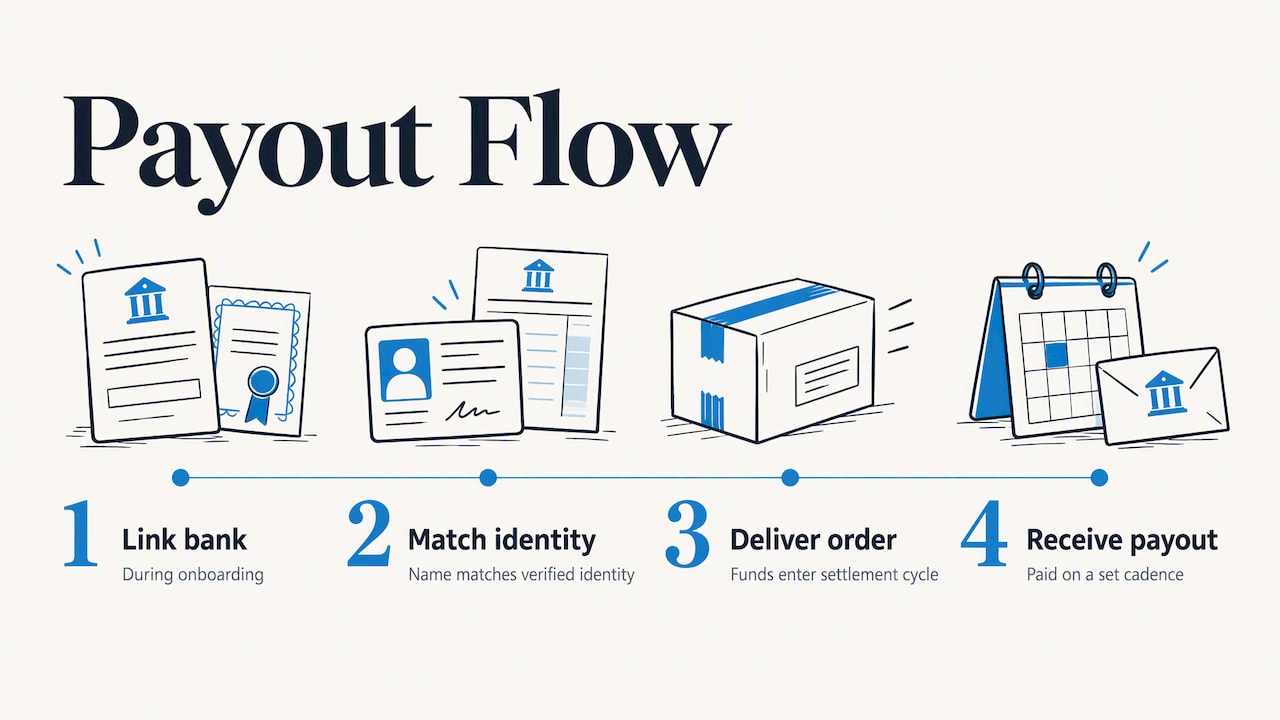
Money reaches you through the bank account you bind in Seller Center, so getting that step right matters more than any other piece of setup. TikTok Shop runs in-app checkout, which means buyers pay inside the platform and the platform settles funds to you afterward, rather than you collecting payment yourself.
The practical flow looks like this. You add your bank details during onboarding, and the name on the account should match the identity or business you verified. A mismatch is one of the most common reasons payouts get held. Once orders are delivered, funds move into a settlement cycle, and the platform pays you out on a set cadence rather than the moment a buyer taps purchase.
Two things shape how much lands in your account. First, fees: TikTok Shop charges fees on sales, and the exact commission and any other charges depend on your region and category, so read the current fee schedule in Seller Center instead of trusting a number from a blog. Second, your own costs: affiliate commissions you offer to creators come out of your margin, as do shipping, packaging, and refunds.
Before you price anything, build a simple per-unit calculation. For example, compare your product’s sourcing and shipping costs with its planned sale price, then account for creator commissions and platform fees. Run the real percentages from your Seller Center schedule through that sheet, and you will know whether a sale makes money or just makes noise. Check payout timing in your own dashboard too, because cash flow matters when you are restocking.
What policies and compliance rules apply to TikTok Shop sellers?
Policy is where new sellers lose accounts, usually by accident. The rules cover three broad areas: what you can sell, how you describe it, and whose work you can use.
Product restrictions and prohibited items. Some categories are banned outright, and others are restricted, meaning you need approval or extra documentation before listing. The exact lists differ by region, so open the policy pages in Seller Center for your market and read the category you plan to sell in before you source inventory. Buying stock for a restricted category and then being unable to list it is an expensive lesson.
Accurate claims. Your title, images, and video must show what the buyer will actually receive. Exaggerated performance claims, misleading before-and-after content, and unsupported health promises are classic reasons for removals.
Intellectual property. Do not sell counterfeits, and do not use brand names, logos, characters, or copyrighted music and images you do not have rights to. Even a resale of a genuine branded product may need proof of authorization in some categories. Original content is safer: shoot your own photos and clips.
Practical habits. Keep supplier invoices and authorization letters in a folder, review policy updates when Seller Center notifies you, and fix flagged listings promptly rather than reposting them unchanged. Repeated violations can limit selling privileges, so treat every warning as a signal to audit your whole catalog, not just the one item.
Which performance metrics matter, and how do you improve them?
TikTok Shop scores how reliably you serve buyers, and a strong score protects your visibility and your standing. You will see these in Seller Center, and the exact names and thresholds can vary by region, so treat the following as the core signals to manage.
Ratings and reviews. Buyers rate the product and the experience. Low ratings usually trace back to a mismatch between what the content promised and what arrived. Fix it at the source: honest photos, accurate sizing, and sturdy packaging.
Response rate. This reflects how quickly you answer buyer messages. Check your inbox at set times each day, and use saved replies for the questions you get repeatedly, such as shipping times and sizing.
Cancellation rate. Canceling orders because you ran out of stock hurts your record. Keep a safety buffer on hero SKUs, and pause a listing before it sells out rather than after.
Late shipment and delivery performance. Ship inside the handling time you set and upload tracking immediately. If a carrier delay is likely, tell the buyer early.
Return and refund rate. A high return rate is a diagnostic, not just a cost. Read the return reasons for patterns: wrong size, damaged in transit, not as pictured.
Build a brief weekly review. Open your metrics, note the one that moved the wrong way, find the cause, and change one thing. Small, steady fixes beat a panicked overhaul after a warning arrives.
What advanced marketing tactics work on TikTok Shop?
Once your basics run smoothly, growth comes from understanding how the platform surfaces products and from deepening your creator relationships. Treat everything here as a test, since no one outside the platform can promise you how its ranking works.
Work with how content spreads. The feed rewards videos people watch and react to. Hold attention from the first second, keep clips tight, and make the product’s benefit visible rather than described. Study your own analytics for average watch time and drop-off points, then recut accordingly. Use trending sounds and formats where they fit, but make sure the product is the star.
Hashtags and challenges. Relevant hashtags help viewers and the system understand what a clip is about. A branded hashtag challenge, where you invite viewers to post their own videos with your product, can create user content at low cost, though it works best when the action is easy and fun. Keep the prompt simple and offer a small reward for participation.
Influencer partnerships beyond samples. After a few successful seedings, move your best creators to longer relationships: higher commission tiers for top performers, exclusive bundles or discount codes, and early access to new products. Ask them to test different hooks for the same item so you learn what resonates. Our guide on how much TikTok pays creators helps you understand what creators weigh when choosing which products to promote.
LIVE as a recurring show. Move from one-off streams to a regular schedule so repeat viewers know when to show up. Plan each LIVE around two or three products, a clear offer, and a rhythm of demo, questions, and reminders.

Measure every campaign against what it cost you in product, commission, and time.
How do you scale your store without breaking operations?
Scaling is mostly about protecting what already works. Add volume in steps, and make sure each step is stable before the next one begins.
- Lock in a winner. Wait until one hero SKU sells consistently with healthy metrics and a manageable return rate.
- Fix inventory first. Track stock in one master sheet or system, set reorder points based on how long your supplier takes to deliver, and keep a buffer so a viral clip does not lead to cancellations.
- Add adjacent products. Expand into items your buyers would naturally want alongside the winner, such as accessories, refills, or bundles, which also raise average order value.
- Systematize fulfillment. Create packing checklists, batch your shipping, and consider a fulfillment partner once order volume eats your day.
- Automate the repetitive work. Saved replies, scheduled posts, and inventory sync tools reduce errors. Choose tools that integrate with Seller Center instead of stacking manual spreadsheets.
- Deepen creator pipelines. Keep a ranked list of creators, who sells, who posts on time, and who brings returns, and put your effort behind the top few.
If you are still choosing what to scale, a short primer on startup product development can sharpen how you test an idea before buying inventory in bulk. Review your numbers at each stage, and slow down the moment return or cancellation rates start climbing.
How should you handle customer service for TikTok Shop buyers?
Customer service on TikTok Shop is part of your sales strategy, because buyers see your ratings and responsiveness before they trust you with a purchase. Fast, friendly, specific replies protect the metrics we covered earlier.
Answer quickly and in the buyer’s tone. TikTok shoppers message casually. Reply in short, warm sentences, name the order, and say exactly what happens next. Aim to respond on the same day, and set daily check times so messages never pile up.
Prepare templates, then personalize. Draft saved replies for the repeat questions: shipping time, sizing, order changes, and tracking. Add the buyer’s name and one detail from their order so it never feels canned.
Handle problems before they become reviews. If a package is delayed, message the buyer first with the new timeline. If an item arrives damaged, ask for a photo, offer a replacement or refund promptly, and thank them for flagging it.
Treat comments and LIVE chat as support too. Public questions under your videos are free insight. Answer them publicly, then fold the common ones into your listing bullets or pinned comment.
Keep records. Log complaints and their causes. If buyers say a size runs small, update the listing rather than answering the same message forever.
Know when to escalate. If a dispute involves a policy or a payment issue you cannot resolve, gather screenshots and order IDs and contact Seller Support with a clear summary.
What should you know about selling across borders?
TikTok Shop operates by region, so your seller account is tied to the market you register in, and international selling depends on what is available for that market. Check the current rules in Seller Center before you plan anything cross-border, because availability and requirements change.
Start with where you are allowed to sell. Confirm which markets your account type can serve and whether cross-border selling is offered to you. Do not assume that being approved in one country lets you list to buyers in another.
Currency. Prices are generally shown in the currency of the market where the buyer shops. Work out your margin in that currency, and account for exchange-rate movement between the time you price and the time funds settle. Build in a cushion rather than pricing at the edge of profitability.
Shipping and customs. Longer distances mean longer delivery windows, higher costs, and possible duties or import taxes. State delivery times honestly in your listings, and confirm who pays duties so buyers are not surprised at the door.
Product rules by country. A product that is fine to sell in one market may be restricted in another, including certain electronics, cosmetics, supplements, and children’s items. Check labeling and safety requirements for each destination.
Returns across borders. Returning an item overseas can cost more than the item is worth, so decide your policy in advance, and consider offering refunds without return on low-value goods.
Start small. Test one market with one hero SKU before widening.
A launch plan from our desk
Here is how I would run the first month. Start by confirming eligibility, creating your account, and verifying your documents. Then list a small number of hero SKUs, seed creators, and prepare your first LIVE. After going live, adjust based on your metrics. Resist listing everything at once: iterate and lean on creators. Our newsletter carries ongoing tips.
— Nathaniel
Where do our courses help you shorten the learning curve?
We offer Instant Course Access for Life.
If you want a clearer path to your first sales, take a look at Instant Course Access for Life at a one-time price of $97 and start working through the material at your own pace.
FAQ
How do you become a successful TikTok Shop seller?
Pick one or two products you can fulfill reliably, make clear demo content, and partner with creators who fit your audience. Keep your shipping, response, and cancellation numbers healthy so the platform trusts you. Success usually comes from steady testing, not from listing many products at once.
How many views do you need on TikTok to earn $100?
There is no fixed number, because earnings depend on your conversion rate, product price, and margin. A higher-priced product with strong conversion needs far fewer views than a low-priced one. Track your own view-to-sale ratio in Seller Center and work backward from your profit per order.
What is the 3 second rule on TikTok?
It is a common creator guideline that you need to hook viewers within the first few seconds or they scroll past. For sellers, that means opening with the problem, a striking visual, or the product in action. Treat it as a practical habit, not an official platform rule.
Is TikTok Shop worth it for sellers?
It can be, especially if you already create or can partner for short video, since TikTok Shop combines an in-app shop, in-app checkout, and an Affiliate Program. Whether it pays off depends on your margins after fees and commissions, so run the numbers before committing inventory.
Official TikTok Seller resources
For region-specific forms, policies, and incentives, go to the source. Start with the TikTok Shop seller hub for Seller Center onboarding and TikTok Shop Academy training, and use the Start Selling page for creator and LIVE resources.