
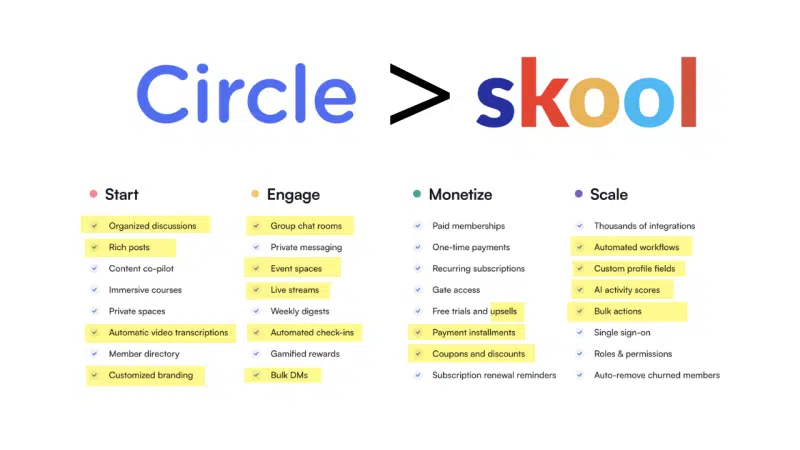
LAST UPDATED 10.7.26: Many features have changed since I first wrote this post. All updates are in yellow highlights.
TL:DR

Skool and Circle.so are both great platforms for hosting a paid community. Circle is much more feature rich and flexible while Skool is a "just enough" type of software. Skool has closed some big gaps since my last update. It now has native video hosting, built-in live calls and a $9/month entry plan. I still recommend Circle over Skool to most serious community and course builders, but the gap is smaller than it used to be. Read this full Circle vs. Skool comparison to see which is right for you.
"Should I use Skool or Circle for my community?"
I've been asked this a handful of times this year already.
As someone who actively uses both Skool and Circle for community building and course hosting, I am uniquely qualified to accurately answer this question.
Why I use both is a long story. I started with Circle way back in 2017 and cancelled in about 2022 to just use Facebook for my community. Recently I moved everything to Skool and now have two paid communities hosted there.
This year though, I teamed up with a friend to create a high ticket community that was targeted at medical professionals. Wanting to make sure we used the most professional, effective option, I revisited Circle.
After a few minutes of reviewing all of the updates they had made since I left, I signed up and paid for a year.
Honestly, as I looked more into the different features, I kindof started to get mad. I had no idea how many things I was leaving on the table by using Skool and not Circle.
So, I decided I needed to share this with everyone, because I've been back in forth on which I've recommended to others.
Since then, both platforms have shipped major changes, so I've updated every section below. Anything that changed is reflected here.
Let's start by listing what both platforms can do for you and then I'll explain why Circle does more and does it all better.
Note on Pricing: Skool now has two plans with identical features. Hobby is $9/month with a 10% transaction fee. Pro is $99/month with a 2.9% transaction fee. Skool also now offers yearly billing with 2 months free. Circle now has four tiers: Professional ($89/month), Business ($199/month), Scale ($419/month) and Circle Plus (custom pricing). Those Circle prices assume annual billing; Professional runs about $129/month if you pay monthly. I use the Professional plan on Circle and that is what will be referenced in this article. Circle can do even more things that Skool cannot when you upgrade to their higher tiers.
Note on Pricing: Features will be compared between the basic plan of Circle to the basic (and only) Skool plan. Circle is $89/month (paid annually) and Skool is $99/month (no annual). Circle can do even more things that Skool cannot when you upgrade to their higher tiers, but even the base tier on Circle is more robust than Skool's basic plan. I use the base plan on Circle and that is what will be referenced in this article.
Note on My Affiliation: This is not a sponsored post but I am an affiliate for both Skool and Circle. Skool actually pays me more than Circle does, but I think it's fair that you know that both (might) pay me if you purchase through either of the links shared in this post.
Skool vs. Circle: What You'll Get with Skool and Circle
Here is what you'll get if you purchase either membership program.
- Unlimited members
- Course areas
- Community feed
- Gamification (reward members for engagement)
- Event scheduling
- Native video hosting
- Built-in live calls and streams
- Upsells
- Free and paid pricing options for members
- Zapier integrations (fill in technology gaps with your other software)
- Various other basic 3rd party integrations (analytics, advertising, etc.)
- Affiliate programs
- Email collection
That is the heart of both programs. There are other features, but these are the nucleus.
Why I Prefer Circle Over Skool
The short answer is simply that Circle has important features that Skool lacks and allows for more customization.
Skool's new $9 Hobby plan makes it the cheaper way to start. Once your community is earning real money, though, Skool's 10% Hobby fee pushes you to the $99 Pro plan, and Circle's extra features start paying for themselves.
Here are all of the key ways Circle outperforms Skool.
Note: This article started out as "5 features Circle has that Skool doesn't" but as I started digging deeper, I continued to find more and more things that Skool lacks. Skool has since caught up on two of them (video hosting and live streams), and I've marked those below.
Note: This article started out as "5 features Circle has that Skool doesn't" but as I started digging deeper, I continued to find more and more things that Skool lacks. It got pretty crazy actually.
Features |  |  | Notes |
|---|---|---|---|
#1 Built in Live Streams & Webinars | Now on both. Skool added Skool Calls. Circle Professional caps you at 100 live stream attendees and 10 hours a month before add-ons. | ||
#2 Custom Domains | All Skool communites are "skool.com/your-name." Only the slug is customizable. You can't host the Skool from your own domain. | ||
#3 Video Hosting | Skool now hosts videos natively, just like Circle. | ||
#4 Layout Options | Skool is "Feed" style only. | ||
#5 Rich Text Options | Skool allows for almost zero text customization in posts. | ||
#6 Group Chats | Skool allows you to direct message members, but only one at a time. | ||
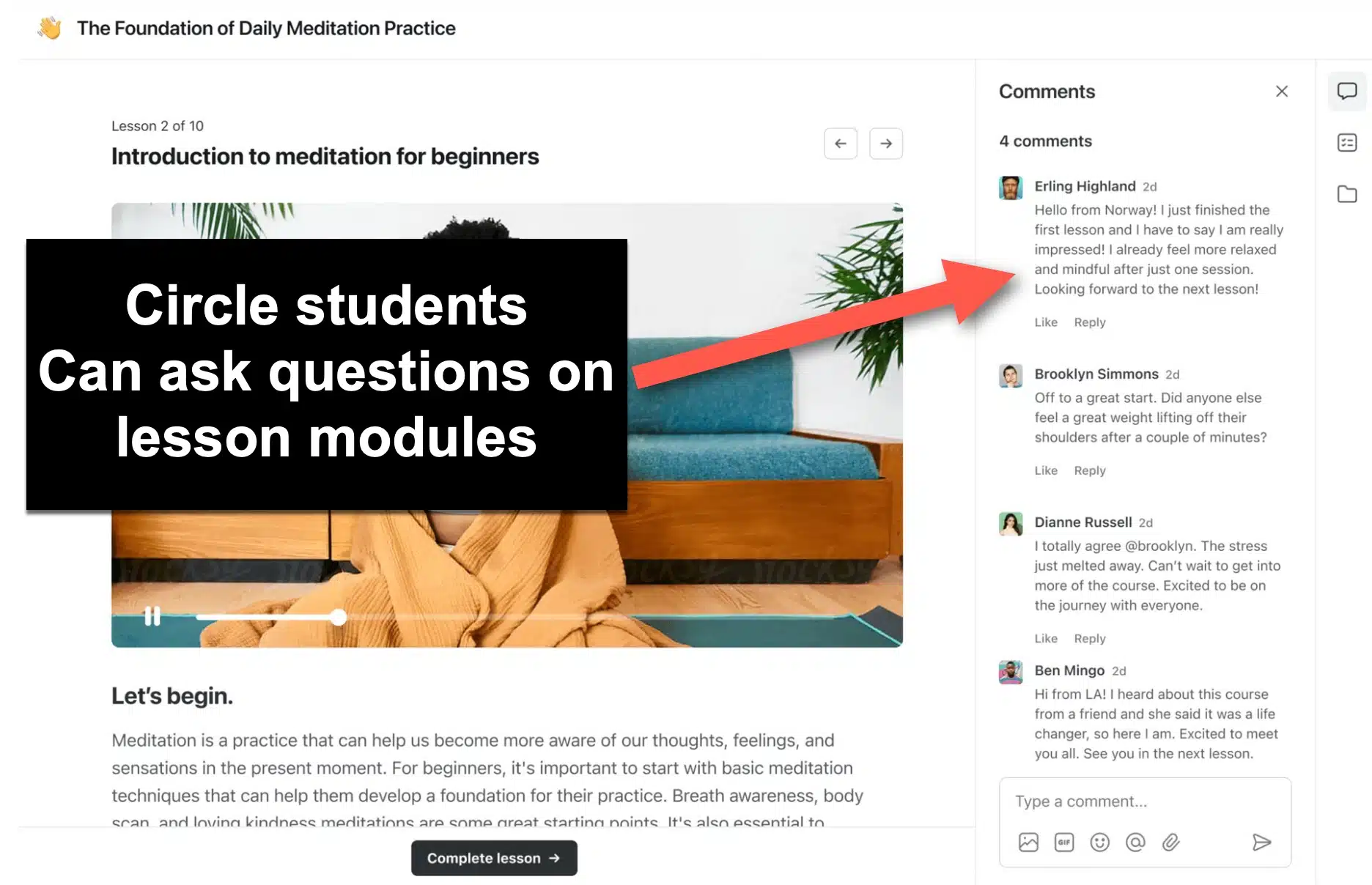
#7 Comments on Courses | Skool doesn't allow students to ask questions directly on course content. Circle does. | ||
#8 Coupons and Discounts | Skool has no coupon system. Running a promo means creating a separate price. | ||
#9 Automated Check-Ins | Circle lets you message members on a schedule BUT workflows now start on the Business plan. | ||
#10 Full Email Marketing Suite | Circle's Email Hub is an optional add-on on top of your plan, with the first 30 days free. | ||
#11 Customizable Branding | Skool offers minimal customization but Circle allows for a fully customized color palete. | ||
#12 Multiple Pricing Tiers | Skool now supports freemium access and one-time purchases. Circle still gives you far more control over tiers and access. | ||
#13 Robust Member Directory | Skool has a member directory, but they might as well not since it's so basic. Skool provides a true, robust member directory with valuable filters and information. | ||
#14 SSO (Single Sign On) | Circle allows users to sign in with Facebook, Twitter and more. | ||
#15 AI Integrations | Circle offers several powerful AI tools such as their feed summarizer that breaks down the latest content into concise paragraphs for members. |
Skool vs. Circle: Custom Domains
Circle Supports Custom Domains, Skool Uses "Skool.com" Domains Only
Skool refuses to let you host your community on your own domain. All Skool communities are formatted like Skool.com/your-community.
Skool used to charge $100 to change the slug (the part after Skool.com). A custom URL is now included on both plans. Skool still doesn't support your own domain, though one report says a bring-your-own-domain feature is in development.

Skool no longer charges this fee for a custom slug but still doesn't allow for custom domains.
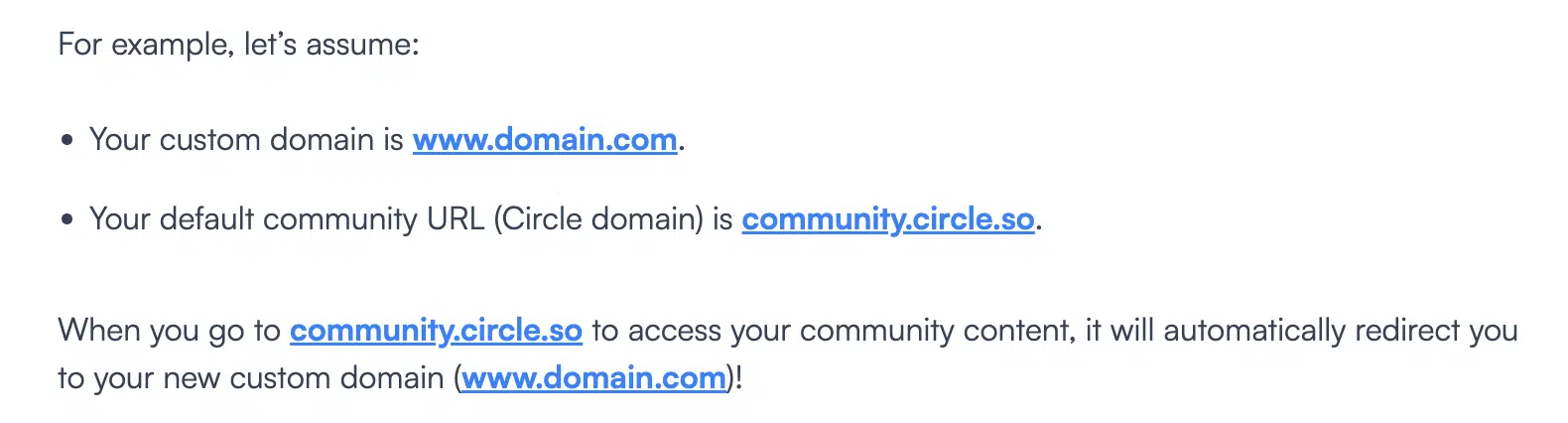
With Circle, you can actually host your community as a subdomain on your own website.
For example, the community for englishlikeanative.co.uk/ is https://community.englishlikeanative.co.uk/.
You can also do a custom root domain. This allows you to have your community show as something like www.yourcommunity.com.
It's up to you if you think that is better than a skool.com/your-group domain, but I like having the option.
Honestly, the brevity of my Skool domain skool.com/eam is pretty nice, so I don't have complaints their.
Also, if you really like the idea of your community being hosted on your website, you can embed your Circle community inside of any website you own with some basic iFrame code snippets.
Skool vs. Circle: Pricing Flexibility for Membership
Circle Allows for Multiple Monthly Pricing Tiers, Skool Has Just One
This used to be a massive oversight on Skool's part. Skool has since added freemium access and one-time purchases, so you can sell a course outright instead of only bundling it into a membership. It's a real improvement, but Circle still gives you much more control over what each tier of member can access.

Circle Lets You Set Different Pricing Tiers
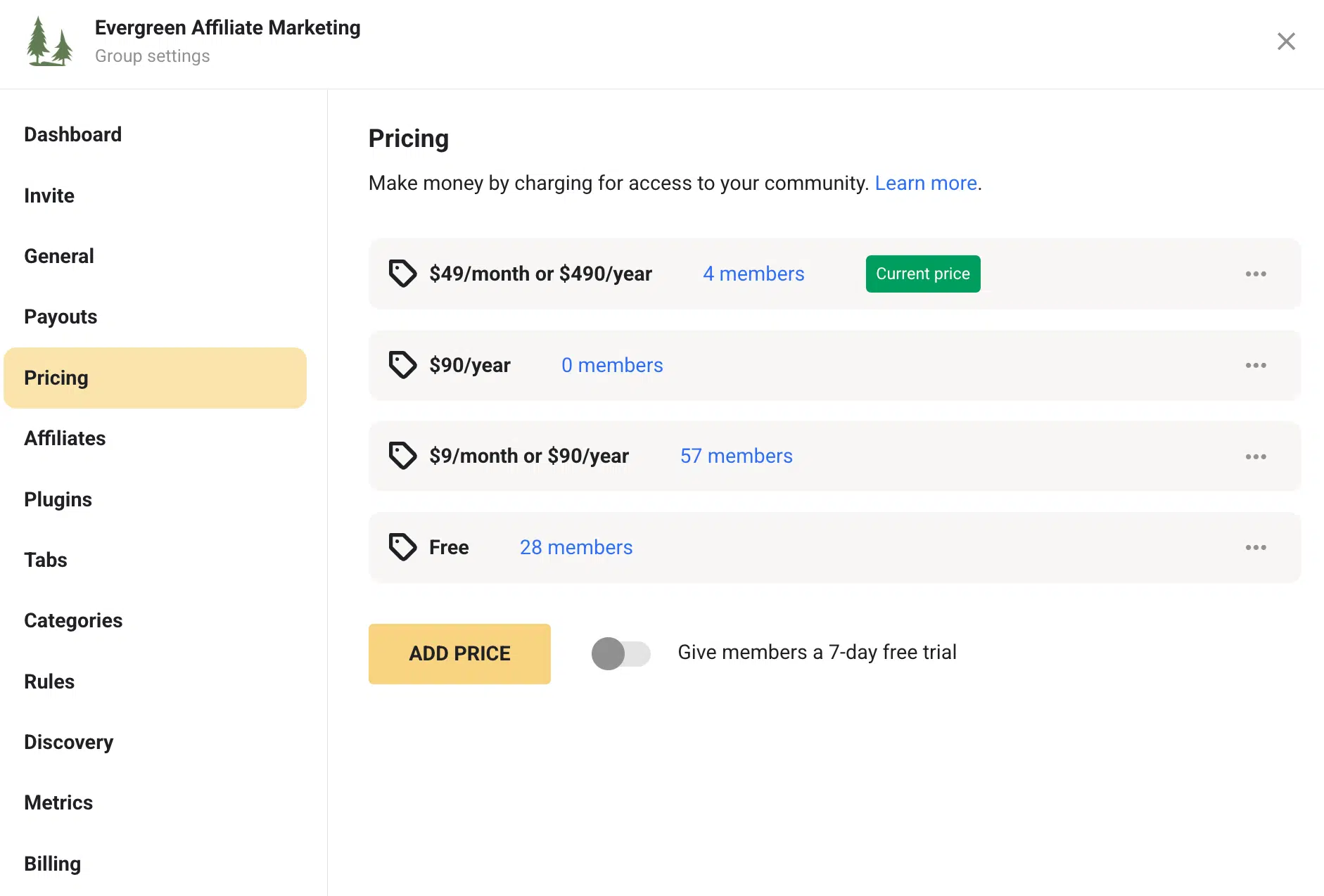
Skool Doesn't Allow for Different Pricing Tiers
Skool vs. Circle: Video Hosting
Both Now Host Video Natively
This used to be one of Circle's biggest wins. Skool now includes native video hosting on both plans, so you no longer need YouTube or Vimeo for your course videos.
Circle allows you to upload videos directly and host them without a 3rd party tool. If you prefer to use Vimeo or YouTube, you can still do that in Circle. Circle Professional includes 200GB of storage.

Skool requires 3rd parties
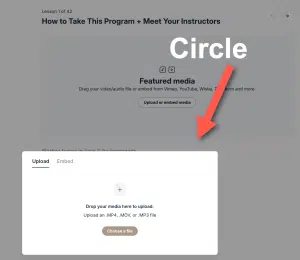
Circle has video hosting
Skool vs. Circle: Post Formatting
Circle Supports Rich Text Posts, Skool Has One Type of Text
It's not the biggest need, but it's frustrating that Skool doesn't allow you to format text in your posts.
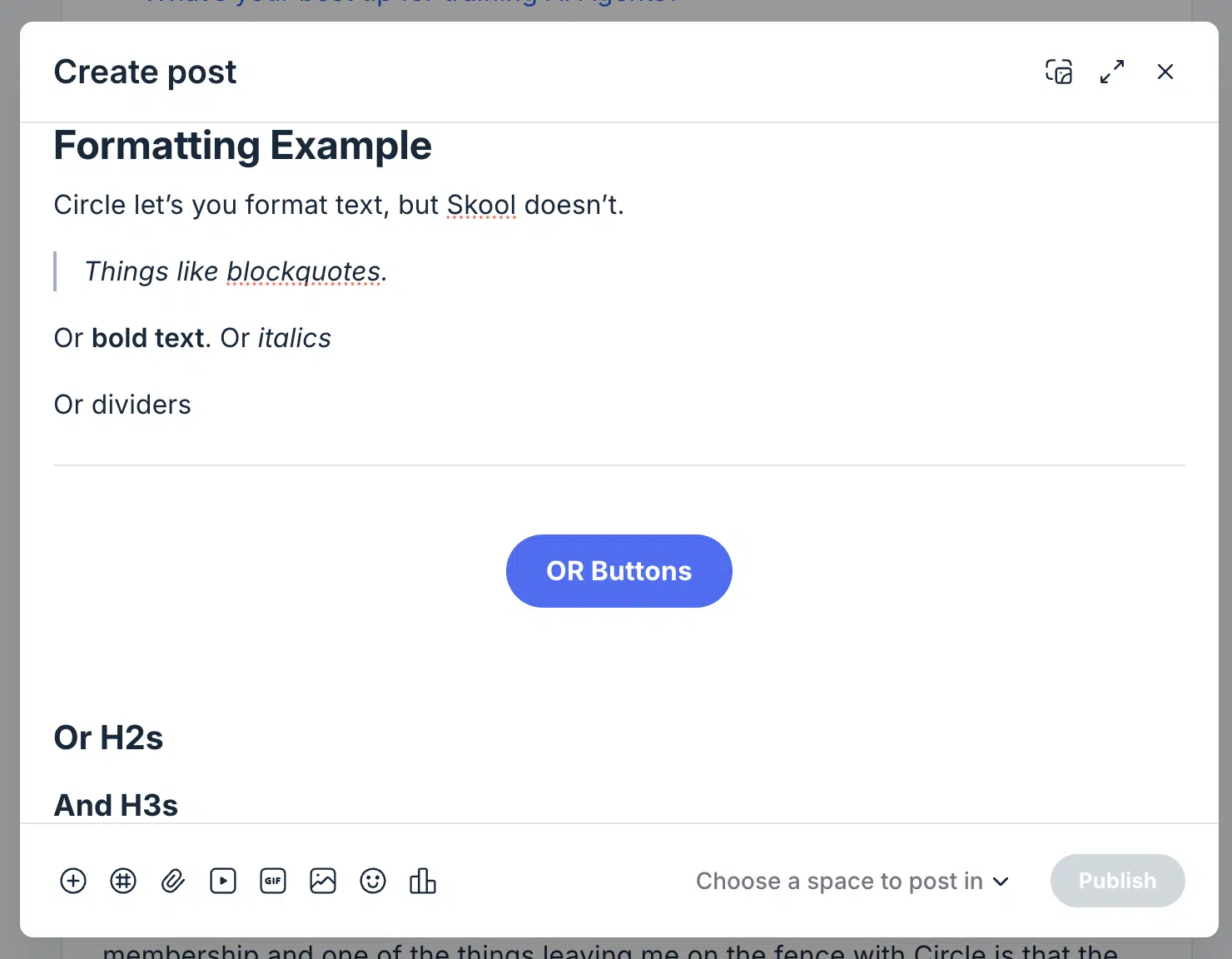
You can format inside of courses with more control, but not on regular posts.
Skool vs. Circle: Layout Options
Circle Has Multiple Layout Options, Skool Has One
Skool has one layout style and it is kind of lame.
Circle let's you choose from feed, list or card style layouts.
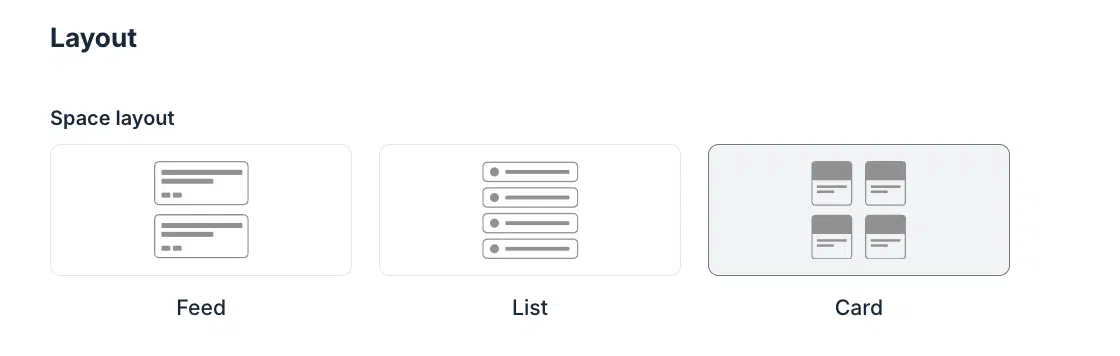
You can make beautiful photo style spaces in Circle that you could never make in Skool, like this one.
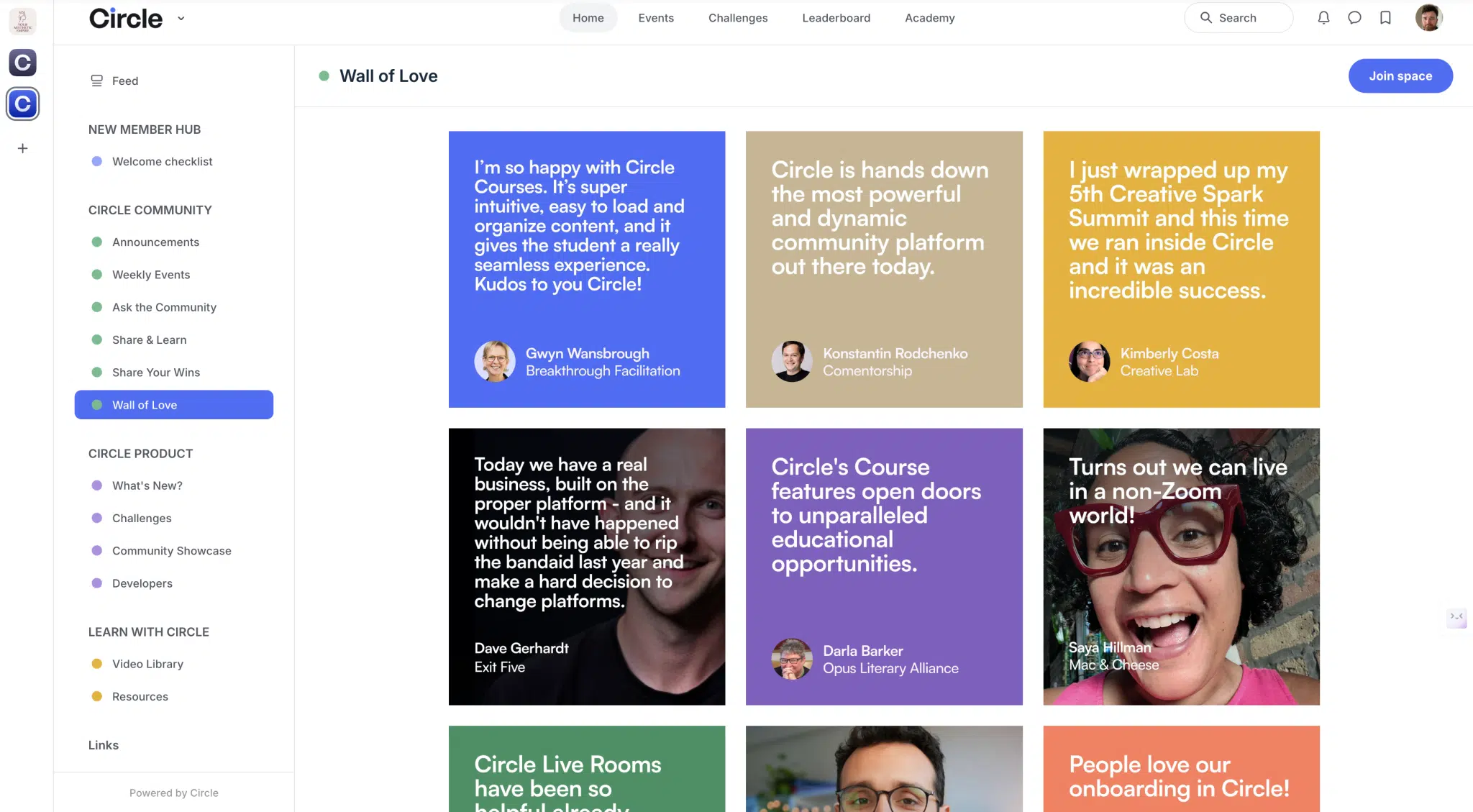
Example of a page design you could never make in Skool that you can make in Circle.
Skool vs. Circle: AI Features
Circle Has Powerful AI Tools, Skool Doesn't Have Any
Circle has integrated AI throughout their program, even on the basic tier. Every plan includes a monthly allowance of Circle AI credits (2,500 on Professional), and you can buy more at $10 per 1,000.
For instance, members can use Circle's built-in AI feature to summarize all of the latest content inside of your community.
Other things like instant video transcriptions and AI content writing are beyond impressive. On the Scale plan and up, Circle also offers AI agents and AI workflows.
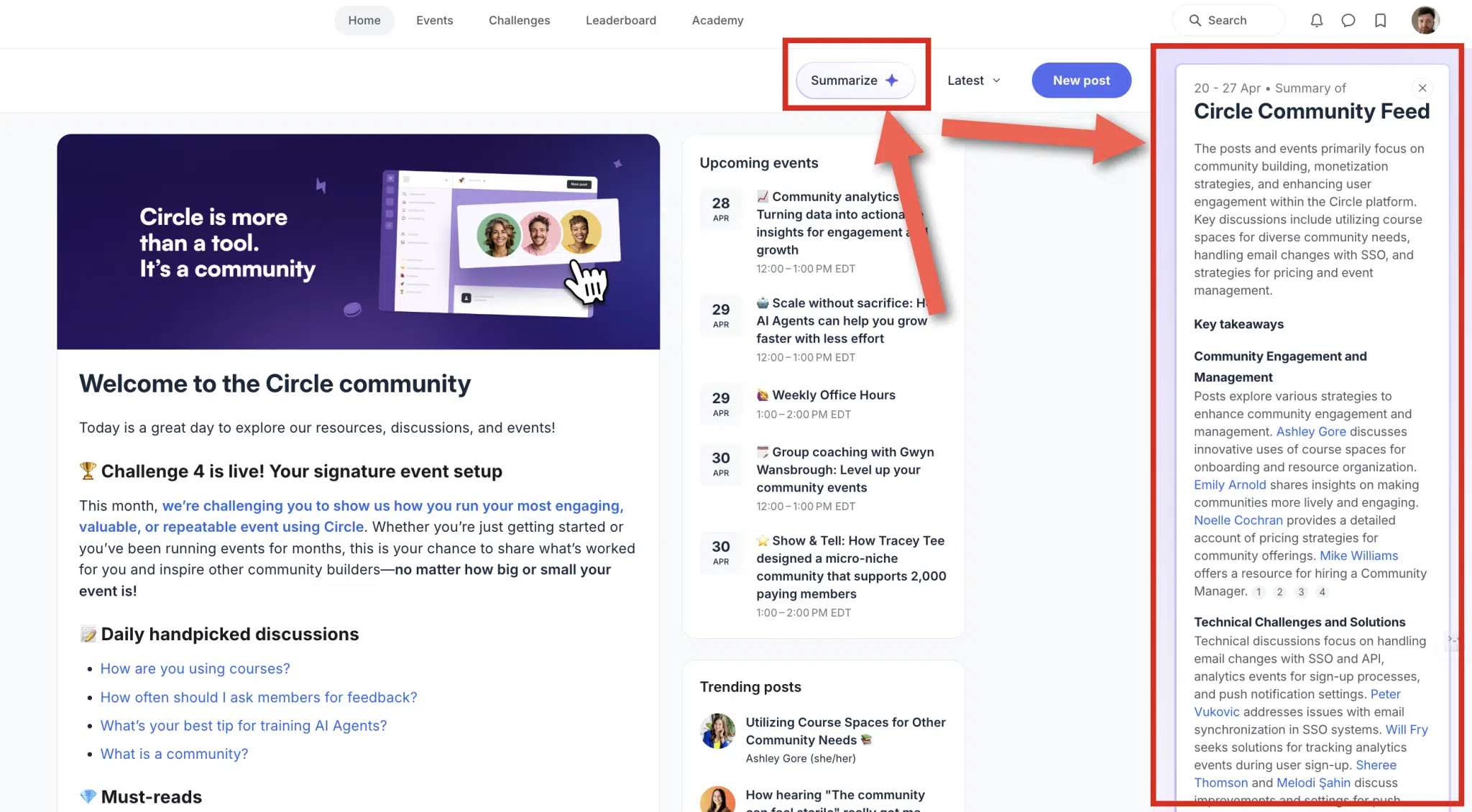
Other things like instant video transcriptions and AI content generators (a premium feature not on the basic plan) are beyond impressive.
Skool vs. Circle: Livestreaming
Both Now Have Built-In Live Streams
This used to be the biggest benefit of Circle over Skool. Skool has since launched Skool Calls, which lets you host live calls right inside your community. When you create an event, you can set the location to a Skool Call instead of pasting a Zoom link.
With Circle, you can host live streams, Q+As and coaching calls without taking your members off of Circle. On the Professional plan, live streams are capped at 100 attendees and 10 hours a month. Extra attendees cost $20/month per 100, and extra hours cost $50/month per 10.r

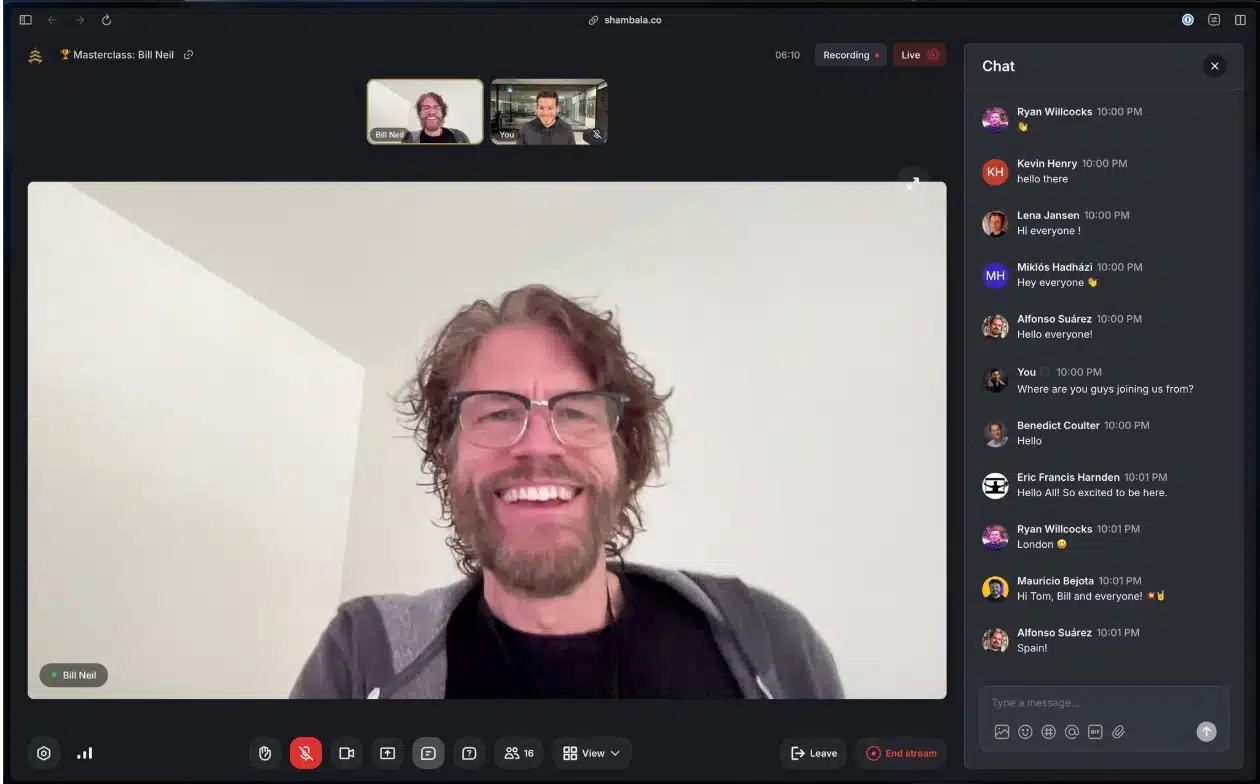
Events in Skool require a 3rd party solution like Streamyard connected to YouTube or Zoom to function.
Skool vs. Circle: Emails and Automations
Circle Offers Emails and Automations, Skool Lets You Send 1 Email Every 3 Days and Has Almost No Automations
Free for your first 100 contacts and then for an extremely low rate beyond that, Circle allows its users to manage their entire CRM and email marketing inside of Circle.
You can use their email software to do things like send email reminders when a webinar is about to start or send a specific message to a member once they've unlocked a new course area. Circle's workflow automations start on the Business plan.
You can send an email to all members inside of your Skool group once every 72 hours, but that is a far cry from full control and the ability to email whatever and whenever you'd like. The email you send also needs to be a post inside of your community, so it is not at all the same as a true email broadcast.
Skool vs. Circle: Messaging Members
Circle Lets You Direct Message All Members at Once, Skool Lets You Message One at a Time
Circle's Email Hub is an optional add-on that's charged on top of your community plan, and the first 30 days are free. It lets you manage your CRM and email marketing inside of Circle.
Circle lets you message all members at once, whereas Skool allows one on one messaging only.
Furthermore, you can segment your audience with Circle, so the direct messages you send can be even more powerful.
For instance, you can message everyone in your community that doesn't have access to your premium course area and offer them a limited time discount.
Skool vs. Circle: Course Comments and Engagement
Circle Lets Students Comment on Course Content, Skool Doesn't
Skool vs. Circle: Flexibility for Conversations
Circle Offers Spaces for Conversations, Skool Is Just One Thread
Skool is just one big conversation with no segmentation.
Currently, I have 4 paid communities that each have their own separate WhatsApp chat because we weren't using Circle when we launched.
This could have been done much more easily had we used Circle from the beginning.
Skool vs. Circle: Coupons, Promos and Discounts
Circles Lets You Use Coupons and Discounts, Skool Doesn't
Special offers are a marketing super power. Skool clips its users' wings by not allowing them. If you want to run a promo on Skool, you have to set up a separate price instead of handing out a code.
Skool vs. Circle: Branding Customization
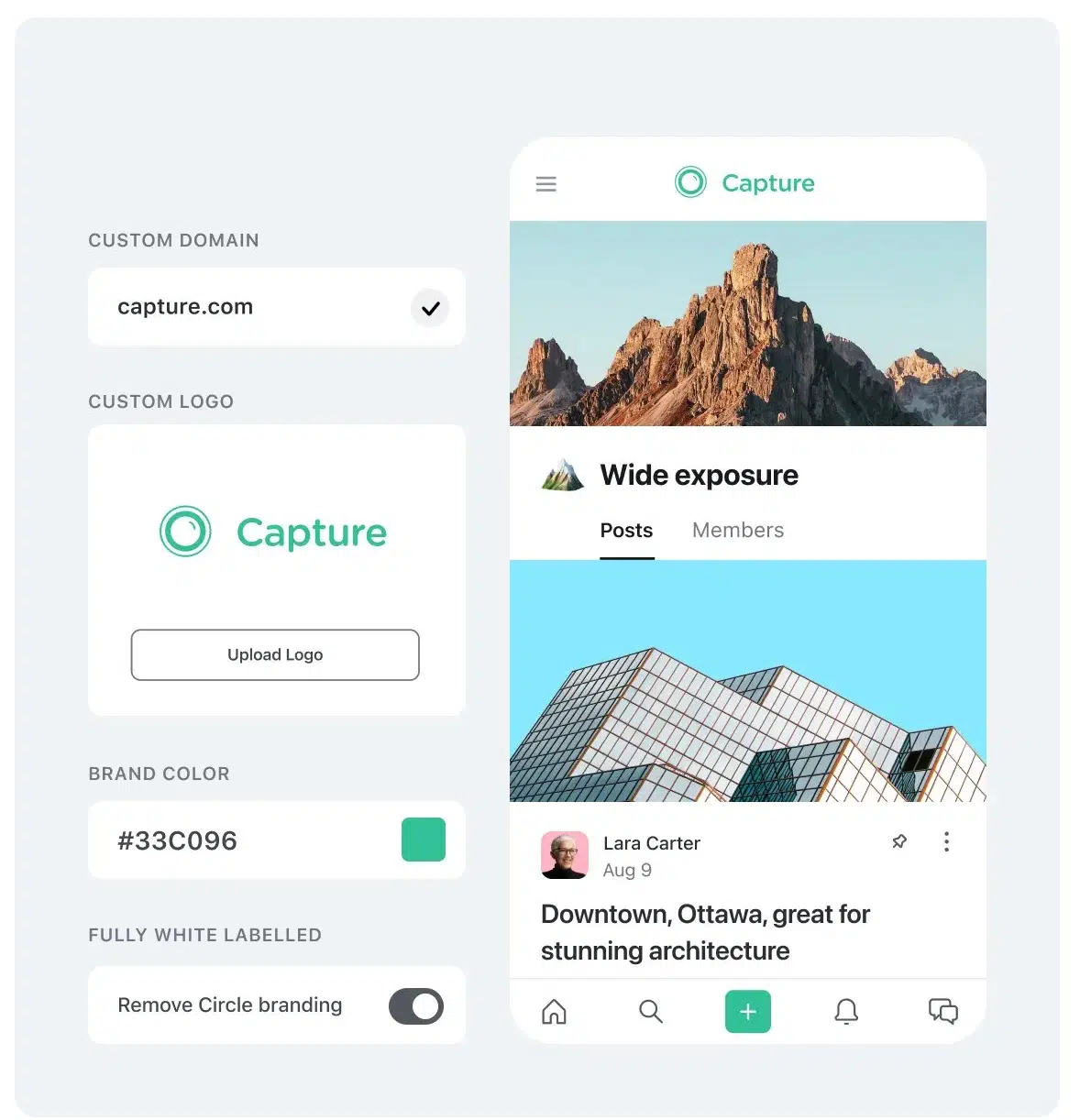
Circle Lets You Customize Your Branding, Skool Barely Does Any
Every Skool community looks nearly identical to every other community.
Here are my two communities for reference...
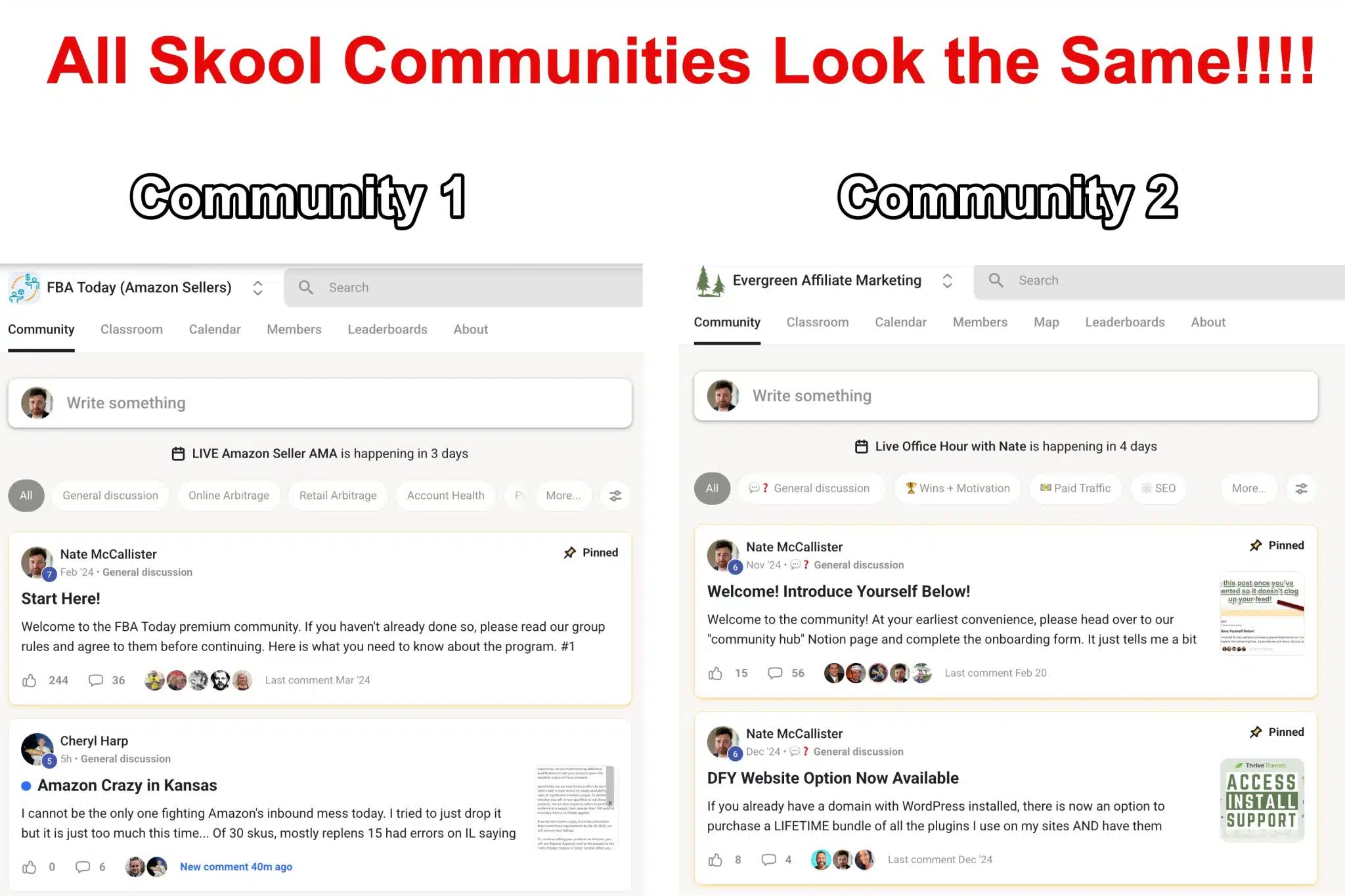
Circle, on the other hand, let's your community stand out with much deeper customization options.
Skool vs. Circle: Gamification
Circle Has Customizable Gamification, Skool Doesn't Let You Change It
Gamification is an amazing way to boost community engagement. More engagement means more of everything good.
- More success stories.
- More happy customers.
- More upsells.
- More affiliate sales.
Although both Circle and Skool offer gamification, Skool has a fixed formula for how much activity unlocks each tier.
This gets crazy because the highest tiers are nearly impossible to reach.
Circle lets you change how many "points" are required to level up.


Skool vs. Circle: Community Directory
Circle Has a Robust Member Directory, Skool Has a Basic One
Skool shows your members but the information provided is minimal.
Circle provides a beautiful directory of your members that is easy to navigate.
You can also add customized fields (however that is not available on the basic plan, it requires a $49/month add on or an upgrade to business or higher).
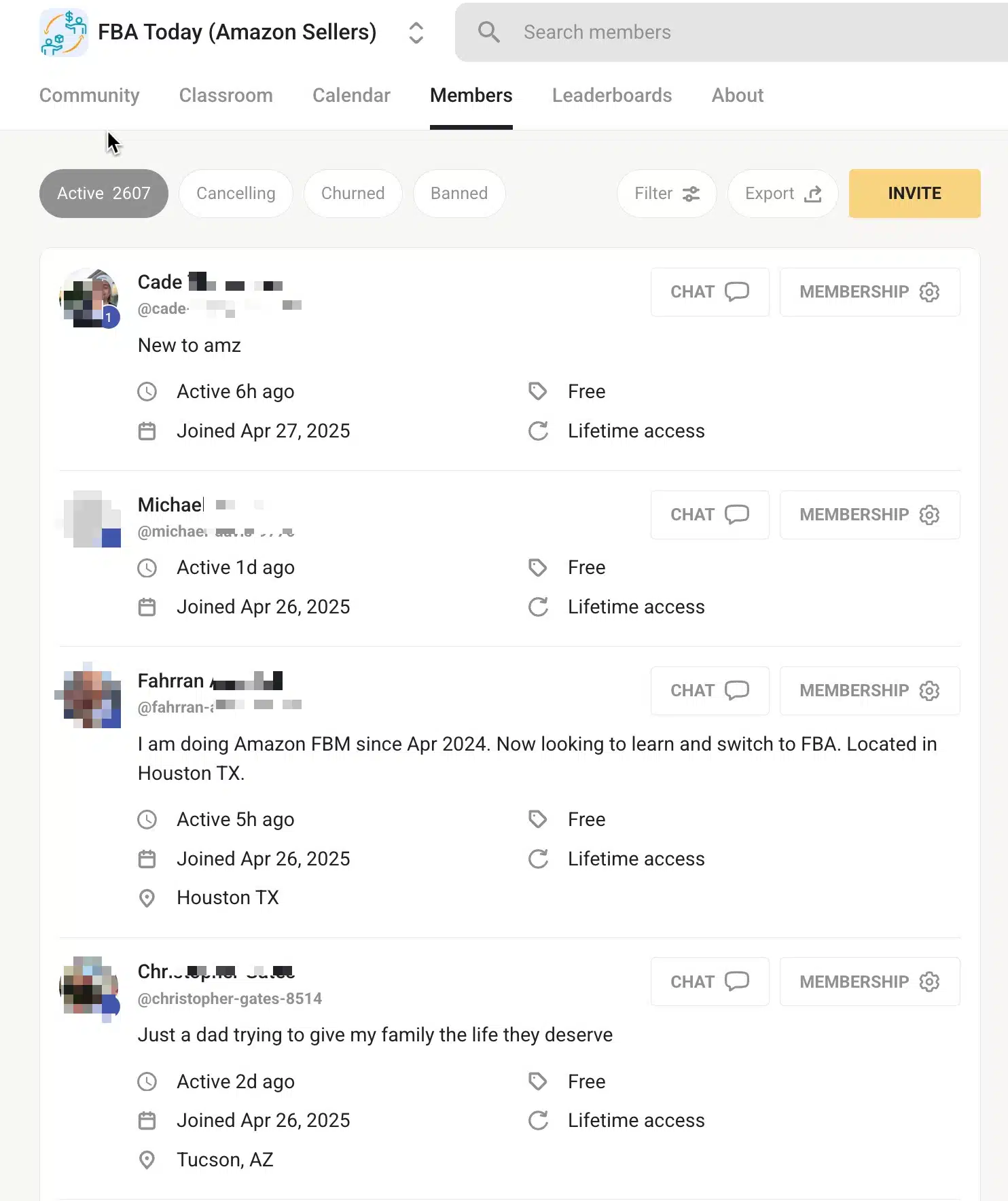
Skool member directory.

Circle member directory.
Skool vs. Circle: Transaction Fees
Here's what each platform takes from every sale, based on their current pricing pages.
| Plan | Monthly price | Platform fee | Stripe fee on top? |
|---|---|---|---|
| Skool Hobby | $9 | 10% | No, included |
| Skool Pro | $99 | 2.9% | No, included |
| Circle Professional | $89 (annual) | 2% | Yes |
| Circle Business | $199 (annual) | 1% | Yes |
| Circle Scale | $419 (annual) | 1% | Yes |
| Circle Plus | Custom | 0.5% | Yes |
Stripe's standard fee is 2.9% + $0.30 per transaction, so a $100 sale on Circle Professional costs you about $5.20 in total fees. On Skool Pro, the same sale costs about $3.20, since one review reports a $0.30 fixed fee on top of the 2.9%. On Skool Hobby, it costs $10.
The Four Ways Skool Is Better Than Circle
Skool is better than Circle in four ways.
- Their community discovery feature. Skool makes their communities publicly visible in a directory (although you do have the option to turn it off). How effective this is is up for debate, but there is no denying more free visibility is always better. The downside is that this leads to a massive influx of spam requests to free groups, but paid groups see no issues with this.
- Skool is less confusing. Part of Skool's value is in its minimalism. "Less is more," if you're just trying to get a group up and running as quickly as possible. However, Circle is only marginally more difficult to set up and the returns are worth it.
- Skool transaction fees are lower than Circle's on Skool's Pro plan. Circle Professional charges 2% plus Stripe fees on top. Skool Pro charges 2.9% with processing included, so Skool Pro comes out cheaper per sale. Circle's Business and Scale plans (1%) roughly match Skool Pro after Stripe fees.
- Skool is cheaper to start. The $9 Hobby plan is the cheapest way to launch a paid community on either platform. Just watch the 10% fee. Once you're making roughly $1,200 or more a month, the $99 Pro plan saves you money.
Video Version of This Post
I know some of you prefer video!
Other Alternatives to Skool and Circle
Have you come all this way and feel like you aren't satisfied with either?
Here are some Skool and Circle alternatives worth considering.
Best Circle Alternative: Thinkific.
Best Skool Alternative: Facebook groups (free) or Whop.
Here's a complete list of alternatives to check out.
Conclusion
Don't get me wrong, these are both fantastic software platforms, but Circle is still the clear winner for serious community and course builders.
Skool deserves credit for closing its two biggest gaps. Native video and Skool Calls mean you no longer need Vimeo or StreamYard to run a Skool community. The $9 Hobby plan also makes it the easiest way to test a paid community idea.
Circle still wins on custom domains, layouts, rich text, conversation spaces, group chats, coupons, email, branding, customizable gamification and AI.
If you want the simplest, cheapest way to start, go with Skool. If you want a professional, branded community you can grow into a real business, go with Circle.
If you are already a Skool member, Circle makes it easy to switch. Circle can help you transfer your content and members over to their platform. Payment migrations are free if you qualify, and course migrations are free on annual Business plans and above.
Both Circle and Skool offer a 14-day free trial, and Circle also has a 30-day money-back guarantee.