

You open Seller Central, hit the pricing page, and Amazon asks for one decision before you've listed a single product. Individual or Professional.
New sellers often treat that like a signup detail. It is an operating choice that affects your cost structure from day one. It changes how you list, whether you can run ads, how much flexibility you have with inventory, and how quickly small mistakes turn into expensive ones.
The simple version says the Professional plan starts to make sense at 40 units a month because of Amazon's per-item fee on the Individual plan. That rule is incomplete. In practice, your real break-even point depends on what you sell, whether you need advertising to get traction, how tight your margins are after FBA fees, and how much inventory risk you're taking on while you test a product.
I've seen sellers pick the cheaper plan to save money, then lose momentum because they needed tools the plan did not include. I've also seen sellers pay for Professional too early, add software and inventory before demand was proven, and turn a small product test into a monthly burn.
There's a second point that trips people up. Seller plan choice is not the same as choosing between Amazon's seller and wholesale models. If you still need to sort out that bigger platform decision, review the difference between Amazon Seller Central and Amazon Vendor Central first.
If you already know you're selling on the marketplace as a third-party seller, the question is straightforward. Which plan fits the business you can run profitably now, not the one you hope to have later?
Choosing Your Amazon Launchpad
A new seller usually hits this decision with a small budget and too many moving parts. You might have ten used books to flip, a wholesale account you want to test, or one private-label product that still has not proven demand. The seller plan you choose sets the cost structure for that test.
The practical question is simple. Do you need the lowest possible monthly overhead, or do you need access to the tools that make an Amazon launch easier to manage?
Amazon gives you room to start small, and that matters because many sellers begin with a narrow catalog and uncertain demand. Some are testing one SKU. Some are clearing local inventory. Some are building a brand and already know ads, bulk listing, and reporting will be part of the job from day one.
I tell new sellers to match the plan to the business they can run profitably right now. Hope is expensive on Amazon. If margins are thin after referral fees, FBA fees, prep costs, and returns, saving on a monthly subscription can be the right move. If the product needs PPC to get traction, or you are managing multiple listings, the cheaper plan can cost more than it saves because it limits how you operate.
That is where a lot of new sellers get tripped up by the old 40-units-a-month rule. The math on subscription fees matters, but it is not the whole decision. Your real break-even point depends on whether advertising is required, how much cash is tied up in inventory, and how much risk you are carrying if the first launch underperforms.
I have seen both mistakes. Sellers stay on Individual to avoid fixed costs, then realize too late they need Professional tools to run the business they began. I have also seen sellers pay for Professional, buy inventory, turn on software, and create a monthly burn before the product earns its place.
One more point. Seller plan choice is separate from the bigger question of whether you are selling as a third-party marketplace seller or working through Amazon's wholesale channel. If you still need to sort that out, read our guide on the difference between Amazon Seller Central and Amazon Vendor Central.
Choose the plan that fits your current test, your margin, and your tolerance for risk. That is your real launchpad.
The Core Difference Individual vs Professional
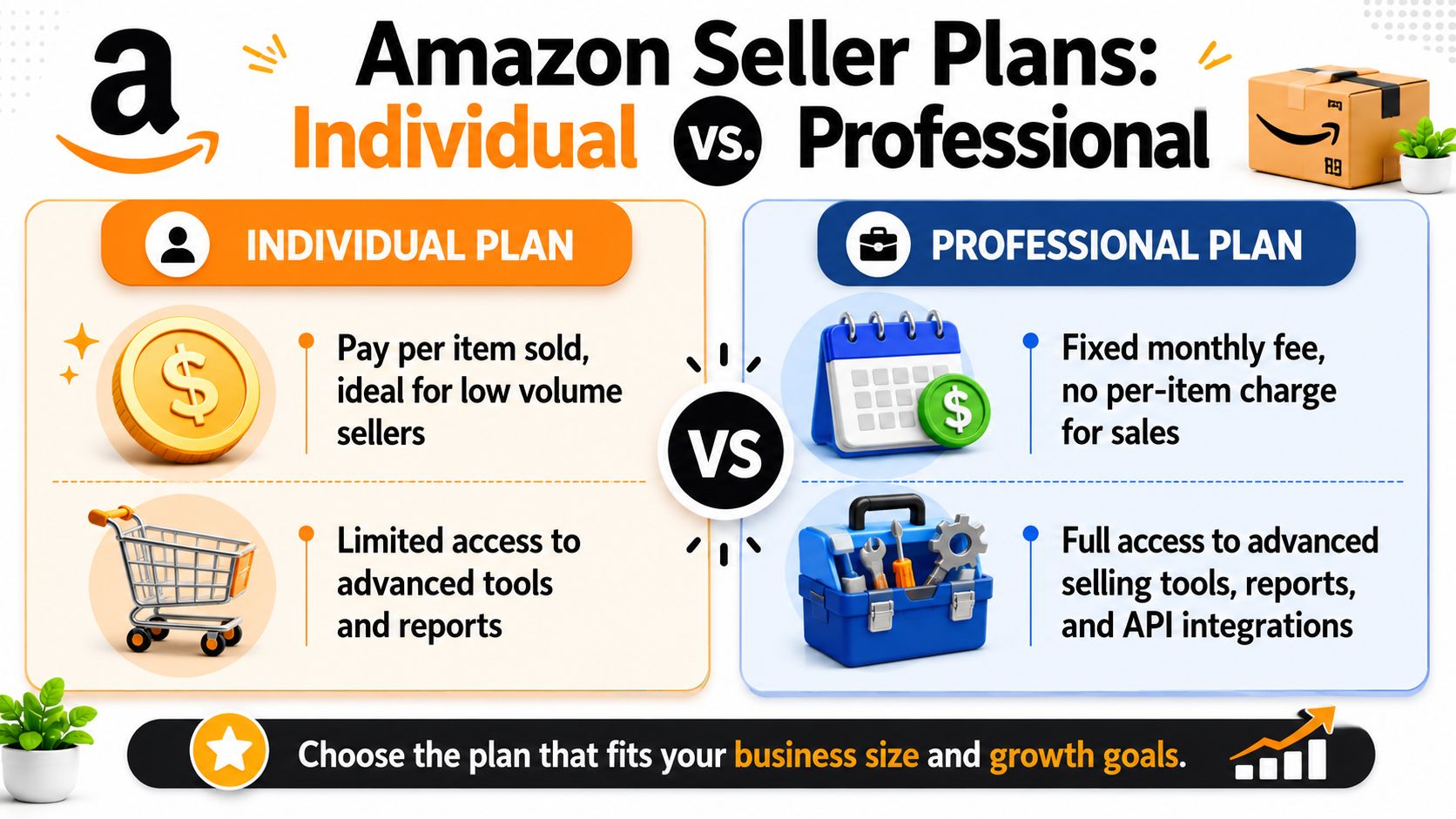
A new seller usually sees this choice as simple math. Pay per item on Individual, or pay one monthly fee on Professional. That is the surface-level difference, and it matters.
| Plan | Core cost structure | Best fit |
|---|---|---|
| Individual | $0.99 per item sold | Lower volume sellers testing demand or selling occasionally |
| Professional | $39.99 monthly subscription | Sellers who need selling tools, advertising access, or steadier volume |
That baseline matches Amazon's standard plan structure, as summarized in Seller Assistant's breakdown of the Individual vs Professional plans.
The quick math
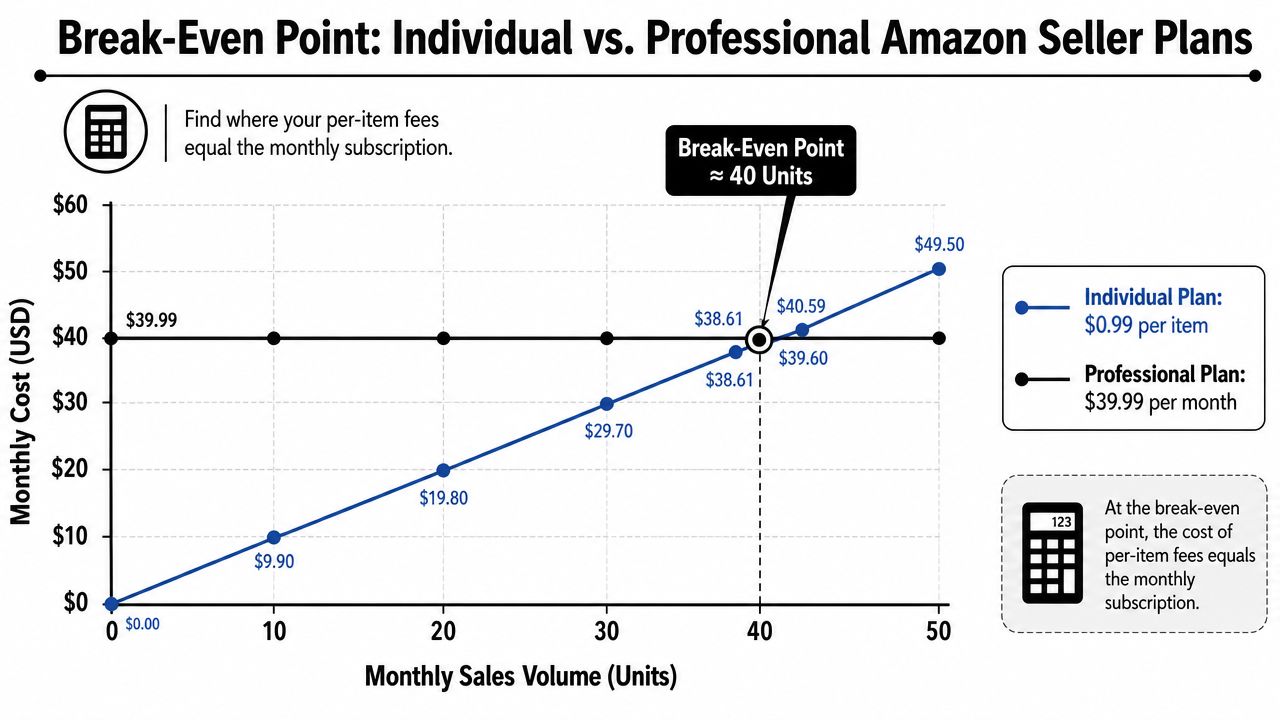
On pure subscription cost, the old rule is easy to understand. Around 40 units a month, the flat Professional fee starts to look cheaper than paying $0.99 per sale on the Individual plan.
That math is real. It is also incomplete.
The better way to frame the difference is operational. Individual is a lighter, lower-commitment plan for testing and occasional selling. Professional is the plan built for sellers who need the business to run with fewer restrictions. If you expect to advertise, build out listings, or manage a catalog instead of a few casual sales, the decision changes before the unit count does.
Why the 40-Unit Rule is Incomplete
I have seen new sellers get this wrong in both directions.
One seller stays on Individual because the monthly fee feels unnecessary, then runs into limits the moment the product needs PPC or tighter listing control. Another upgrades to Professional on day one, adds software, sends inventory to FBA, and creates fixed monthly costs before the product has proven demand.
The primary distinction is not just how Amazon charges you. It is how you plan to operate.
A low-volume reseller with strong margins may do fine on Individual for longer than expected. A private label seller with one product often needs Professional earlier because launch strategy usually includes ads, brand-building work, and active listing management. A seasonal seller may cross the fee break-even line in one month and fall back under it the next, which makes cash flow and inventory exposure more important than the headline subscription math.
Before picking a plan, run the product through an Amazon FBA calculator for fee and margin estimates. That gives a more useful starting point than unit count alone, especially if FBA fees and ad spend will eat into profit from the first sale.
Calculating Your True Break-Even Point
The 40-units-per-month rule is frequently memorized and treated like law. It isn't. It's just the cleanest possible math.
The more useful question is this: At what point does the Professional plan improve actual profit, not just fee efficiency?
The hidden variables that change the answer
A seller's true break-even point shifts because the plan fee sits inside a much bigger cost stack. As noted in Sellerboard's discussion of the Professional plan break-even problem, Amazon seller costs often include referral fees, FBA fees, storage, labeling, and returns, and those costs can materially change the actual threshold, especially on lower-margin or seasonal products.
That's why I don't like asking, “How many units do you sell?”
I ask:
- What's your profit per unit before plan cost?
- Do you need ads to generate velocity?
- Will inventory sit and rack up storage cost?
- Are you testing demand, or are you scaling a proven offer?
If your margins are tight, a flat monthly fee feels bigger because every cost line matters. If your margins are strong and Professional provides better visibility or smoother operations, the subscription can be justified before the pure fee math says so.
A practical way to model it
Use a simple decision sequence instead of chasing a perfect spreadsheet:
Estimate contribution margin per unit
Start with your selling price, then subtract referral fees, fulfillment costs if you'll use FBA, prep or labeling, expected returns, and any shipping-related cost. If you need help estimating fulfillment costs, use an Amazon FBA calculator.Decide whether ads are optional or required
If the product probably needs Sponsored Products to get traction, then the Individual plan has a built-in limitation. You're not just comparing fees anymore. You're comparing visibility.Factor in inventory risk
Slow-turning products change the economics. If a product sits, storage and aging inventory pressure can overwhelm the tiny savings you thought you were protecting.Count operational friction
Listing one product manually is fine. Listing a growing catalog manually is where cheap becomes expensive.
Practical rule: model the plan decision on profit per unit and operating requirements, not just monthly sales count.
When the 40-unit rule fails
It fails in two common situations.
First, when a seller has one low-risk test product and doesn't need ads yet. In that case, Individual can make sense even if they're close to the threshold, because preserving flexibility matters more than feature access.
Second, when a seller has a product that clearly needs launch support. If ads, bulk changes, or better reporting are important from the start, Professional can be the smarter move before the pure subscription math says it is.
The right plan isn't the one with the cleaner fee line. It's the one that gives the product the best chance to make money.
A Detailed Feature and Tool Comparison
A new seller usually looks at the plan fee first. Day to day, the bigger difference is operational control.
The Individual plan works for simple manual selling. The Professional plan gives you the tools to run a catalog like a business instead of a side test. That distinction matters fast once you have multiple SKUs, replenishment cycles, returns to monitor, or listing changes to push across products.
Amazon Seller Plan Feature Comparison
| Feature | Individual Plan | Professional Plan |
|---|---|---|
| Selling fee model | $0.99 per item sold | $39.99 monthly subscription |
| Listing workflow | Manual, one listing at a time | Bulk uploads and batch edits |
| Inventory management | Basic manual updates | Inventory files, reports, and feed-based workflows |
| Order data access | Limited visibility | Order reports and deeper operational reporting |
| Shipping setup | Standard options | Customized shipping settings |
| Marketplace reach | More limited setup | Access to broader multi-marketplace selling options |
| Best operating style | Low-volume testing, narrow catalog | Repeatable operations, larger catalog, team workflows |
What these features actually change
Listing and catalog management
If you are testing one product, manual listing flow is tolerable.
If you are managing five, ten, or fifty active SKUs, manual work becomes a tax on margin. Every price update, title fix, variation issue, or stock adjustment takes longer than it should. I have seen sellers save money on the monthly subscription, then give it right back in sloppy listing edits, missed updates, and time spent fixing preventable mistakes.
Professional makes batch work possible. That matters more than many beginners expect.
Inventory control
Inventory mistakes are expensive because they create second-order problems. A bad stock count can trigger stockouts, stranded inventory, late shipments, or unnecessary reorders. Those are not software problems. They are profit problems.
The Professional plan gives you better inventory files and reporting structure to catch issues earlier. That does not eliminate inventory risk, but it gives you a cleaner operating system for handling it.
Order and business reporting
Reporting matters more once something goes wrong.
If return rate climbs, fulfillment costs drift up, or one ASIN starts underperforming, basic account visibility is rarely enough to diagnose the issue quickly. Professional gives sellers more reporting depth, which helps you spot where margin is slipping. For a seller running ads, FBA, and multiple reorder decisions at once, that added visibility often pays for itself by shortening the time between problem and fix.
Shipping flexibility
Custom shipping settings matter most for merchant-fulfilled sellers, oversized products, bundles, and products with unusual economics. If shipping cost is a meaningful part of your margin, standard settings can box you into bad choices.
That may not matter on day one. It matters once you start dialing in contribution margin by SKU.
Tool access changes the quality of your decisions
This is also the point where your software stack starts to matter. Sellers comparing Amazon seller tools and FBA tools usually do it for research, keyword tracking, inventory planning, and listing management. Sellers also use outside systems for analytics, workflow automation, and content production, including some of the best AI tools for e-commerce.
Those tools are useful, but they work better when the seller account itself supports cleaner operations. If the account is still built around manual updates and limited reporting, software can only compensate so much.
When the Professional plan earns its keep
I would not upgrade just because a feature list looks better on paper. I would upgrade when the workflow tells you it is time.
Common signs include:
- Repeating the same listing or inventory tasks every week
- Managing enough SKUs that one-by-one edits are slowing you down
- Needing better order or inventory reporting to find margin leaks
- Running a catalog that needs cleaner shipping rules or more structured operations
- Preparing for a larger tool stack or more consistent replenishment
The mistake is waiting until the account becomes chaotic. By then, the actual cost is not the subscription. It is the time lost, the inventory errors, and the bad decisions made with weak visibility.
Strategic Implications Most Sellers Overlook
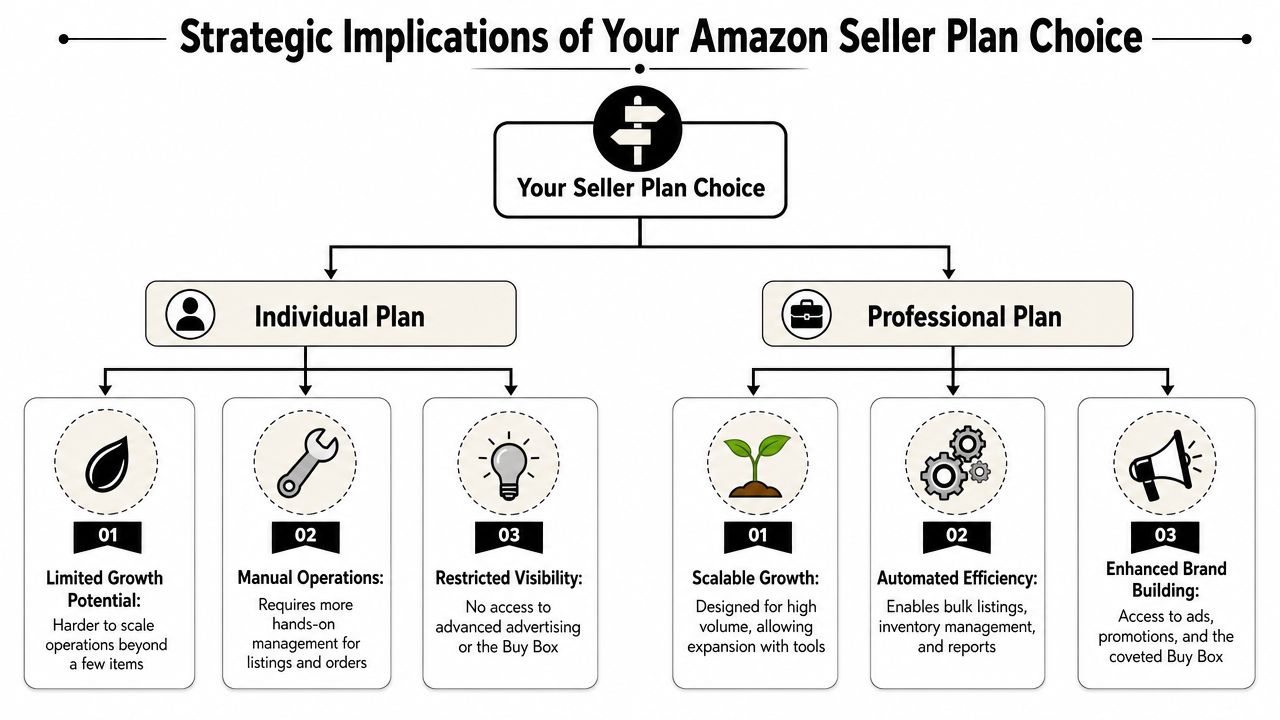
A lot of sellers think plan choice is about affordability. It's really about how much optionality you want to preserve.
That's why the best plan isn't always the cheapest one this month. It's the one that matches the risk profile of the products you're selling and the way you intend to gain traction.
When staying lean is smart
There's a contrarian point here that deserves more attention. As noted in Analyzer's discussion of unserved demand and niche validation on Amazon, some sellers are better off staying on the Individual plan longer while they validate niche demand, especially when they're testing uncertain categories or long-tail products.
That makes sense.
If demand is unproven, the smartest move may be to minimize fixed cost, list carefully, watch conversion signals, and avoid building a heavy workflow around products that haven't earned it yet. That approach works especially well when you're validating a narrow niche or seasonal item that could tie up inventory longer than expected.
When upgrading earlier is the smarter move
The opposite is also true. Some sellers should move to Professional earlier than the fee math suggests.
That usually happens when three things line up:
- The market gap looks real
- Execution speed matters
- Visibility tools are part of the launch plan
If you've identified a strong opportunity and need bulk listing, ads, and stronger inventory controls to exploit it, waiting for the unit threshold can be penny-wise and dollar-foolish.
I see this most often with private label and focused brand launches. The issue isn't whether the monthly fee is technically justified by unit volume yet. The issue is whether the product has a fair chance without the operating tools that support launch velocity and control.
A cautious seller protects cash. A strategic seller also protects momentum.
The ad and workflow angle
Many new sellers underestimate the gap. Some products can coast on existing demand. Others need visibility. If you're in the second group, plan choice affects discoverability, not just bookkeeping.
And once your workflow expands beyond one-person manual management, your software stack starts mattering more. Sellers who are building systems often end up exploring resources like these best AI tools for e-commerce because listing optimization, forecasting, and operational automation become part of the game. That's another clue that you're drifting away from the Individual-plan mindset and toward a more scalable setup.
The overlooked point is simple. Amazon seller plans aren't just fee packages. They're operating models.
Which Amazon Seller Plan Is Right for You
The fastest way to decide is to stop thinking in the abstract and put yourself into a real seller profile.

The hobbyist
This is the seller cleaning out shelves, listing used media, flipping a few collectibles, or selling occasional handmade inventory.
Recommendation: start with Individual.
The reason is simple. Your operation is light, your sales pace may be inconsistent, and paying only when something sells keeps the risk low. You probably don't need bulk workflows, custom shipping setups, or a larger reporting stack.
What doesn't work for this seller is upgrading too early because it “feels more serious.” Seriousness doesn't create profit. Fit does.
The side hustler testing a product idea
This seller usually has one product or a very small product set and is trying to answer the primary question. Is there demand here, or am I forcing it?
Recommendation: usually start with Individual, unless your test depends on advertising and repeated listing control from the start.
Nuance is important to consider. If you're validating a niche and trying to avoid fixed overhead while you learn, Individual is often the right call. If your test needs a more aggressive launch approach, then Professional can make sense earlier.
Here's a good walkthrough if you want another perspective before deciding:
The arbitrage seller
This seller is sourcing from retail, online deals, or wholesale-style replenishment and cares about repeatability.
Recommendation: go straight to Professional.
Arbitrage gets messy fast if you're trying to run it through a stripped-down workflow. Even if you're near the subscription threshold, the operational side usually makes the decision for you. Multi-SKU handling, regular replenishment, and faster listing workflows all point toward Professional.
The brand builder
This seller is launching a product line, building a real catalog, or treating Amazon like a business unit instead of a casual sales channel.
Recommendation: go straight to Professional.
If you're building a brand, you need the operating environment that supports growth. Trying to save on the monthly fee while limiting the tools around inventory, listing management, and launch support usually backfires.
A simple decision filter
If you want the short version, use this:
- Choose Individual if you're testing demand, selling casually, or keeping risk low while you validate products.
- Choose Professional if you already know you need scale tools, a structured workflow, or a more serious growth motion.
- Reassess quickly if your product mix, listing count, or operational demands change.
One practical resource in this stage is EntreResource itself, which publishes comparisons and tool guides for Amazon sellers who are choosing between account setups, software, and growth workflows. That's useful once you move from “Can I sell this?” to “How do I run this cleanly?”
How to Change Your Amazon Seller Plan
The good news is that this decision isn't permanent. If you pick the wrong plan for your current stage, you can change it inside Seller Central.
Use this process:
Log in to Seller Central
Open your account dashboard.Go to Account Info
Click the gear icon in the top-right area, then choose Account Info.Open your services area
Find Manage Your Services, then select Selling on Amazon.Choose the plan you want
Select Professional or Individual, depending on the direction you're moving.Apply the change
Confirm and save.
Amazon's own seller guidance says that when you switch to Professional, the subscription begins immediately and some billing features can take time to activate, while some services may prevent downgrading until you disenroll from them, according to Amazon's explanation of how to switch selling plans.
Two practical notes matter here.
- Upgrading is easier than most sellers expect. If your workflow is growing, don't hesitate just because you think the switch is complicated.
- Downgrading may require cleanup. If you're using services tied to Professional, check those first before trying to move back.
Frequently Asked Questions
Can I sell internationally on the Individual plan?
If cross-border selling is part of your plan, start by checking the exact marketplace tools and account settings tied to each country. In practice, sellers who expect to expand beyond a simple domestic test usually end up on Professional because the account is built for a more operational setup.
I would not make this decision based only on where you want to sell. Make it based on whether you also need ads, tighter catalog control, and a repeatable process across marketplaces.
Do I still pay referral fees on the Professional plan?
Yes.
The monthly subscription does not replace referral fees, FBA fees, storage charges, return costs, prep, labeling, or ad spend. That is why the simple 40-unit rule is incomplete. A seller can cross that unit count and still have a weak business if margins are thin and advertising is doing all the work.
Is the Professional plan always worth it once I cross the basic threshold?
No. The better question is whether the plan helps you protect margin and operate more efficiently.
Here's a common example. A seller moves past the rough break-even point on paper, upgrades, then realizes their true profit is getting squeezed by PPC and slow-moving inventory. Another seller upgrades earlier, uses the tools they need, and gets cleaner listing management and better launch execution. The same plan can be a smart move for one seller and a waste for another.
What happens to my listings if I switch plans?
Your listings usually stay in place when you switch plans, as noted earlier. What changes is your access to plan-specific tools, features, and workflows.
The practical issue is not listing loss. It is whether your current setup depends on features tied to Professional.
Should new sellers start with Individual just to be safe?
Start with Individual if you are testing demand, listing a small number of products, or trying to keep fixed costs low while you learn. That approach makes sense for clearance inventory, side-hustle experiments, or a first product with uncertain demand.
Start with Professional if you already know you will need advertising, serious catalog control, or a faster launch process. I've seen sellers waste more money delaying the upgrade than they would have spent on the monthly fee.
What's the biggest mistake people make with Amazon seller plans?
They treat the plan decision like a subscription choice instead of a business model choice.
A significant mistake is ignoring hidden costs. If your product needs FBA to stay competitive, ads to get visibility, and larger inventory buys to avoid stockouts, your true break-even point is higher than the basic plan comparison suggests. That is the question to answer before you choose.