

Checkout optimization is the work of removing whatever stops a motivated buyer from finishing a purchase: extra fields, surprise costs, forced accounts, confusing errors and missing payment options. Start by finding where people leave. Then fix the specific friction there, one change at a time, and measure the result. A prettier page or a one-page layout is rarely the answer on its own.
If you run a store, sell digital products or send affiliate traffic to someone else’s checkout, this guide is for you. It covers what to diagnose first, the fixes with the best evidence behind them, and how to test without fooling yourself.
TL;DR
- Most carts never convert. The average abandonment rate across 50 studies sits around 70%, so even small checkout gains matter.
- Baymard’s research points to usability failures, not lack of intent, as a common cause. Diagnose the exact friction before redesigning.
- The highest-value fixes are boring: guest checkout, fewer fields, full costs shown early, working autofill, recoverable errors and the right payment methods.
- Treat published lift figures as opportunity estimates, not promises. Test every change on your own traffic.
Table of Contents
- Cart abandonment vs. checkout abandonment
- Diagnose before you redesign
- 12 checkout fixes, in the order we would tackle them
- A simple order of operations
- Worked example: reading a funnel
- Checkout optimization for creators and affiliates
- Our perspective
- Want the full playbook for selling online?
- How to measure whether it worked
- FAQ
- Sources
Cart abandonment vs. checkout abandonment
People use these terms interchangeably, but they measure different moments, and mixing them up leads to fixing the wrong page.
| Cart abandonment | Checkout abandonment | |
|---|---|---|
| Where it happens | Anywhere after a shopper adds an item, including browsing and comparing | After the shopper starts the checkout flow |
| Typical intent | Often low: saving for later, price checking, curiosity | Usually high: they decided to buy |
| Main causes | Price, comparison shopping, no urgency | Forms, account walls, cost surprises, payment failures, errors |
| Who fixes it | Merchandising, pricing, email reminders | Checkout design, payments, performance |
The distinction matters because a shopper who reaches your payment form has already said yes in their head. When they leave, you usually lost them to friction, not to indecision. That is why checkout fixes tend to be the most direct revenue lever you have. If your problem is earlier, in the cart, our piece on pricing psychology and which levers to test before repricing is a better place to start.
Diagnose before you redesign
Baymard Institute has been studying why orders are abandoned for years. Its checkout usability research estimates that the average large ecommerce site has 32 distinct checkout improvements available, and that fixing checkout UX issues could lift conversion by 35.26%. Treat that as the size of the opportunity, not a guarantee for your store. The same research reports that 65% of sites deliver mediocre or worse checkout usability and only 2% are rated good.
The practical lesson is to find your specific problem. Before touching design, pull these numbers:
- Step-by-step funnel. Cart, shipping, payment, confirmation. Where is the biggest percentage drop?
- Device split. Mobile and desktop funnels often differ sharply. A fine desktop checkout can hide a broken mobile one.
- Payment failures. How many card attempts are declined or error out, and which methods?
- Form errors. Which fields trigger the most validation errors or abandonment? Session recordings and form analytics show this.
- Page speed on the payment step. Slow loads and layout shifts kill trust right where it matters.
- Customer feedback. Read support tickets and exit-survey answers. People tell you what annoyed them.
Write down your current checkout conversion rate before changing anything. Without a baseline, every improvement is a story, not a result.
12 checkout fixes, in the order we would tackle them
1. Make guest checkout the obvious path
Forcing an account is one of the oldest conversion killers. Baymard’s 2025 checkout UX benchmark found that 62% of sites did not make guest checkout the most prominent option. Offer guest checkout first, then invite buyers to create an account after the order, using the details they already typed.
2. Cut fields to what you truly need
Every field is a small tax on effort. Ask what you need to fulfill the order and nothing more. If you sell a digital product, you probably do not need a shipping address at all. Payment providers such as Stripe recommend reducing unnecessary steps and fields, using smart defaults, and letting buyers reuse shipping details as billing details with one click.
If you ask for a phone number, say why. Baymard found that 49% of sites did not explain why a phone number was required. A short note such as “Only used for delivery updates” removes the doubt.
3. Show the full price early
Cost surprises at the last step feel like a bait and switch. Show shipping and tax estimates as early as you can, and make the total visible throughout. If you advertise through Google Shopping, this is also a rule: Google Merchant Center’s checkout requirements say the price at checkout must not increase relative to the product data and product page, additional non-government fees must be disclosed clearly, shipping costs must be accurate, and currency must stay consistent from product page to cart to checkout. Promotions may lower the price after an item is added to the cart, but nothing may raise it.
This is also where a lot of small sellers slip. A flat fee added in the final step, or a currency switch between the product page and payment, reads as a trust problem even if it is innocent.

4. Fix autofill so typing is optional
On a phone, every keystroke costs you buyers. The web.dev guidance on payment and address forms recommends semantic input types and autocomplete attributes for names, addresses, phone numbers and card fields, and a single card-number input where possible. It also notes that stable name and id values help browsers recognize your fields across site updates. If a developer rebuilds your form and renames those fields, autofill can quietly break and conversion can drop with no visible cause. Add autofill to your post-release checklist.
5. Validate as people type, and never wipe their data
Web.dev’s guidance treats the payment form as the most critical part of checkout, because small input and validation glitches can stop a purchase, especially on mobile. Validate during entry and on submission. When there is an error, say what is wrong and how to fix it, and keep everything the buyer already entered.
Baymard’s benchmark found that 94% of sites did not provide adaptive validation messages, meaning messages that respond to the specific mistake. Compare “Invalid input” with “Card number is missing 2 digits.” The second one gets the sale.
6. Offer the payment methods your buyers expect
Cards alone are no longer enough for many shoppers. Digital wallets, saved cards for returning customers, and local or bank-based methods all reduce effort at the final step. Stripe’s guidance lists relevant cards, wallets, bank and local methods as a core lever, along with saved payment details for returning buyers. For a practical walkthrough of enabling card, Apple Pay and Google Pay payments, this guide (in Slovenian) shows how those options fit into an invoicing setup.
More logos is not the goal. Pick the methods your audience actually uses, and test each one on mobile.
7. Show delivery as a date, not a range
Shoppers want to know when the package arrives. Baymard found that 48% of sites did not present delivery as a date, 83% did not show a cutoff time as a countdown, and 52% omitted some fulfillment options from the shipping selector. If you ship physical goods, show “Arrives Thursday, Oct. 22” instead of “3 to 5 business days” wherever your carrier data allows it.
8. Simplify passwords
If you do ask for accounts, do not punish people with rules they cannot guess. Baymard found 65% of sites used overly complex password requirements. Show the rules before the buyer types, allow password managers, and keep requirements reasonable.
9. Build a progress indicator that tells the truth
A progress bar helps only when it matches the real sequence of steps. Baymard’s checkout flow guide warns that a mismatched bar can hurt: make completed stages clickable, keep entered data when buyers go back, and avoid grouping hidden steps that create uncertainty. If your checkout is a single step, you do not need a bar at all.
10. Explain what happens next
Shopify’s checkout UX guidelines stress that trust comes from explaining why you request personal information and what will happen after an action. Put return and cancellation terms where buyers can find them without leaving the flow. Use a clear button label such as “Pay $97.00” rather than a vague “Submit.”
11. Test every customer path
A checkout is not one flow. It is guest, logged-in, accelerated wallet, discounted product, shipping and pickup, physical and digital. Shopify’s guidance recommends testing these different customer states because something that works in one path can fail in another. Run a test purchase on each path after every change, on a real phone.
12. Make it fast
Speed is part of trust. Measure how long the payment step takes to become usable on a mid-range phone on mobile data, not on your office Wi-Fi. Remove third-party scripts you do not need on the checkout page. Every extra widget is another thing that can slow or break the form.
A simple order of operations
You cannot fix 12 things at once, and you should not try. Here is the sequence we suggest:
- Week 1: measure. Baseline conversion, step drop-off, device split, payment failure rate.
- Weeks 2 to 3: remove blockers. Guest checkout, hidden costs, broken autofill, unhelpful errors. These are fixes, not experiments, so ship them.
- Weeks 4 to 6: add options. Wallets, local methods, delivery dates.
- Ongoing: A/B test the judgment calls. Button copy, trust messaging, layout, promotions.
Separate fixes from experiments. If a form wipes data on error, that is a bug and needs no test. If you are choosing between two headline treatments, test it, and run the test long enough to reach a trustworthy sample. Changing five things at once tells you nothing about which one worked.
Worked example: reading a funnel
Say 1,000 shoppers start checkout on your store. 700 finish the shipping step, 450 reach payment, and 300 buy. Your checkout conversion is 30%. The biggest single loss is at shipping (300 people) and the next at payment (250).
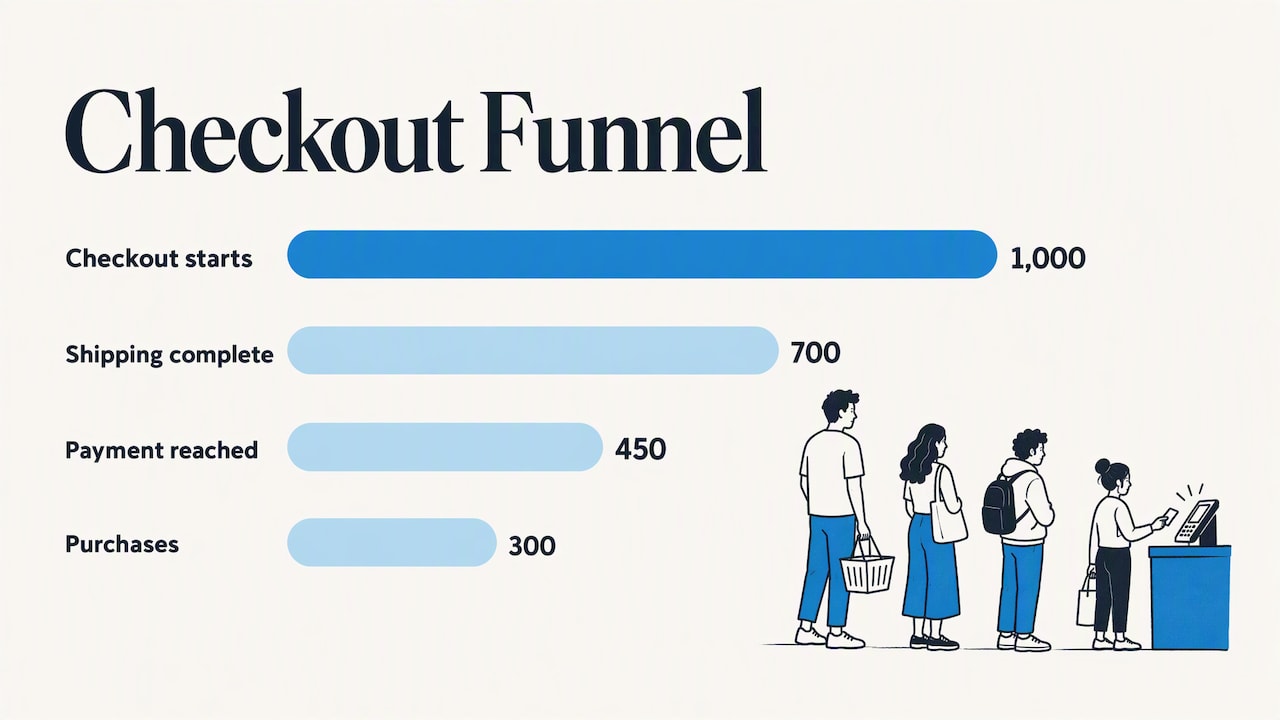
Now split by device. If desktop converts at 40% and mobile at 22%, your mobile experience is the lead suspect, and autofill, validation and wallet options are the first things to check. If most shipping-step exits come after the shipping cost appears, you have a cost surprise, not a layout problem. The same funnel, read properly, points to different fixes. These numbers are illustrative, not benchmarks.
Checkout optimization for creators and affiliates
Many readers here do not run a store. They send traffic to a checkout they do not control, or sell a course or digital product through a hosted cart. You still have levers:
- Match the promise. If your page says one price and the cart shows another, you lose the buyer and the commission. Keep the offer, price and currency consistent end to end.
- Pre-sell the next step. Tell readers what the checkout looks like, what they will pay and what they get. Surprises cause exits.
- Check the link on mobile. Click your own affiliate links on a phone, as a new visitor, in a private window.
- Use bonuses carefully. A bonus can lift conversion if delivery is smooth. We cover the setup in how to add bonus delivery to affiliate sales in ThriveCart.
- Follow up by email. Buyers who dropped off at checkout are warm. Our guide on email marketing for affiliate marketers shows how to reach them without being pushy.
If you host your own course or membership, the platform choice shapes your checkout options. We looked at that trade-off in whether ClickFunnels is a viable home for a membership site or course.
Our perspective
We have spent years reviewing tools, testing offers and sending readers to other people’s checkouts. The same pattern shows up again and again: people want a clever hack, and the real gains come from removing small annoyances.
When a reader tells us a funnel is underperforming, the culprit is rarely the headline or the button color. It is a surprise fee, a form that fights the phone keyboard, an account wall, or a price that differs between page and cart. Those are dull problems, and fixing them is dull work. It is also the work that pays.
Our advice is to be realistic about numbers. A published lift figure is a ceiling that describes what is possible across many sites, not what your store will get next month. Pick the biggest leak, fix it, measure, and move on to the next. Do that for a quarter and the compounding effect is real, and you will know why it worked.
— Nathaniel
Want the full playbook for selling online?
If you are building an online business and want guided, practical training alongside these articles, take a look at Instant Course Access for Life. It is a one-time payment of 97 $, with no subscription. You can also browse our full course listing first to see what fits.
How to measure whether it worked
A few habits keep you honest:
- Use one primary metric. Checkout completion rate (orders divided by checkout starts) is cleaner than overall site conversion, which moves with traffic quality.
- Watch revenue, not just rate. A change that lifts conversion but cuts order value, for instance by hiding an upsell, may not help.
- Compare like with like. Seasonality, promotions and traffic mix change results. If you are heading into a busy sales period, do not read a pre-sale test against a sale-period baseline.
- Keep a change log. Date, change, expected effect, result. In six months you will be glad you did.
- Re-check after releases. Theme updates, app installs and developer changes can undo earlier gains.
And remember that traffic quality sets your ceiling. Strong checkout work cannot rescue visitors who never wanted the product. For the upstream side, see our notes on ecommerce SEO trends.
FAQ
What is the difference between cart abandonment and checkout abandonment?
Cart abandonment counts every shopper who adds an item and leaves without buying, including people who were only browsing or comparing. Checkout abandonment counts only those who started the checkout process and did not finish. The second group has higher intent, so the causes are usually friction such as forms, costs or payment problems.
How do I reduce checkout abandonment quickly?
Start with the fixes that need no experiment: make guest checkout prominent, show total costs early, repair autofill, and make error messages specific. Then check your mobile funnel separately, since problems often hide there. Measure your completion rate before and after so you know what helped.
Is a one-page checkout always better?
No. Baymard’s research suggests the real causes of abandonment are usually specific usability failures, so diagnose friction first. A multi-step flow with an honest progress indicator can work well, and a one-page layout with confusing fields can fail. Test against your current flow rather than assuming.
How much can checkout optimization increase conversion?
Baymard estimates that fixing checkout UX issues could raise conversion by 35.26% for the average large ecommerce site, but that is an opportunity estimate, not a promise. Your result depends on how many issues you have and how well you fix them. Run tests on your own traffic and judge by your own data.
Do I need to offer many payment methods?
You need the right ones, not the most. Look at where your buyers live and which cards, wallets or local methods they use, then test those on mobile. Adding methods your audience never uses adds clutter without adding sales.
Sources
- Baymard: E-Commerce Cart & Checkout Usability Research
- Baymard: Checkout UX Best Practices 2025
- Baymard: The Checkout UX Guide
- Google Merchant Center Help: Checkout requirements and best practices
- Stripe: Checkout flow design strategies
- web.dev: Payment and address form best practices
- Shopify: UX for checkout
- WiserNotify: Cart abandonment statistics for 2026