

Yes, you can do affiliate marketing on YouTube, and you have two main routes: the built-in YouTube Shopping affiliate program that lets you tag products directly in your videos, or standard affiliate links placed in your descriptions and pinned comments. Your next move is simple: check the Earn tab in YouTube Studio for Shopping access, or add your primary affiliate link with a disclosure to the top of your next video description.
TL;DR:
- Standard affiliate links have no subscriber minimum; YouTube Shopping requires Partner Program membership and regional eligibility, so check the Earn tab as thresholds can change.
- YouTube’s paid promotion setting does not replace FTC disclosure: state the affiliate relationship in the video and place clear wording beside each link.
- Treat estimated revenue as provisional until merchants validate orders and return windows close; compare approved revenue with clicks to spot products with high returns.
- Place the main link and its disclosure near the description’s opening, and use a managed redirect so one update can repair links across older videos.
Table of Contents
- What YouTube Affiliate Marketing Is and How Creators Get Paid
- YouTube Shopping Affiliate Program: Availability and Eligibility
- How to Set Up Affiliate Links and Tag Products in YouTube Studio
- Disclosure Rules: YouTube’s Policy and FTC Guidance
- Tracking and Understanding Your Affiliate Earnings
- Affiliate-Friendly Video Ideas That Convert
- Optimization Tactics to Increase Clicks and Conversions
- Why Affiliate Marketing on YouTube Works Best as a Relationship, Not a Transaction
- Want a Faster Path to Your First Affiliate Sale?
- FAQ
- Sources
What YouTube Affiliate Marketing Is and How Creators Get Paid
Affiliate marketing on YouTube works in two basic forms. The first is native product tagging through the YouTube Shopping affiliate program, where you attach real products to your video and earn a commission when a viewer buys through that tag. The second is the classic approach: dropping affiliate links from programs like Amazon Associates, ShareASale, or a brand’s own affiliate network into your video description or pinned comment.
Both rely on the same basic chain. A viewer clicks your link or tag, the merchant’s tracking system logs the click, and if that viewer buys within a set window, you earn a cut. Merchants, not YouTube, set the commission rate and the attribution window, so a cookware brand might offer one commission rate and attribution window while a software tool offers another.
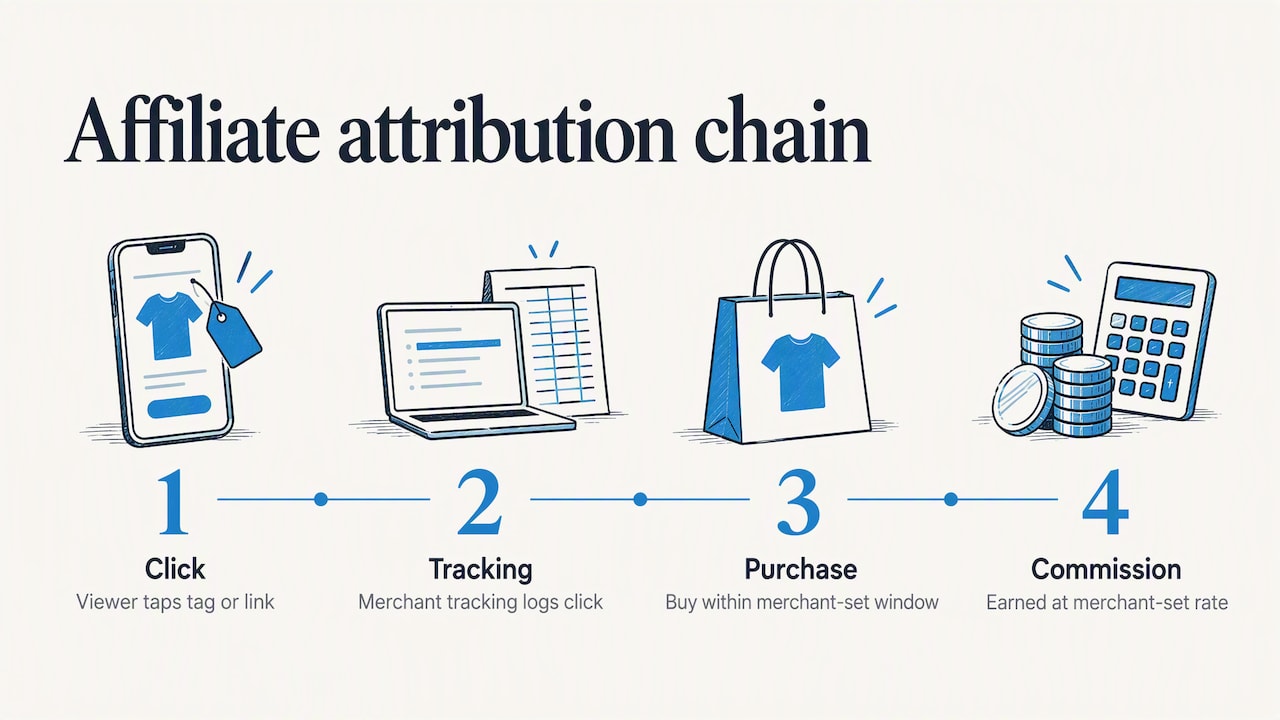
Product tagging through the Shopping program tends to work best when the merchant is already part of that ecosystem, since it creates a native, tap-to-shop experience without sending viewers off-platform. Standard affiliate links remain useful when your merchant isn’t in the Shopping program or when you’re promoting something outside of physical retail, like a course, a software subscription, or a service.
YouTube Shopping Affiliate Program: Availability and Eligibility
The YouTube Shopping affiliate program is available in a specific list of markets, and access depends on both your location and your channel’s standing. To qualify, you generally need to be part of the YouTube Partner Program and meet subscriber thresholds that YouTube sets for your region. Channels that are Made for Kids or primarily music content are excluded from the program entirely.
Here’s how to check your access and get started:
- Open YouTube Studio and go to the Earn tab, then look for the Shopping section.
- If you’re eligible, select “Get started” or “Turn on” to activate the affiliate program for your channel.
- Browse the Shopping tab to explore participating sellers, available products, and any special commission offers merchants are running.
- Review each seller’s commission rate and attribution window before tagging their products.
YouTube has occasionally lowered its eligibility bar, letting creators with smaller subscriber counts join the Shopping affiliate program, so it’s worth rechecking your Studio dashboard periodically even if you were turned away before. Commission rates and promotional boosts change often since individual merchants, not YouTube, control those terms.
How to Set Up Affiliate Links and Tag Products in YouTube Studio
Once you know which route fits your content, the setup itself is quick. For product tagging, you can add tags while uploading a new video or by editing an existing one: open the video in Studio, find the Products section, and select items from the Shopping tab that match what you’re demonstrating. For standard affiliate links, you’ll paste the URL directly into your description or pinned comment.
Placement matters more than most creators expect. Viewers may see only the opening of a description before they have to tap “show more,” so your primary affiliate link and disclosure belong near the top, not buried under a paragraph of hashtags or channel links.
A few practical habits make this easier to manage over time:
- Lead your description with the exact product or offer you talked about, followed immediately by the link.
- Keep your disclosure sentence right next to the link rather than in a separate section.
- Use a consistent format for every video so returning viewers know where to look.
Pro Tip: Route your affiliate links through a managed redirect URL, something like go.yourdomain.com/product, instead of pasting raw affiliate links. If a merchant retires an offer or swaps a link, you can update the redirect once and fix every old video at the same time instead of editing descriptions one by one.
If you want deeper tracking than YouTube Studio provides, add UTM parameters to your links before you shorten or redirect them. A link tagged with utm_source=youtube&utm_campaign=springreview tells your analytics dashboard exactly which video and promotion sent the traffic, which becomes valuable once you’re running several affiliate videos.
Disclosure Rules: YouTube’s Policy and FTC Guidance
Disclosure isn’t optional, and it isn’t just a YouTube requirement. Two separate sets of rules apply, and both matter if you’re earning commissions through your content.
On the platform side, YouTube requires you to use the paid promotion declaration in Studio whenever your video includes branded content or a paid partnership. If you skip this step and YouTube’s systems detect undisclosed paid promotion, the platform may apply a branded content label automatically and notify you. That label is visible to viewers, so it’s cleaner to declare the promotion yourself before you publish.
Separately, the FTC’s endorsement guidance requires you to disclose material connections, which includes affiliate relationships, clearly and conspicuously. That means in the video itself and near the link, not just in one place. Simple, direct wording satisfies this: something like “I get commissions for purchases made through links in this description” works fine. You don’t need legal language.
A few placement habits keep you compliant without overthinking it:
- Mention the affiliate relationship out loud or on-screen during the video, not only in the description.
- Repeat the disclosure for long videos or live streams, since viewers may join partway through.
- Place the written disclosure directly next to the affiliate link, not buried in hashtags or pushed to your About page.
These aren’t competing requirements. Handling YouTube’s paid promotion toggle and writing a clear, plain-language disclosure in your description covers both sets of rules at once.
Tracking and Understanding Your Affiliate Earnings
YouTube Studio gives you real numbers to work from once your affiliate tags start generating activity. The Analytics dashboard shows estimated revenue, total sales, order counts, and product-level clicks, and switching to Advanced mode breaks performance down by individual seller.
The distinction worth understanding early is estimated versus earned revenue. Estimated revenue updates close to real time, but it isn’t final. Earned or approved revenue locks in only after merchant validation and return windows close, with timing that varies depending on the seller’s policies. Don’t treat your estimated number as your paycheck.
A practical cadence works better than checking daily. Review your recent performance metrics for quick feedback on a new video and to spot trends across your uploads, then check which products hold up after returns are accounted for. Pay attention to product-level clicks specifically, since a video with strong views but weak product clicks usually needs a stronger call to action rather than a different product.
Affiliate-Friendly Video Ideas That Convert
Not every video format drives affiliate sales equally well. Some formats put the viewer in a buying mindset naturally, while others are better for building an audience first.
- Unboxing videos capture early curiosity and work well for new product launches.
- Detailed product reviews convert viewers who are already comparing options and close to a decision.
- Tutorials and how-tos position the product as a tool inside a bigger skill, which builds trust.
- Round-up comparisons catch viewers researching between several options at once.
- “What I use” videos lean on your existing credibility rather than hard selling.
- Shorts with product tags work as fast, low-effort entry points that feed your longer content.
A sequence often outperforms a single video. Start with a Short or teaser to spark interest, follow with a full review once viewers want detail, then circle back later with an update or comparison video to catch people who were still deciding. Place your call to action near the moment you demonstrate the product’s benefit, at a chapter marker where interest peaks, and again in the pinned comment and the top lines of your description. Viewers rarely buy from a mention alone; they buy from a moment that convinced them.
Optimization Tactics to Increase Clicks and Conversions
Small adjustments compound once you’re publishing affiliate content regularly. A handful of tactics consistently move the needle:
- Design thumbnails and titles around intent. Show the product alongside its benefit rather than just the product alone, since viewers click based on what it does for them.
- Add chapter markers at purchase-relevant moments. A viewer who skips to “final verdict” is often ready to buy, so make sure your link is easy to find right there.
- Group related videos into playlists. This keeps viewers watching longer and exposes them to multiple products instead of just one.
- Front-load your description. Your primary link and disclosure go near the top of the description, every time.
- Tag your links with UTM parameters. This lets you trace which specific video or campaign is actually driving sales, not just which channel.
- Pin a buy-ready comment. Repeat your link and disclosure in a pinned comment so viewers who skip the description still see it.
Pro Tip: Compare your estimated revenue against your approved revenue regularly, not just your total clicks. A product with high clicks but a wide gap between estimated and approved revenue usually has a high return rate, which tells you it’s worth testing a different product in that slot.
Measurement ties the whole approach together. Track product-level clicks in your Analytics dashboard, watch how estimated revenue settles into approved revenue over the following months, and use that pattern to decide which products deserve a follow-up video and which ones quietly get retired.
Why Affiliate Marketing on YouTube Works Best as a Relationship, Not a Transaction
The creators who make consistent affiliate income aren’t the ones chasing the highest commission rate. They’re the ones who build enough trust that a recommendation actually means something. A viewer who feels sold to once will scroll past your next link without a second thought, and research on influencer behavior backs that up: inauthentic or overly promotional content is a common reason people stop following creators altogether.
Early on, I learned that the videos performing best weren’t the ones with the slickest pitch. They were the ones where I used the product on camera the way I actually would at home, flaws included. That honesty did more for conversions than any script ever did.
A sustainable cadence mixes evergreen how-tos that keep earning quietly in the background with occasional promo-driven content tied to real launches or sales events. Treat affiliate links as a natural extension of content you’d make anyway, not the reason you’re making it.
— Nathaniel
Want a Faster Path to Your First Affiliate Sale?
Everything in this guide works, but piecing it together from documentation and forum threads takes time most creators don’t have. Our Instant Course Access for Life gives you step-by-step lessons and ready-to-use templates for setting up affiliate funnels, tagging workflows, and description structures that are built to convert. Current pricing is on our website.
- Built for creators who’d rather follow a guided path than assemble one from scattered guides.
- Covers the setup work this article walks through, with templates you can copy directly into your own videos.
- The course provides access to its content.
If you’re ready to stop guessing at your description layout and disclosure wording, check out Instant Course Access for Life.
FAQ
Can you do affiliate marketing on YouTube?
Yes, you can earn affiliate income on YouTube through two main paths: the built-in YouTube Shopping affiliate program for eligible creators, or standard affiliate links placed in your video descriptions and pinned comments. YouTube’s external links policy permits affiliate links generally, as long as they point to safe content and aren’t posted excessively.
How much do YouTube affiliates make?
Earnings vary widely based on your audience size, niche, and the commission rates merchants set, since each seller controls its own rate and attribution window. There’s no single published average, so your best gauge is tracking your own product-level clicks and approved revenue inside YouTube Studio Analytics over time.
How many subscribers do you need for YouTube affiliate marketing?
Standard affiliate links in your description have no subscriber requirement at all. The YouTube Shopping affiliate program does require a minimum subscriber count and Partner Program membership, though the threshold has been lowered over time, so check your Studio Earn tab directly for your current eligibility.
What should I check before choosing an affiliate program to promote?
Compare each program’s commission rate, attribution window, and whether it’s part of the native YouTube Shopping program or an external network you’ll link to manually. Also confirm the merchant’s return policy, since high return rates can shrink your approved revenue well below your initial estimated numbers.
Sources
- YouTube Shopping affiliate program overview & eligibility – Android – YouTube Help
- FTC’s Endorsement Guides: What People Are Asking | Consumer Advice