

A cart abandonment email is an automated message sent to a shopper who added something to their cart and left without paying. The best ones arrive within hours, show the exact items, remove one specific objection and link straight back to the cart. Most stores need a sequence of two or three emails, not one.
This guide shows you how to set one up, what to write in each message, when to send it, and how to stay inside US email law. We have used these emails in our own online businesses, and the same principles hold whether you sell physical products, digital downloads or courses.
TL;DR
- Send the first email within about an hour of abandonment. A sequence of two to three emails over roughly three days covers most of the recoverable window.
- Show the actual product, price and image, plus one clear button back to the cart. Add an incentive only in a later email.
- Fix the cause first. Surprise costs, forced account creation and long checkouts drive abandonment, and no email beats a cleaner checkout.
- Abandoned cart emails are promotional under CAN-SPAM, so include an opt-out, your postal address and honest sender details.
- Measure recovered revenue per email sent, not just open rate, and test one variable at a time.
Table of Contents
- Why shoppers abandon carts (and what that means for your emails)
- How to build an abandoned cart email strategy
- When to send abandoned cart emails
- What to put in each email
- Stay on the right side of the law
- Automate the sequence without losing the human touch
- Our perspective
- Go deeper on growing your online business
- FAQ
- Sources
Why shoppers abandon carts (and what that means for your emails)
The Baymard Institute tracks cart abandonment across many studies, and its average sits around 70%. Put simply, about seven in ten shoppers who add something to a cart leave without buying. Your emails are working against that default.
Not every abandoned cart is a lost sale, though. Shoppers abandon for very different reasons, and your email should match the reason:
- Unexpected costs. Stripe’s overview of cart abandonment lists shipping, taxes and handling fees discovered late in checkout as a common trigger.
- Friction. The same source points to lengthy checkouts and mandatory account creation.
- Product hesitation. An academic review in Electronic Markets describes price-conscious shoppers, people who cannot touch or feel the product, and items found to be out of stock after being added to the cart.
- Browsing. Some people use the cart as a wish list or a price calculator. They never planned to buy today.
This matters for your copy. A shopper stopped by shipping costs needs a different message than one comparing three tabs. If you only fix the emails, you recover some of the lost sales. If you also fix the checkout, you lose fewer of them to begin with. We cover that second half in our guide to checkout optimization fixes that recover lost sales.
How to build an abandoned cart email strategy
A strategy here means five decisions: the trigger, the audience, the sequence, the offer and the measurement. Make them in that order.
1. Define the trigger
The trigger is the event that starts the sequence. The usual version is: a known contact adds an item to the cart, does not complete checkout within a set window, and has no purchase afterward.
The key phrase is “known contact.” You can only email someone whose address you captured, either because they are logged in, they are a subscriber, or they typed their email at the first checkout step. Many stores move the email field to the top of checkout for this reason. Make sure your shopping platform also stops the sequence the moment the person buys, or you will send a “you forgot something” message to a paying customer.
2. Segment before you send
One sequence for everyone wastes your best lever. Three simple segments are enough to start:
- First-time visitors versus existing customers. Returning buyers already trust you and rarely need a reassurance email.
- Cart value. A $400 cart justifies a personal-sounding message or a support offer. A $15 cart does not justify a discount.
- Product type. Physical goods raise shipping and delivery questions. Digital products raise questions about access, format and refunds.
3. Plan the sequence
A workable default is three emails. Each has one job:
| Job | Typical content | |
|---|---|---|
| 1: Reminder | Make returning easy | Product image, name, price, cart button |
| 2: Objection handling | Remove doubt | Reviews, shipping and return terms, FAQ, support contact |
| 3: Last nudge | Give a reason to act now | Low stock note or a limited incentive, if you use one |
A sequence guide from MailCharts describes the same pattern: high-quality product images, personalized cart items with prices and a link back to the cart, with urgency and incentives as variations. It is a commercial source, so treat the structure as a starting point and let your own data decide.
4. Decide on incentives
Discounts work, and they also train shoppers to abandon on purpose. Our rule is to lead with help, not a coupon. Use the first email for a plain reminder, the second for answers, and only the third for a small incentive such as free shipping or a modest percentage off. Skip incentives for high-margin digital products if the price is already tight, and skip them for customers who bought at full price before.
If shipping costs were the problem, free shipping is a better incentive than a discount. It addresses the actual reason.
5. Pick the numbers that tell you it works
Open rate is a weak signal, because mailbox privacy features inflate it. Track these instead:
- Recovered revenue per email sent. Total sales attributed to the sequence divided by emails delivered.
- Click-to-order rate. Of the people who clicked back to the cart, how many bought.
- Unsubscribe and complaint rate. If these climb, your sequence is too long or your incentive is too aggressive.
- Margin after discounts. A recovered sale at a deep discount can be worth less than it looks.
When to send abandoned cart emails
Timing is the question most readers ask, and the honest answer is that speed matters most for the first message, then spacing is a testing problem.
Rejoiner’s 2025 research report is a useful benchmark here. It states that in its experience the best time for the first email is 30 minutes to an hour after abandonment, that about 40% of senders send within an hour, and that the first three days are the most valuable recovery window. That is one vendor’s dataset, so use it as a starting hypothesis, not a law.
A schedule we would start with:
- Email 1: 30 to 60 minutes after abandonment.
- Email 2: about 24 hours after abandonment.
- Email 3: about 48 to 72 hours after abandonment.
How to test timing
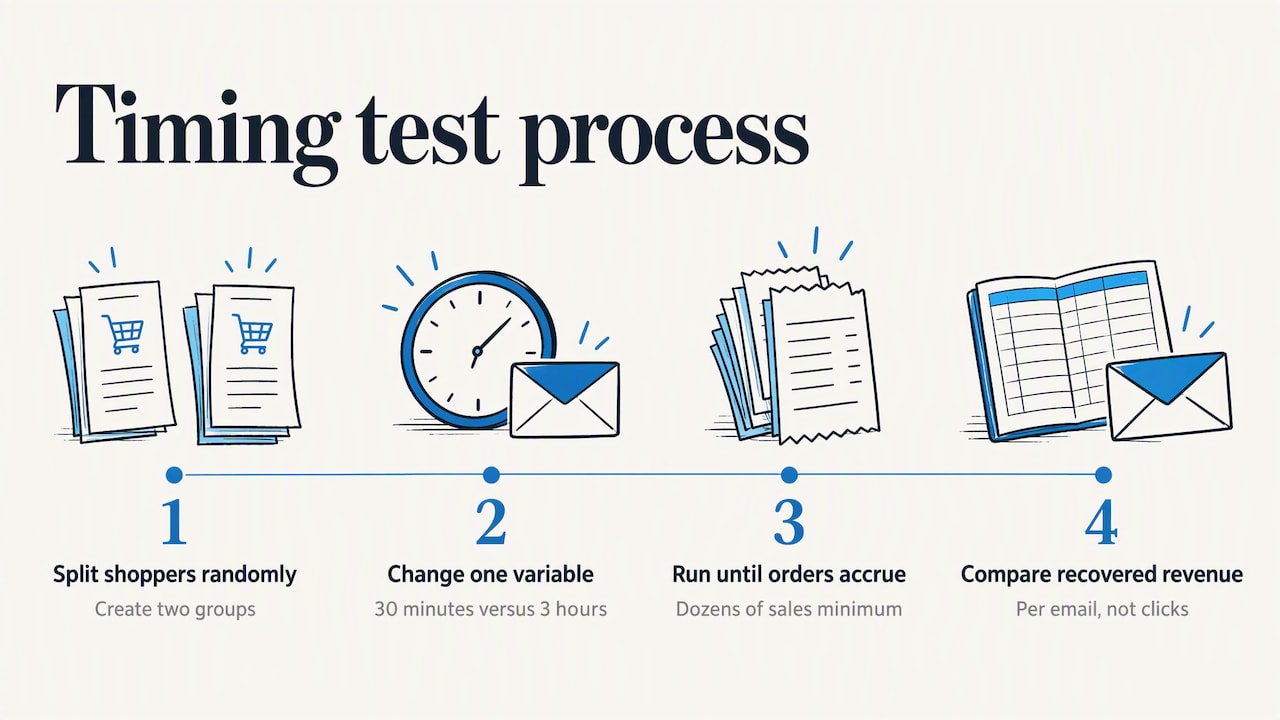
Do not change everything at once. Split your abandoners randomly into two groups and change one thing, such as sending Email 1 at 30 minutes versus 3 hours. Run the test until each group has enough completed orders to compare. Dozens of sales, not a handful, is the bare minimum, and more is better. Judge the winner on recovered revenue per email, not on clicks.
Two cautions apply. First, a very fast email can feel intrusive for expensive or considered purchases, where people need time to think. Test a longer first delay there. Second, send times of day matter less than the delay after abandonment, because the trigger fires whenever the shopper leaves. Do not hold messages until “the best time” of day unless your test shows it helps.
What to put in each email
Good abandoned cart emails are short, specific and a little human. Here is how to write each part.
Subject line and preview text
Name the reason for the email. “You left something in your cart” is clear and honest. Add the product name when it fits: “Your trail running shoes are still waiting.” Avoid fake urgency, such as claiming stock is running out when it is not. It damages trust, and in some cases it can create legal exposure under advertising rules.
The body
Keep it to what the reader needs to decide:
- A large product image, the name, the variant (size, color) and the price.
- One button, labeled with an action such as “Return to your cart.”
- A one-line reassurance: return policy, delivery time or guarantee.
- A support route, such as a reply-to address that a real person reads.
Three examples to adapt
These are our own illustrative templates, not quotes from any brand.
Email 1, the simple reminder
Subject: Still thinking it over?
Hi Sam, you left the Canvas Weekender Bag in your cart. We saved it for you. [Return to your cart]
Questions about sizing or delivery? Just reply to this email.
Email 2, the objection handler
Subject: Quick answers before you decide
Most people ask us three things about the Weekender: how long delivery takes, what the return window is, and whether it fits under an airline seat. Here are the answers, plus two customer reviews. [Return to your cart]
Email 3, the last nudge
Subject: Free shipping on your cart, today only
Your bag is still in your cart. If shipping was the sticking point, we have removed it for the next 24 hours. [Complete your order]
Notice that the third email ties the incentive to a plausible reason. If you use a deadline, make it real, and have your system actually enforce it.
Examples for digital products and courses
If you sell something without shipping, objections shift. Buyers want to know what they get, how fast, and whether it is worth the price. Your second email should show a preview of the product, a clear description of access and your refund terms. Do not invent scarcity for a digital product that has unlimited supply.
Stay on the right side of the law
In the US, abandoned cart emails are generally treated as commercial messages. That means CAN-SPAM applies. The FTC’s compliance guide for business is the authoritative source, and it covers the core rules: don’t use misleading header or subject information, identify the message as an ad where required, include your valid physical postal address, and give a clear way to opt out. It also says you must honor opt-out requests within 10 business days.
A short checklist for your sequence:
- Your “From” name and reply-to address are real and identify you.
- The subject line matches the content.
- Every email has a working unsubscribe link and your postal address.
- An unsubscribe from one email stops the whole sequence, not just the current message.
If you sell outside the US, other regimes apply. Canada’s anti-spam law, described by IAB Canada’s resource page, requires express or implied consent, sender identification and a free, easy unsubscribe. In the EU and UK, data protection rules also affect how you track carts. Our overview of affiliate marketing laws, updated for GDPR is a good starting point, and four compliance steps digital businesses overlook covers the habits that keep a small business out of trouble. For anything specific to your situation, ask a lawyer who handles marketing and privacy law.
Automate the sequence without losing the human touch
Most e-commerce platforms and email tools can fire an abandoned cart flow from a few settings. Once the logic is set, the work is in the copy and the testing. If you want to understand how triggered follow-ups fit into wider lead and customer communication, this overview of automated outreach sequences explains how small businesses structure them.
When you pick a tool, check five things: can it capture emails early in checkout, can it stop the flow after purchase, can it segment by cart value, does it let you A/B test delays, and does it add the required unsubscribe link and address automatically. Our database of SaaS tools for entrepreneurs is a quick way to compare options by category. If you build an email list around affiliate offers, our interview on email marketing for affiliate marketers shows how list-based selling works in practice.
Our perspective
We have written about online business for years, and we talk with a newsletter audience of more than 45,000 subscribers. A pattern keeps coming up: people treat the abandoned cart email as a magic fix and ignore the page it is trying to rescue.
Here is our view. First, treat the email as a second chance, not a safety net. If three in four of your abandoners left because of a surprise shipping fee, show the fee earlier. The email then recovers the stragglers instead of covering for a leaky checkout.
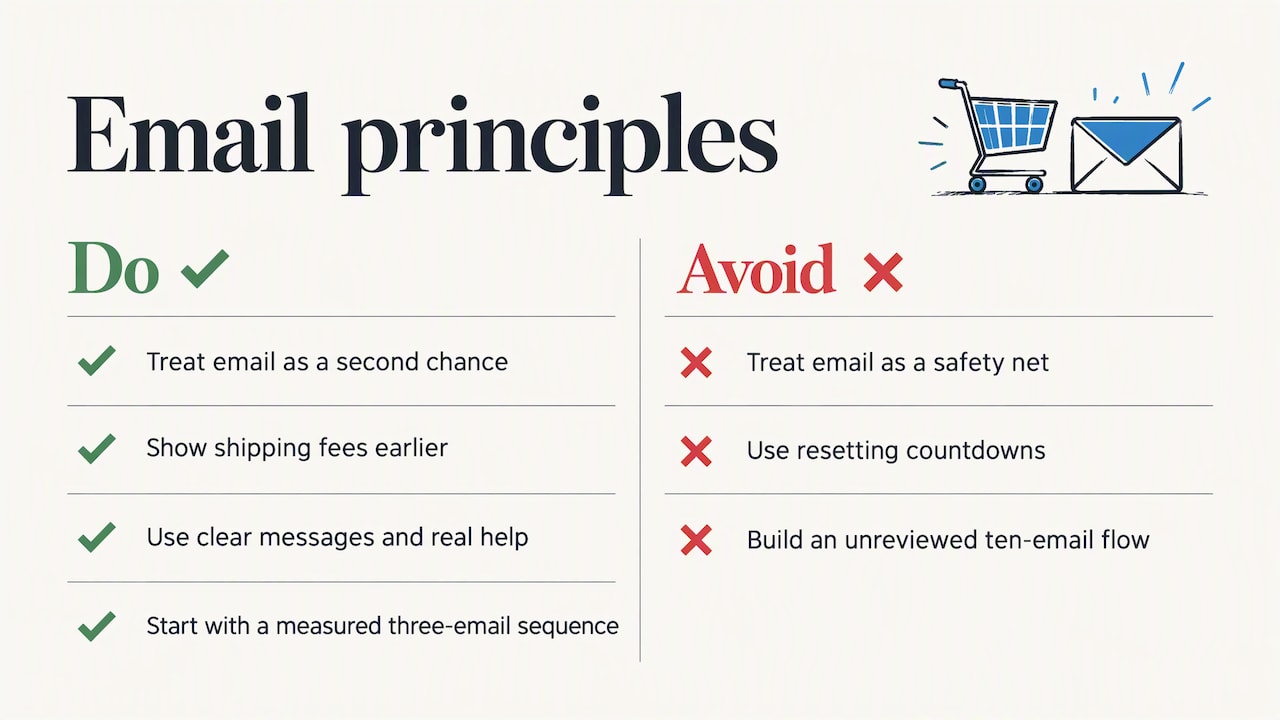
Second, be honest. Shoppers know a “last chance” email is automated. They respond better to a clear message with real help than to a countdown that resets every time. Trust is the asset you are building, and a cheap trick spends it.
Third, start small. One well-written three-email sequence, measured on recovered revenue, will teach you more than a ten-email flow nobody reviews. Add complexity only when the data justifies it. Our piece on proven tactics to drive store conversions shows where the same thinking applies to the rest of your store.
— Nathaniel
Go deeper on growing your online business
If you want a structured way to learn the skills behind this, from email to conversion to traffic, our course library is open to you. Instant Course Access for Life is a one-off $97 payment, with no recurring fee.
You can see what is included and enroll on the Instant Course Access for Life page. If you would rather start with free material, browse our free resources first.
FAQ
How many abandoned cart emails should I send?
Three is a sound starting point: a reminder, an objection-handling email and a last nudge. Space them over about three days. Watch your unsubscribe and complaint rates, and cut the sequence if they rise.
Should I offer a discount in the first email?
Usually not. Many abandoners left for reasons a discount does not solve, such as confusion or browsing, and an early coupon teaches shoppers to abandon on purpose. Save any incentive for the last email, and match it to the likely reason, such as free shipping for shoppers put off by delivery costs.
What is the best time to send an abandoned cart email?
Send the first one within roughly 30 to 60 minutes of abandonment, then follow up around 24 hours and 48 to 72 hours later. Treat that as a hypothesis. Test one delay at a time and judge by recovered revenue per email sent.
Are abandoned cart emails legal without a newsletter signup?
In the US they are treated as commercial email, so CAN-SPAM rules apply: honest sender details, your postal address and a working opt-out. Other countries, such as Canada, set consent requirements as well. Check the rules for every market you sell into, and speak with a lawyer for your specific case.
Why is my abandoned cart email not recovering sales?
Common causes are a slow first send, a vague subject line, missing product details, an unclear button or a checkout that creates the problem in the first place. Check each in that order. Then review the checkout for surprise costs and forced account creation.
Sources
- Baymard Institute: checkout usability and reasons for cart abandonment
- Stripe: What is cart abandonment?
- Electronic Markets: Electronic shopping cart abandonment review
- MailCharts: How to create an abandoned cart sequence
- Rejoiner: Abandoned cart email statistics report
- FTC: CAN-SPAM Act compliance guide for business
- IAB Canada: Canada’s Anti-Spam Legislation resource centre