
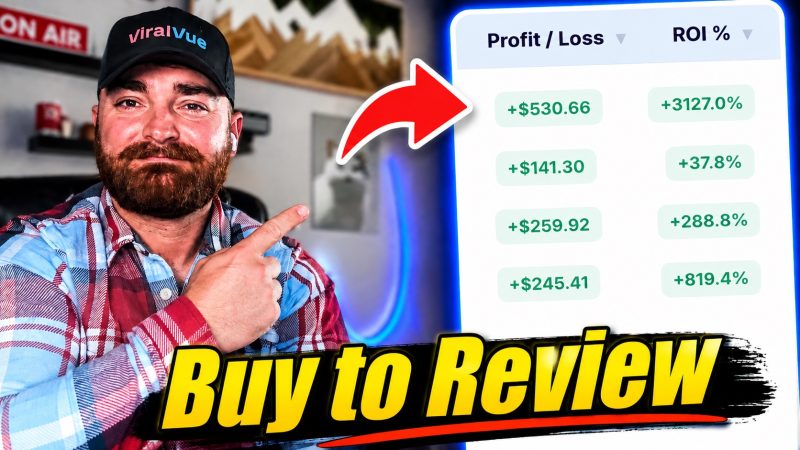
After 4 years as an Amazon influencer, I've over doubled my monthly Amazon influencer earnings this year thanks to the method I'm about to show you. I've scaled from about $3,000 per month up to $7,000 per month and I finally feel like I'm in control of my growth.
The key has been buying products to review them. It has been an absolute game changer for me and I've spent a crazy amount of time and effort analyzing every facet of the model. This article distills it all into a quick, free guide.
If you want to scale your Amazon Influencer earnings and are tired of reviewing 100s (or 1,000s) of low earning items and waiting around for brands to send you free samples, you're going to love this.
Let's talk about investing in products as an Amazon influencer. Many people (myself included) refer to this method as "buying to review," but the name isn't important.
The concept is straightforward: Instead of relying on items you already own or waiting on freebies, you proactively hunt for products with high earning potential. You buy them (either on Amazon or locally), create high-quality videos for them that can rank in the upper carousel, and earn enough in commissions to offset your costs and net a profit.
While an investment product might be something you actually need, it is often purchased solely to drive commissions. Once the video is live, the item can be resold, gifted, donated, or (discarded if perishable).
Sounds great, right? Well there is a lot that goes into making it work and getting it wrong can lead you to actually losing money, not making it. Here is everything you need to know to execute this strategy profitably.
Prefer Video?
Well, here you go!
The Pros and Cons of Investing to Review
This method is great but there are downsides as well.
The Investor Mindset: Embrace the 80/20 Rule
To succeed with this influencer arbitrage model, you need to adopt an investor’s mindset: the winners will offset the losers.
The 80/20 principle (the Pareto principle) absolutely applies here. Roughly 20% of your investment products will generate 80% (or more) of your earnings. Even with practice, experience, and the right tools, you will still have ones that flop.
- Look at the macro: Track your overall earnings over time, not just the ROI of a single item.
- Analyze the winners: Ask yourself why they worked, and do more of that.
- Analyze the losers: Ask yourself why they failed, and avoid the same mistakes next time.
Don't proceed with this model if you aren't cool with all of this.
You're cool? Great, let's continue.
The Tool I Wouldn't Do This Without

I know that one of the biggest allurements of the Amazon influencer program is the low overhead costs. However, investing in a tool like Viral Vue (starting at $29/month) is an investment that has had a massive ROI for me.
Viral Vue is a web app and Chrome extension that makes analyzing products easier, and frankly, this entire method possible.
Without it (or a similar tool at the very least) you're completely in the dark and investing in products is almost certain to fail.
You'll see screenshots of Viral Vue in action throughout this post, but here are the biggest case uses for it in terms of buy to review.
#1 Profit Calculator
This is your north star for buy to review analysis. This calculator is the most robust, data driven one I've tested.
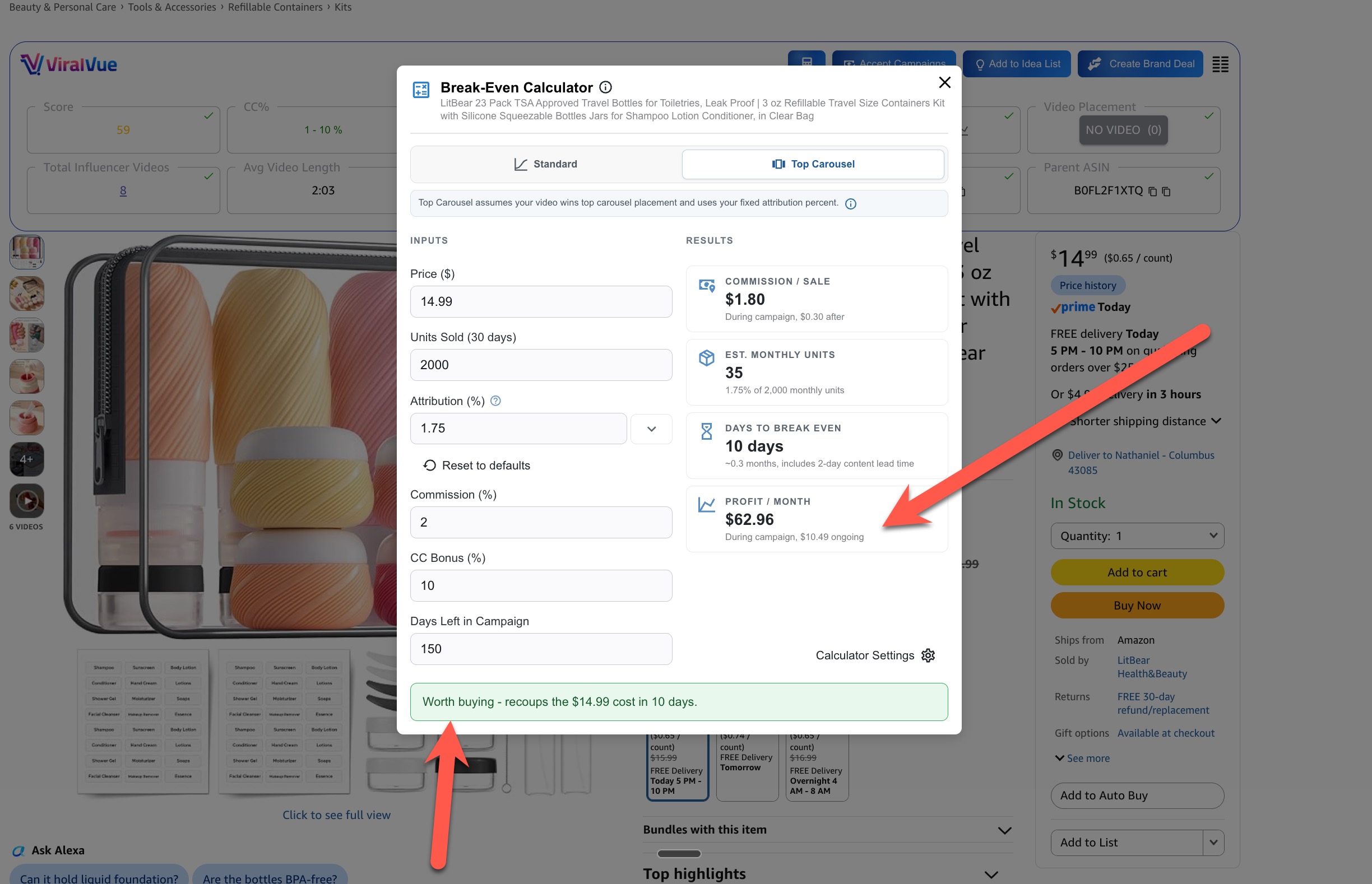
Now, keep in mind that accurately estimating profit is difficult and imperfect. However, there is no tool that comes close to being as accurate as Viral Vue's.
It provides you with estimates that predict your earnings based on your placements in the carousel (top or standard) and factor in variables like number of days left in the creator connection campaign and even the lag time of shipment and video creation.
You can also do things like play with variable numbers like attribution percentage (the percentage of total sales you can capture) to see what earning potential an item might have.
Think your video is going to earn more because it's a long comparison format? Crank it up. Think it's going to perform worse because of the product type? Dial it down.
Having this data, while imperfect, is a gamechanger.
#2 Web App ROI Tracker
This is such a neat and overlooked feature. It was recently updated and I'm in love with it.
We can see how much we've earned from a product based on the Amazon buy price compared to the net earnings. It gives us ROI, net profit and more.
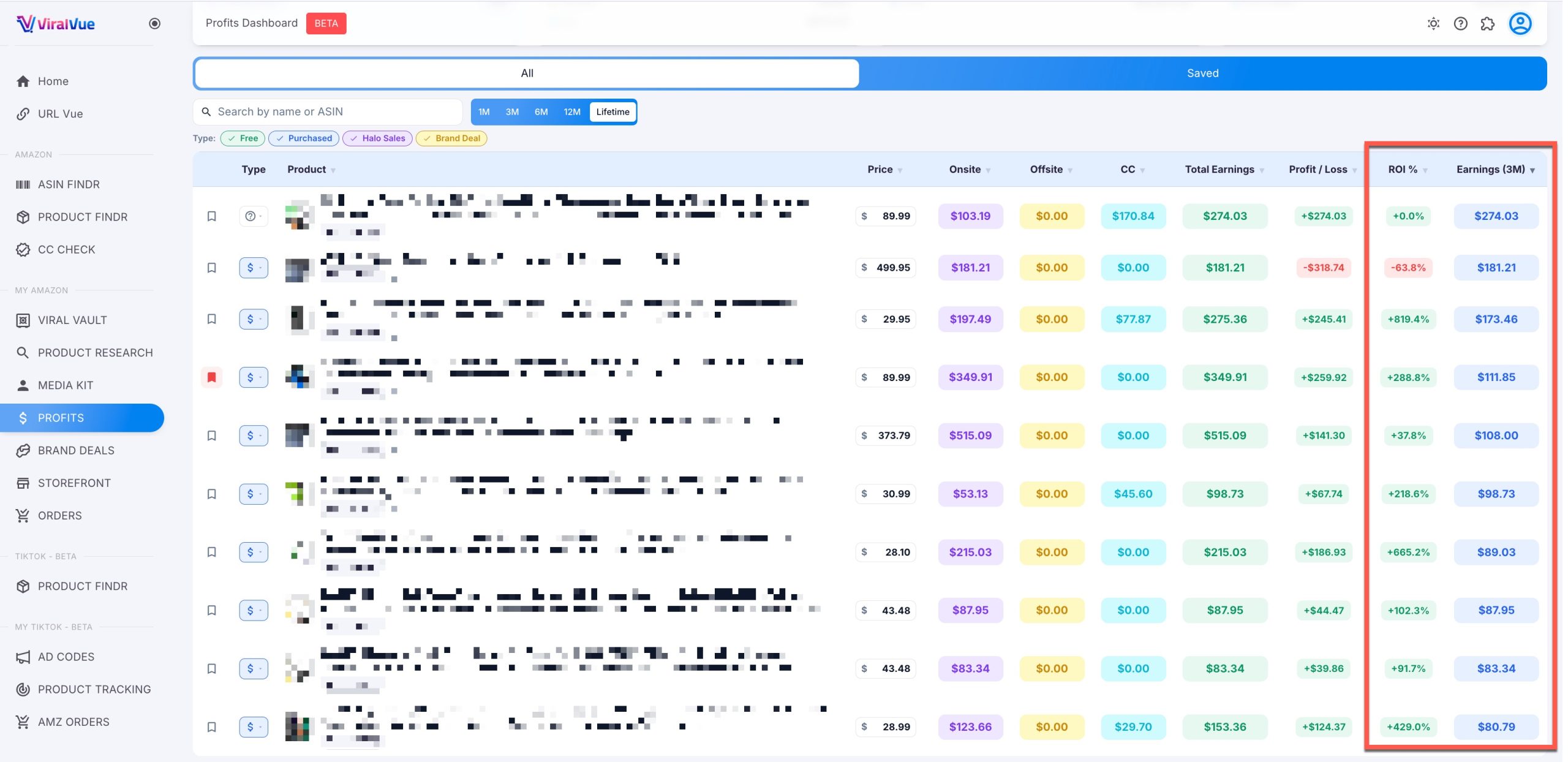
You can also save your latest buy to review items so you can track the results in real time.
As Peter Drucker said, "What gets measured gets managed." If you aren't measuring and analyzing your results, how can you manage them and grow?
This feature makes that possible, especially since Amazon's reporting gets less useful seemingly every week.
#3 Bulk Product Research
99.999% of products on Amazon do not have "buy to review" potential. To find the ones that do, we need to be able to filter through a lot of data very quickly.
We can do this with the Viral Vue Chrome extension and to an extent, with their web app.
We can do things like add filters that remove anything that doesn't meet our investment criteria. Then, when on a page, we can choose "Product Vue" and we will be shown only the things that are a fit.
Below is a "product vue" that takes results from a search for "travel bottles" and plucks outliers that meet certain minimum criteria.
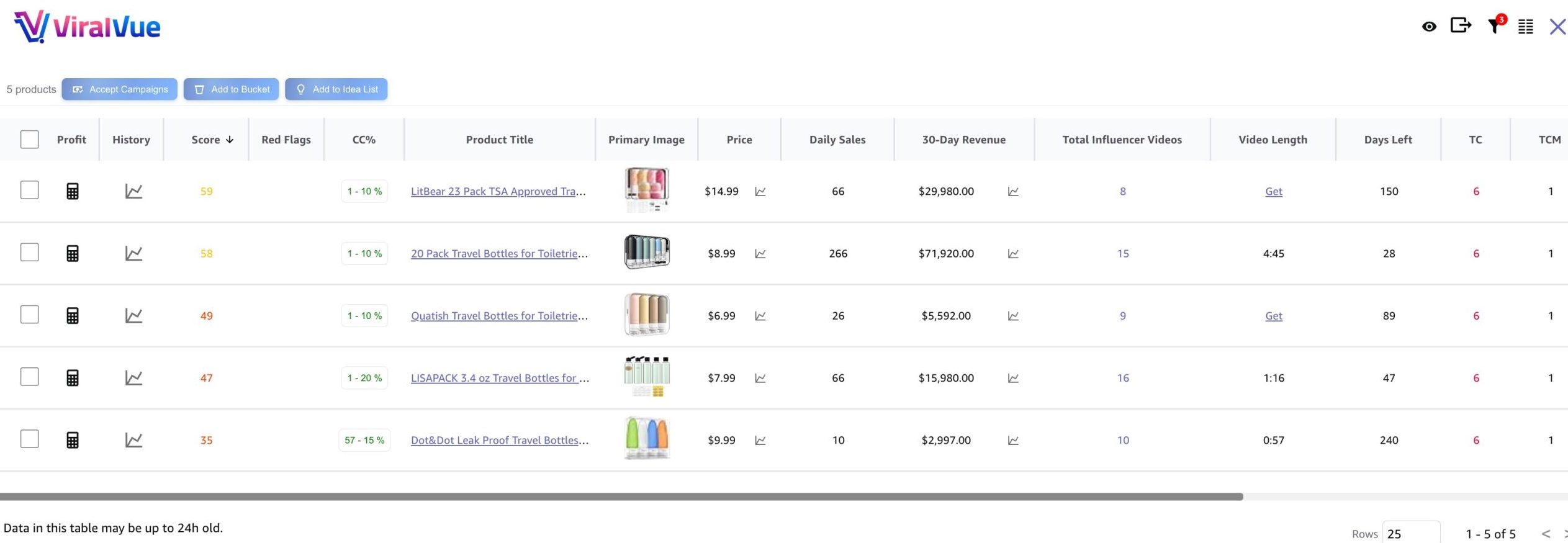
We can see every metric that matters.
- Total influencer videos.
- Upper carousel availability.
- Creator Connections (Yes/No).
- Creator Connection Days Left
Without this, you just won't find products worth investing in. Seriously, I really cannot ethically not tell you to invest in Viral Vue before you invest in any products.
#4 Competitor Carousel Spying
Part of the buy to review process requires us to understand our competitors. Can we take their carousel placements or not? If we can't, the product is likely dead on arrival.
With Viral Vue, we can see deep details about the other Amazon influencers and their videos on the product listing.
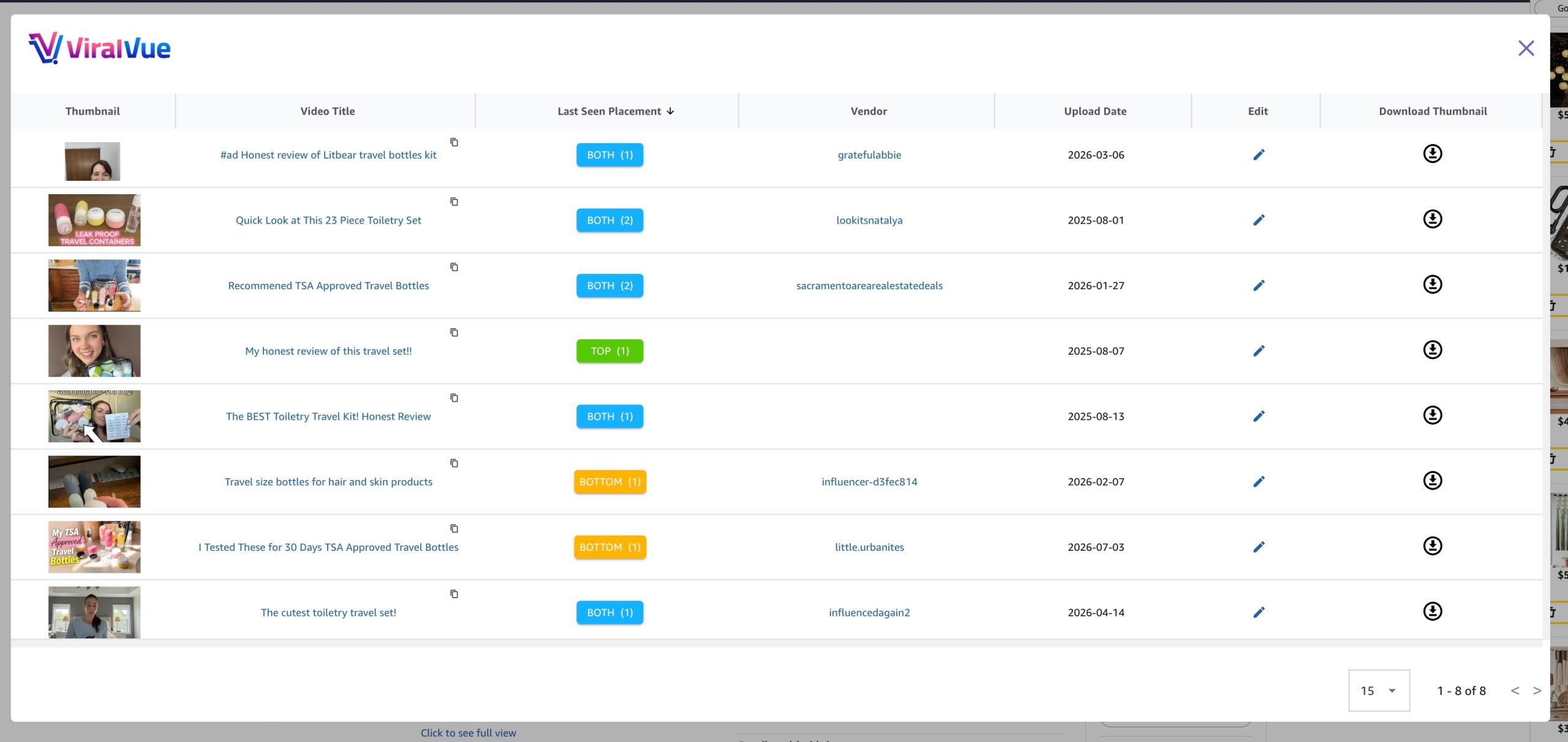
Not only can we see the thumbnails and titles, we can see the date of upload. This lets us know if videos might be stale or if there is an influx in recent videos coming onto the product listing.
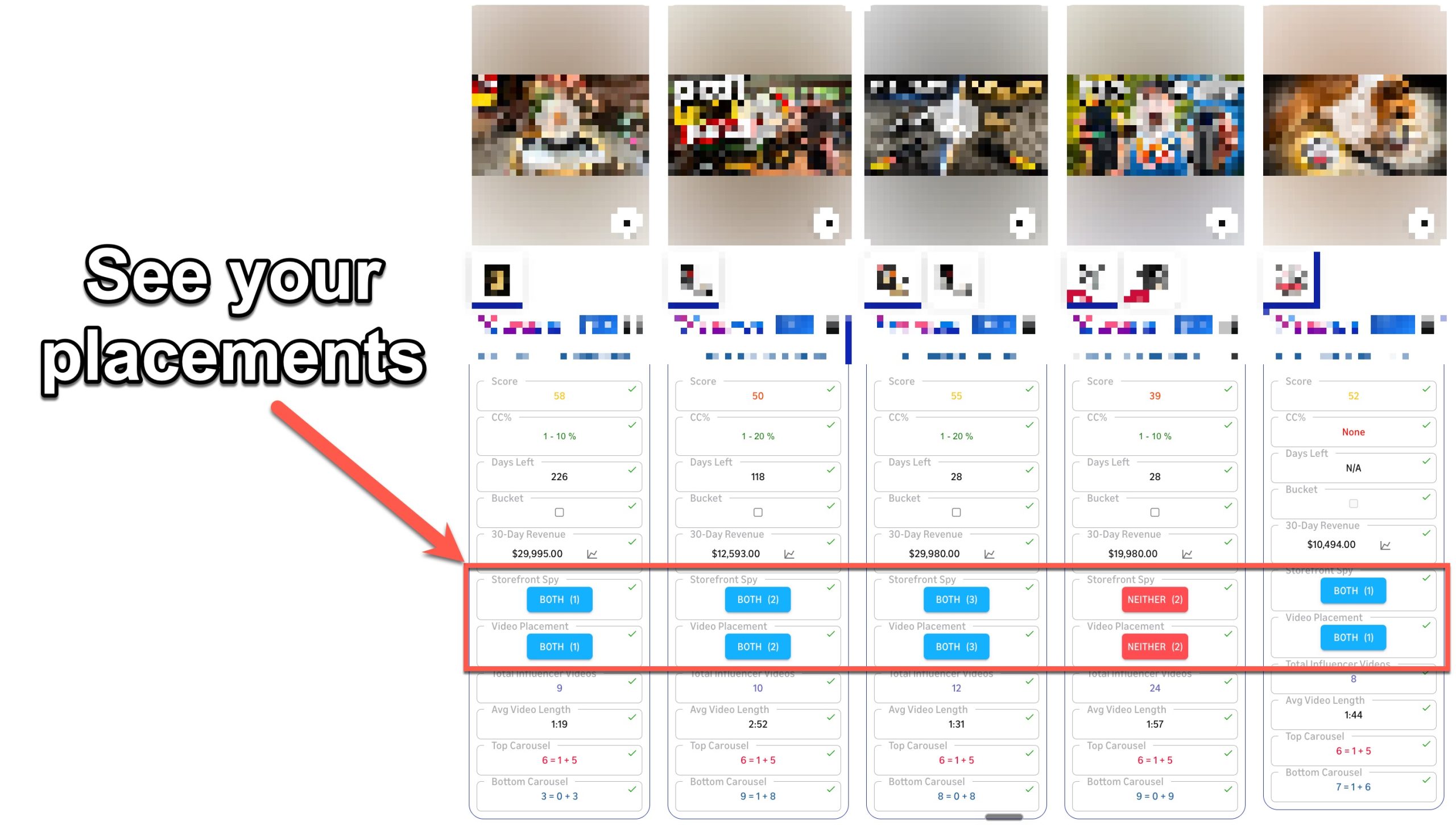
#5 Your Carousel Placements at a Glance
Did that 8 minute comparison video you made last week crack the upper carousel? It's good to know this sort of thing! Viral Vue shows you. This lets us see if our videos are performing as expected and if they aren't, we can improve them or just pocket the results as a lesson in our next investment product.
Another thing about Viral Vue. These are just the features that are useful for product research!
It does dozens of other things that are valuable for Amazon influencers. I can't recommend it enough. Grab you access below (the starter plan will get you everything you need to act on the tactics in this article).
Use code EAM for 10% off at checkout.
The Strict "Buy Criteria" Considerations
Alright, now let's get into the metrics that matter. Having a set of rules and criteria in place is going to help you maximize your winners and minimize your losers. Always double check before buying. I can't tell you how many times I hit purchase and then spotted something that took what I thought was a great purchase and turned it into a sunk cost.
Feel free to copy and paste these somewhere safe or bookmark this article for later.
These criteria are not in any order, each is equally important and should be checked uniformly...
#1 Upper Carousel Availability: The item must have an upper video carousel. No exceptions, unless you personally need the item anyway.
For there to be an upper carousel, there must be a merchant video. I wish that wasn't the case, but it is.
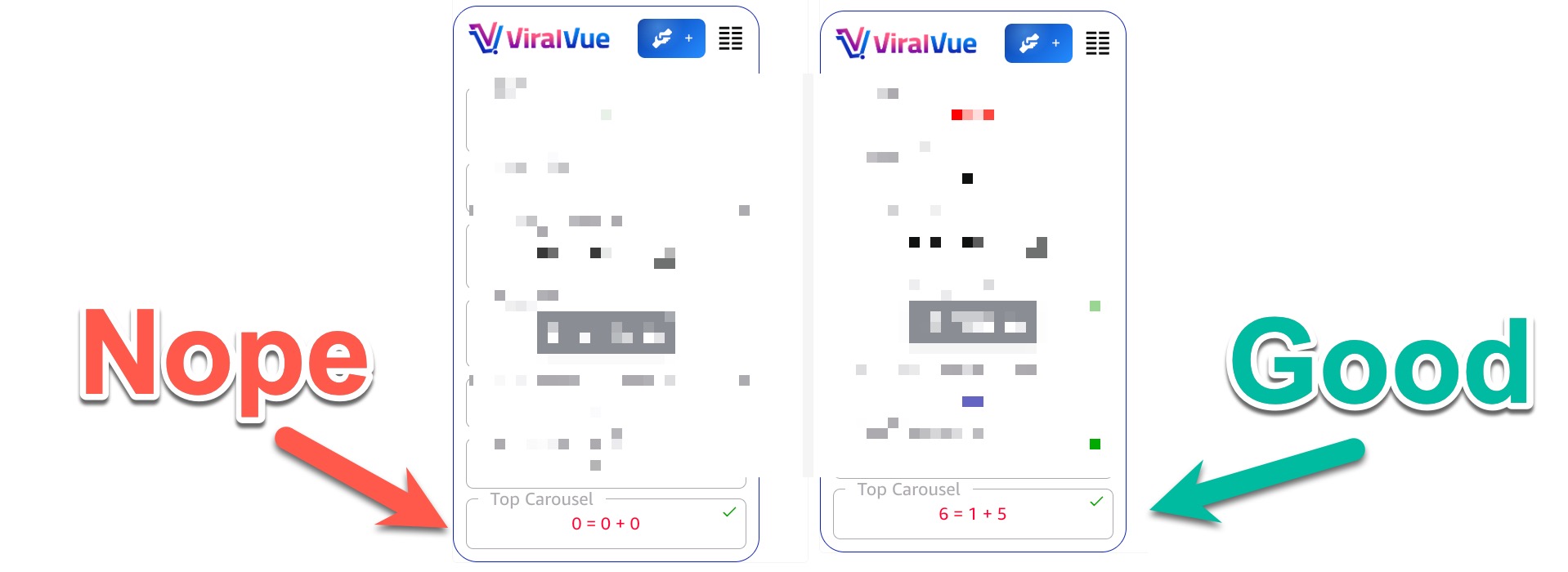
In the example above, one product has no upper carousel while the other has a full carousel. In a perfect world, there would be only a merchant video, but a full carousel is not a deal breaker. No carousel is (at least for buy to review).
I have had one exception to this in my career doing this, but it was an extreme outlier.
#2 30-Day ROI Potential: The expected earnings must offset the cost of the item in under 30 days. Be sure to factor in shipping times and your own content creation lag. The Viral Vue extension can tell us with their profit estimator if this is likely or not.
Here is an example of a product that is profitable even on standard attribution and a relatively short remaining creator connections campaign.
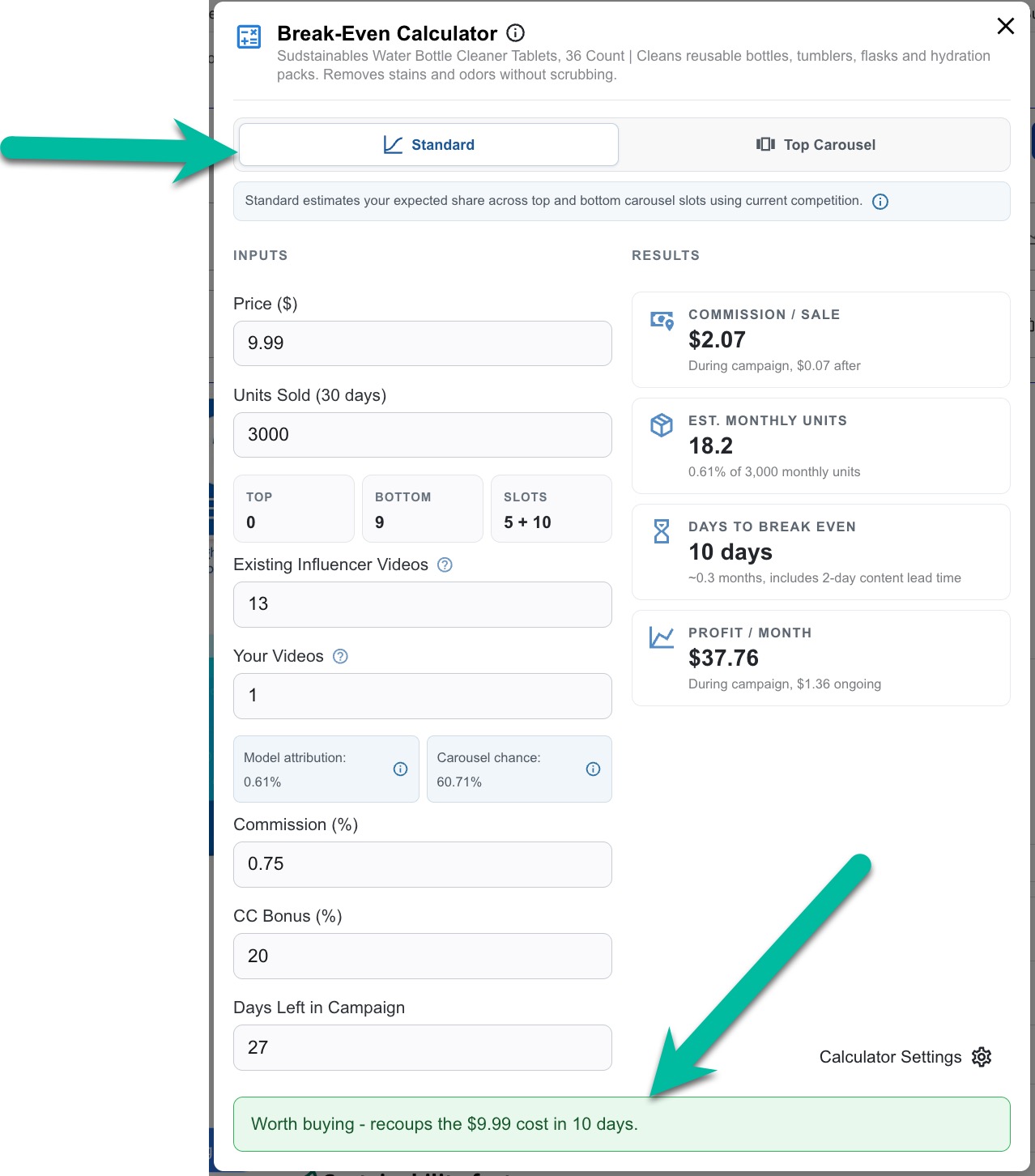
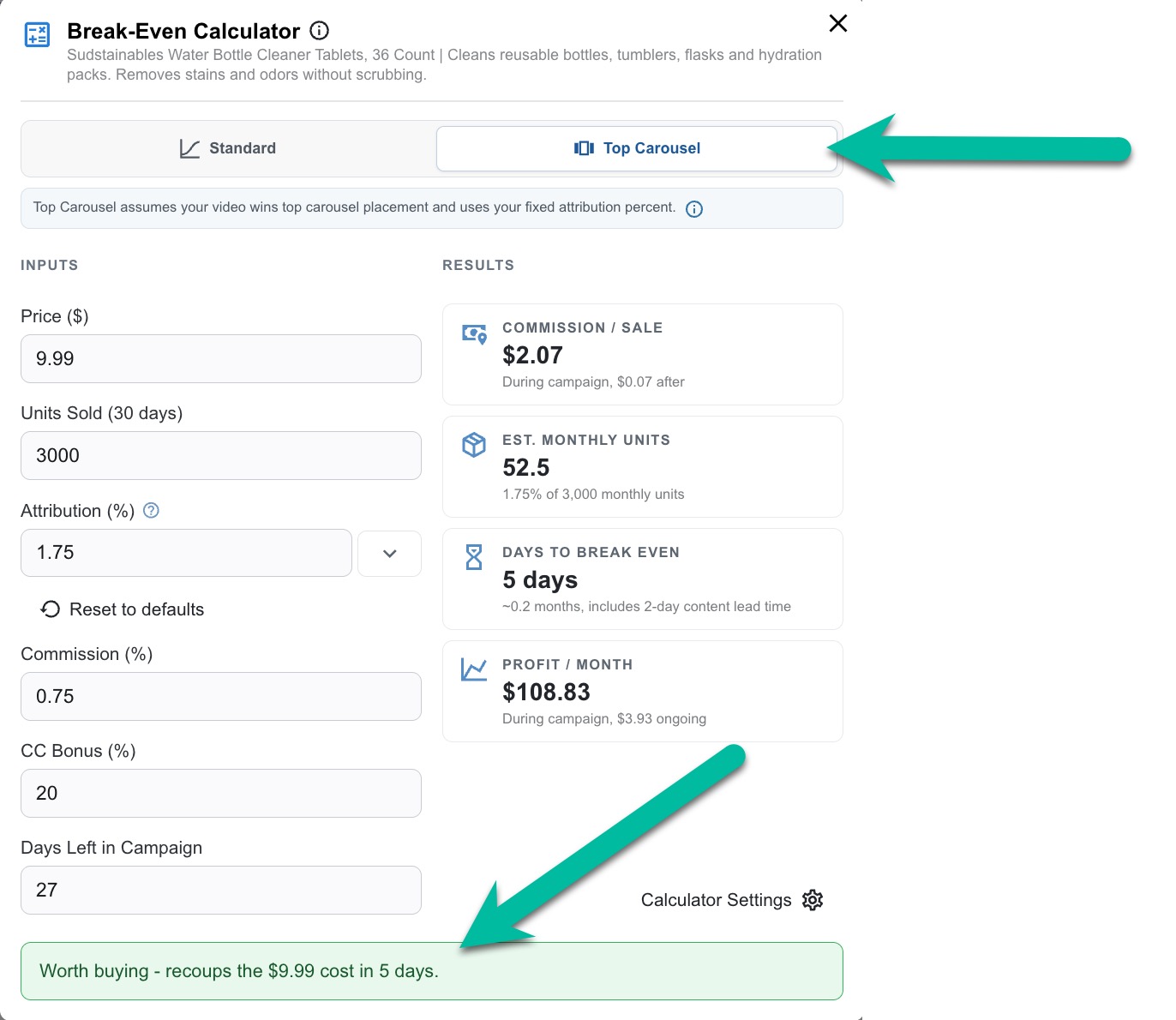
I highly recommend you buy products that break even on both standard and top carousel attribution. This is going to hedge your investment. Even if you don't get the top carousel (position #1) you can likely recoup your money. If you do get top carousel, bonus!
Remember, toggling between these two options is a big deal. Top carousel assumes you are literally the first video after the merchant video. This is prime real estate because your video autoplays if someone watches the merchant videos first.
Never assume you'll get this spot. Make sure your video is good enough that it can earn it.
#3 Competition Strength: You want the first spot right after the merchant's video. Look closely at the current videos: Are they long? Do they lack thumbnails? Are they missing "helpful" upvotes? If the current videos are weak, the spot is yours for the taking.
Competition is a combination of total competitor videos and the length and quality of the current upper carousel placements.
The best way to explain competition strength is with some examples. Here is what a high competition carousel looks like.
Notice that even though it doesn't have a ton of videos (19 is, relatively, not a lot) the average video length is nearly 9 minutes and the upper carousel has no shorter videos (besides the merchant videos that default to the top).
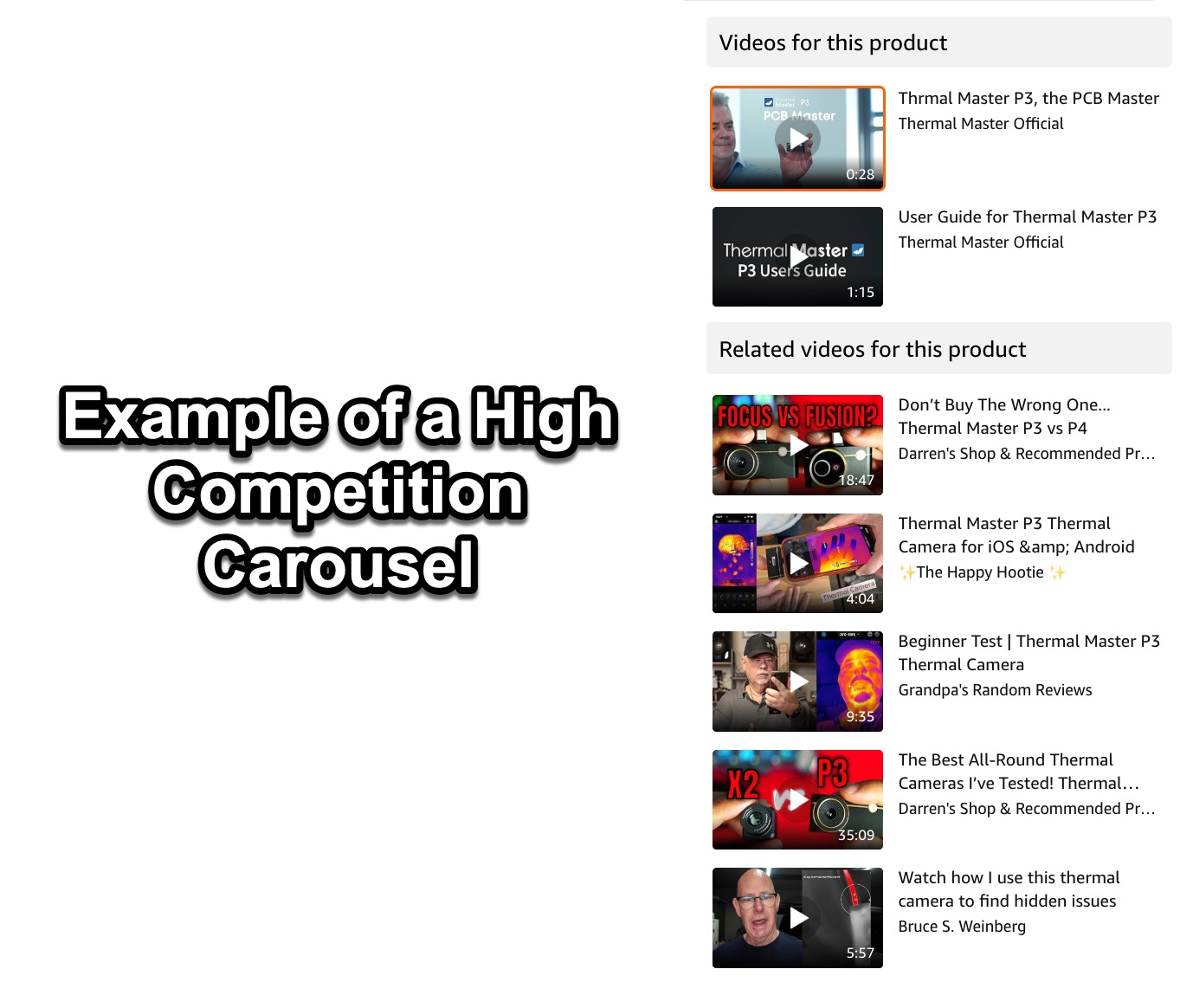

Another two subtle things to note that turn me off of this product. There is a comparison video in the top spot and there is more than one merchant video.
I might consider jumping into high competitive carousels if there is no comparison video yet. I would then make one, make it longer and better than the others, and try to snag a spot, but even then my confidence rate would be low.
Now here's an example of a low competition carousel.
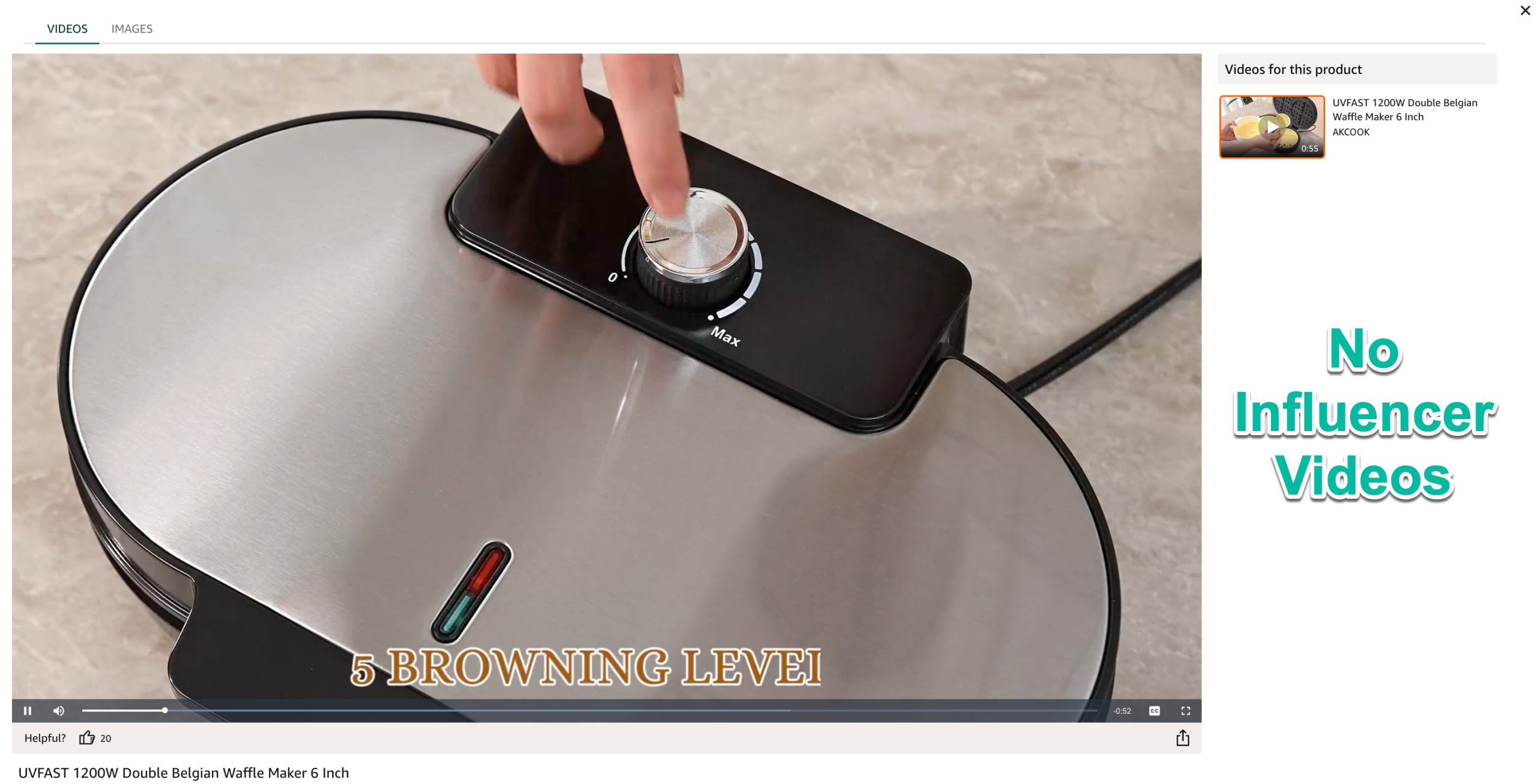
This product has a top carousel merchant video and zero influencer videos. Making any video should get you that top spot. The only thing that could make this less competitive would be a shorter merchant video (this one is about 60 seconds).
Note: This isn't a buy to review quality product, it's merely an example of what the lowest form of competition looks like.
#4 Creator Connections is Mandatory: Ensure the product is in Creator Connections 99.9% of the time, and check the campaign's remaining duration. A profitable lead often loses viability once the campaign ends.
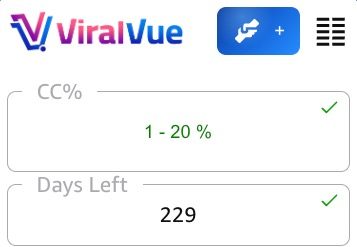
Viral Vue will show us, on every product, if there is an active creator connection campaign and how many days are left.

One of the biggest mistakes I used to make was buying products that had CC campaigns but didn't have enough days left to recoup the costs.
The example above has 57 days left, which isn't amazing but isn't a deal breaker. Over 60 days is usually where I'm aiming to be, but if I can recoup my costs and spin a profit before the campaign ends, that's a win.
Remember, a campaign ending doesn't mean it's gone forever. Many brands renew their campaigns, so if I can make a profit in that current window, there is a decent chance I get a new campaign later to jump on.
Here's an example of two products that are also going to be a no for me. Although one has a CC campaign, it ends in 8 days. By the time it arrives and I film the video, I'll have hardly any time to drive sales.
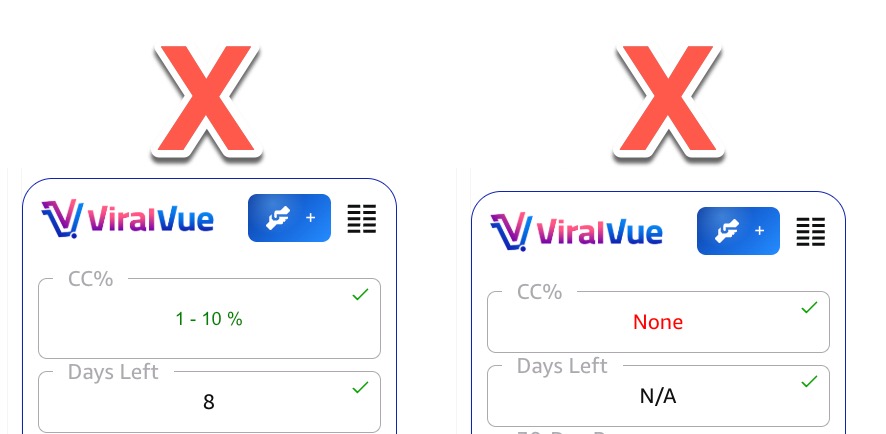
Here's what a real winner looks like. An active campaign that has well over 60 days remaining (and a high CC rate to boot).
#5 The 60-Day Drop-Off Rule: Assume a lead will tank after 60 days. If it keeps earning, that is a bonus. If it dies, your 30-day ROI rule ensures you've already made a profit.
Viral Vue will actually show us earning estimates during a creator connection campaign and the drop off after it ends. Just in case you need a reminder as to why a creator connections are so important, look at this one.
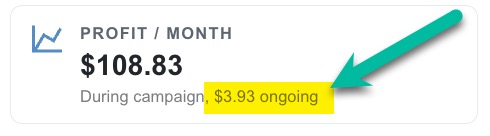
$108.83 per month while the campaign is active vs. $3.93 per month after. Quite the difference!
#7 No Viral Vue Red Flags
Viral Vue now has a feature that alerts you if a product has something that might make it less profitable than it appears.
An example would be something like multiple sellers on a listing (not a brand exclusive listing) or a campaign that has been active for an extended period of time with 100% of its budget remaining.
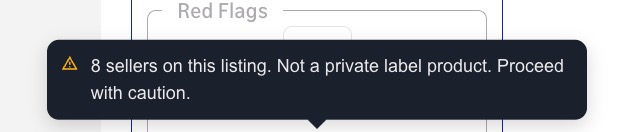

Turn this on in your filters and if there are any, skip that product.
Spotting the Winners (Positive Indicators)
When vetting a product, look for these green flags:
✅ Brands That Don't Give Samples: If you asked the brand for a sample and they said no, that is actually a good thing. It means they aren't flooding the listing with freebies for other influencers.
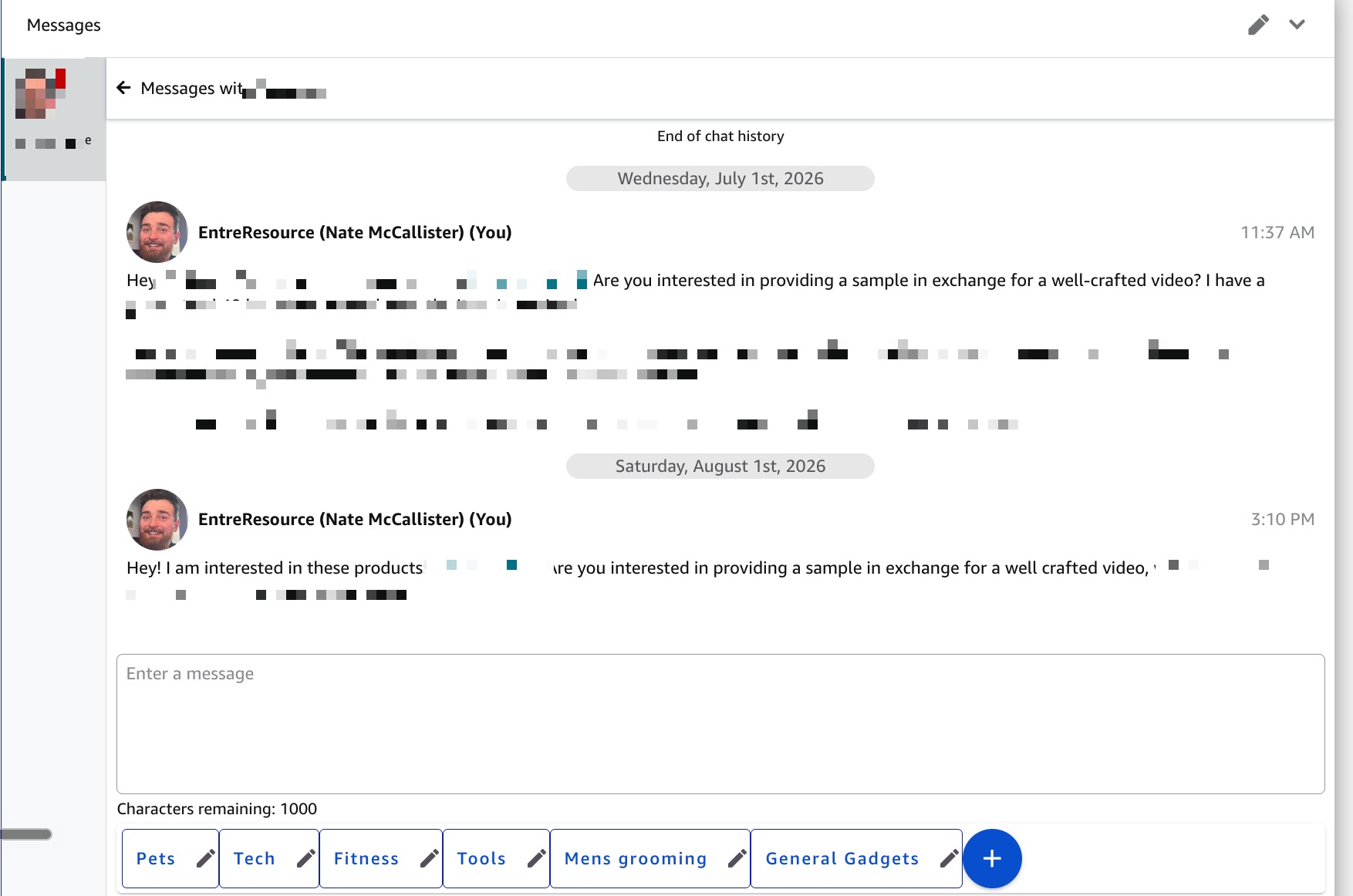
A brand like this one is ghosting me, which is a good sign that they aren't giving everyone who asks a free sample. I like that.
If a product has been listed for a long time and has sold consistently and still has just a few influencers, that's a great sign as well. The beauty of buy to review is that we are buying a certain level of exclusivity.
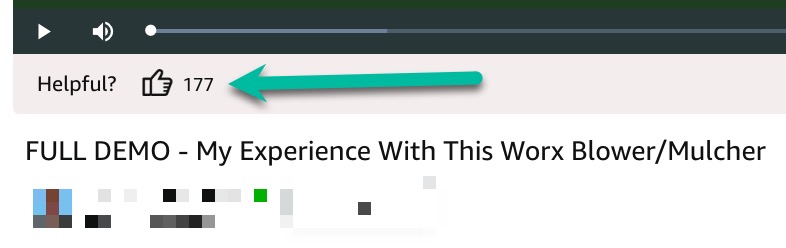
✅ High "Helpful" Counts: This proves customers are actively watching and relying on the influencer videos before buying. If the top placement video has been on the listing for awhile and has zero upvotes, I become hesitant. This is a small tip that I think is actually very powerful.
What is classified as a "high number" is subjective. I like to see at least 10 on an influencer video unless it's a very new listing. The image below shows 177 helpful votes, which is very high, regardless of the item.
✅ Steady Historical Sales: Products that have sold consistently over a long period with very few influencers jumping in and out are goldmines for long-term passive income.
Here is an example of an extremely volatile sales graph. The volatility is not a deal breaker BUT I should base my buy decision on the current sales trend, not the previous high or recent outliers.
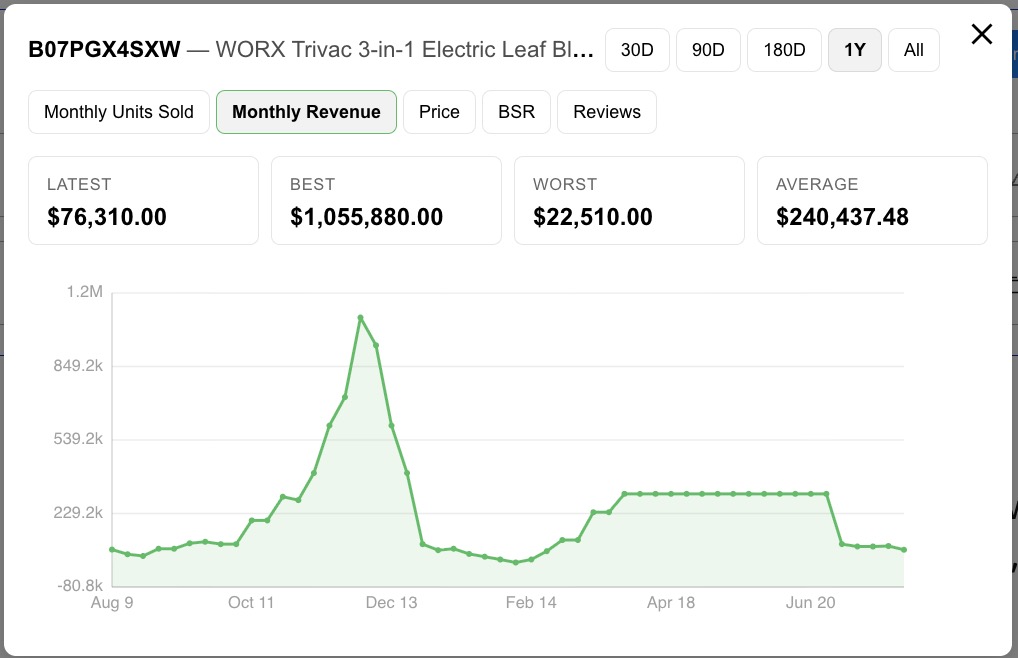
The image above is the Viral Vue historical sales data, but you can also check with a tool like Keepa.
✅ High Buyer Curiosity Products: Does the buyer need to see how it works? High-priced, complex, or highly competitive items naturally drive shoppers to watch reviews before checking out. Going back to "high helpful counts," that is a good indicator that customers have questions before buying and they're likely to watch a video.
✅ New Items from Established Brands: Sales metrics are likely to climb, but the influencer competition hasn't discovered the listing yet. This is an advanced tactic and there are ways to monitor for new releases from big names.
High Competition vs. Low Competition Opportunities
When doing product research, there are two different strategies. You can target low competition products or high competition products.
#1 Low Competition
These are products with fewer than 5 influencer videos. This means making any video will likely get you an upper carousel placement.
However, low competition buy to review can easily become competitive over time as other influencers see the opportunitiy.
Although I still recommend making your video good enough to compete in the long run, low competition products don't require the same amount of effort as the next type.
#2 High Competition
These are products that have a lot of influencers on the listing but you believe you can still compete for the top spot by making a video that is so good, you can take the top spot anyway.
These are things that might
Spotting the Traps (Red Flags)
Avoid listings that show any of these negative indicators:
🚩 Merchant-Dominated Carousels: If the seller has multiple long videos taking up the upper carousel, move on. The reason being, the top influencer videos are usually autoplayed after the last merchant video. If there are multiple merchant videos, we are likely missing out on that organic "roll into" effect that is much more important than I think many influencers appreciate.
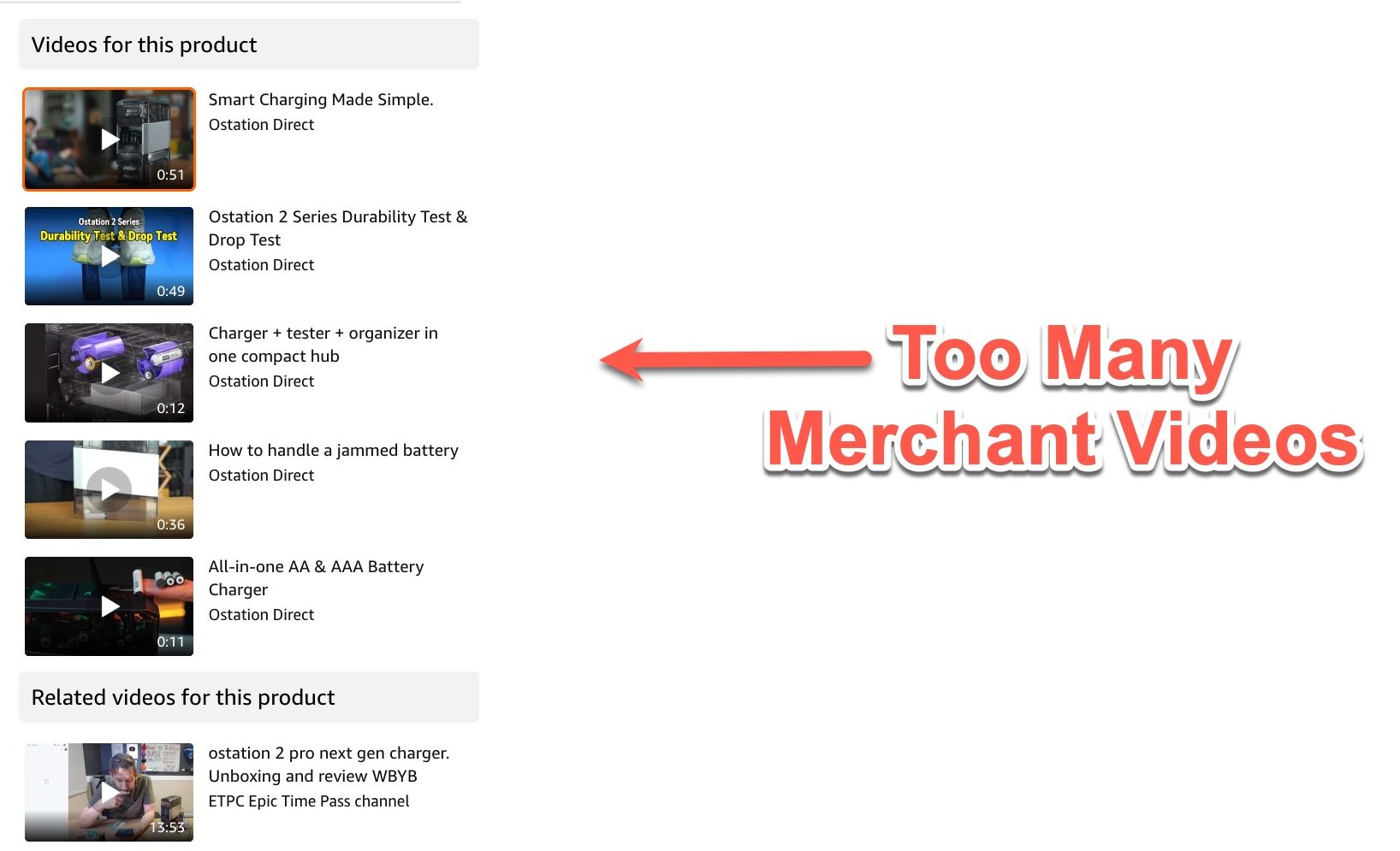
🚩 Multiple Sellers on a Listing: If a product has multiple sellers, it is harder to earn onsite commissions.
🚩 Campaign Budget Still 100%: We can see how much a campaign has already paid out to influencers. If a campaign has been up for an extended period of time and has paid nothing yet, that's a big red flag.
🚩 Multiple Customer Review Videos: These appear in the upper carousel but usually below the influencer videos. These can siphon views away from influencers. This is not an extremely strong factor but it's worth noting.
🚩 Strong Incumbent Influencers: If the top spots are already taken by long, high-quality comparison videos, it will be incredibly difficult to dethrone them. Remember, your goal is to beat the top video, not just the average watch time.
🚩 Post-Seasonal Cliffs: Be careful investing in seasonal items (like pool toys or Christmas trees) as they exit their peak. The sales spike will vanish instantly.
Maximizing Your Video ROI
Once the product arrives, your execution matters just as much as your research.
💨 Speed to Market: Film and publish your video as soon as possible. This doesn't mean rush the production, but it does mean prioritizing getting it published.
If you let a product sit for 2 weeks before making a video, you've missed out on a lot of the earning window. The profit estimator allows you to edit your own lag times, so if you don't meet them, the earnings are going to be overstated (which might make an entire video unprofitable).
⏮️ Front-Load Value: Put your best B-roll and edits at the very beginning to boost early watch time. Answer the most common customer questions immediately.
⌛️ Go Long: Make your videos as long and detailed as possible to increase watch time and establish authority.
2️⃣ Leverage Comparisons: Videos that compare two similar items consistently perform the best.
♻️ Recycle: Cross-post your videos to TikTok Shop, YouTube, other Amazon geographics etc. to double-dip on commissions.
↪️ Reinvest: Finally, commit to reinvesting your profits (I suggest at least 10% of your net earnings each month) back into new products to keep the flywheel spinning.
💵 Flip Products Whenever Possible: The saviest buy to review influencers often sell the things they purchased after using them. You can do this anyway you want. Facebook Marketplace seems to be the most popular and effective. Just don't resell them as new on Amazon!
With the right tools, strict criteria, and high-quality video execution, Influencer Arbitrage can transform your Amazon storefront into a highly profitable, scalable business.
How to Do Product Research for Buy to Review Products
What does the process of finding profitable products actually look like?
In short, we use Viral Vue and navigate across Amazon product search pages, leveraging the Product Vue feature to filter out winners from losers.
Step #1 Start with a Product Search
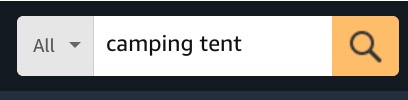
I suggest you start with things you actually want to review. For instance, have you been wanting to buy a new tent for that summer camping trip?
Type in "camping tent" and let the page load.
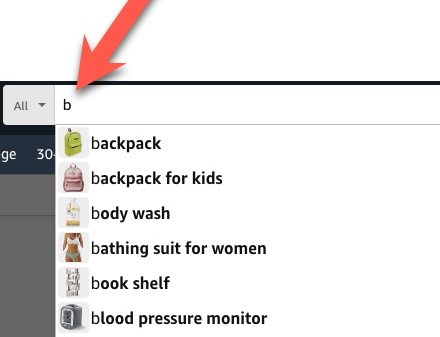
📝 Pro Tip: Having trouble thinking of a search? Use the A-B-C autofill approach.
Go to the Amazon search bar and type any letter. Then see what Amazon's autofill suggests.
This can lead you to products you might not have ever considered.
With the Viral Vue extension installed, your page will look like this...
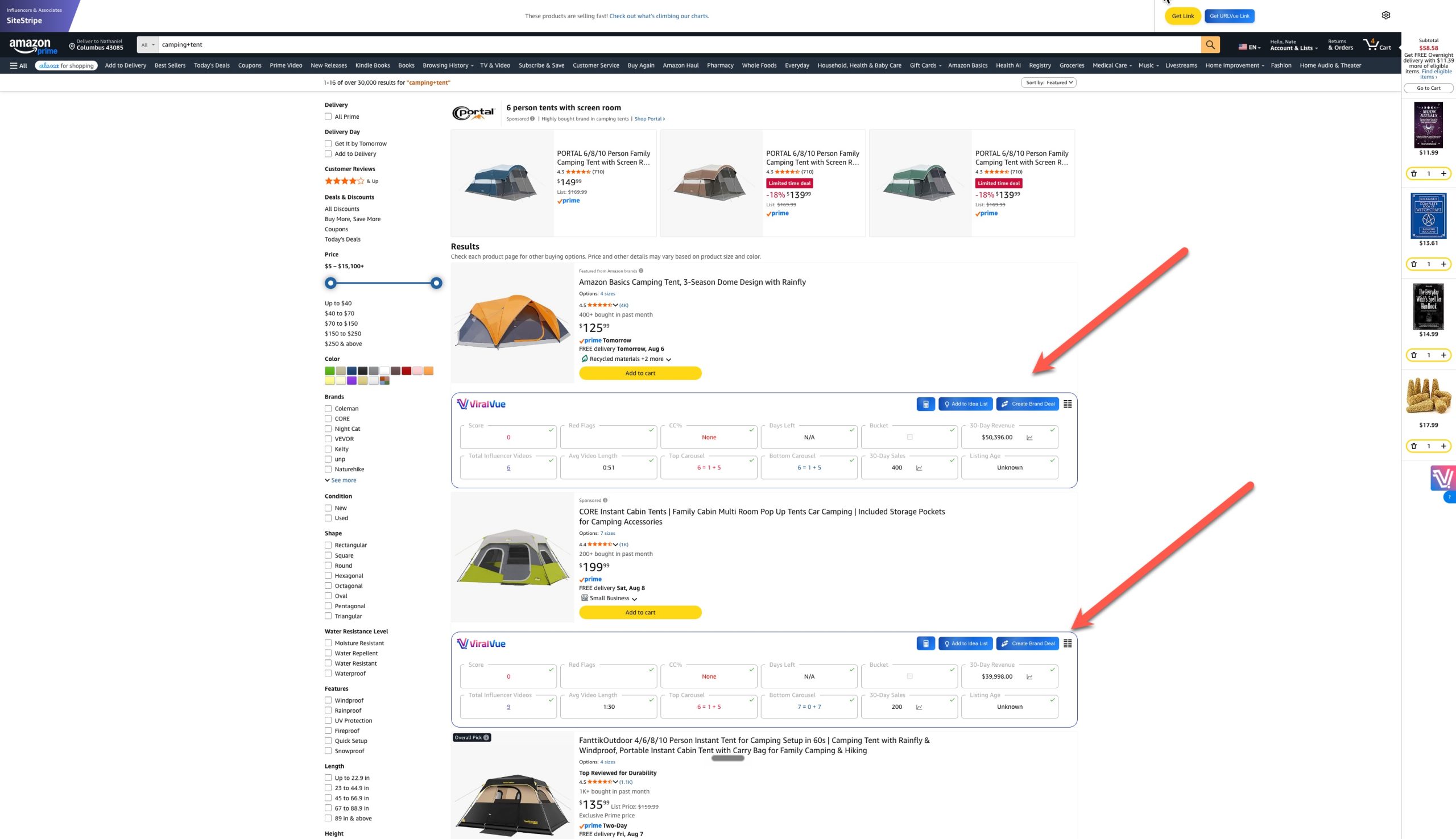
A Viral Vue data box will now appear under every product.
You can adjust the data that is shown. I suggest copying the ones I have visible. They are the heart of what goes into a good investment product.
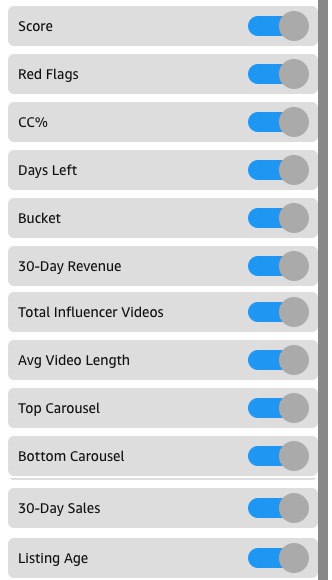
- Viral Score: A number between 0 -100 that estimates a products potential. This is a nice reference, but don't give too much weight to it. I mostly use it to spot extreme outliers (over 80+) and obvious losers (0).
- Red Flags: Absolutely invaluable. This will signal if there are things that might ruin the products profitability that most influencers don't notice.
- CC%: I don't really care what the percentage is, I just want to know it has one.
- 30-Day Revenue: No revenue, no purchase. The total revenue needed to justify a buy varies based on other metrics, but usually a buy to review needs at least $10,000 in 30 day Revenue.
- Days Left: Very important. Most of our earnings come in this window.
- Bucket: Not buy to review related, but adding a product to your bucket lets you message the brand for a free sample. This is nice for things that are worth reviewing but not buying.
- Total Influencer Videos: The first metric for competition.
- Avg Video Length: The second metric for competition. Shorter average video length can offsite a high number of total competitors.
- Top Carousel: A non-negotiable.
- Bottom Carousel: How many influencers are appearing in the bottom carousel. This one doesn't matter that much and if you want to remove any of these columns, it can be this one.
- 30 Day Sales: How many units are selling each month. More units means more chances to grab a sale. Revenue is great but for high ticket items, it can be misleading. Combining it with sales paints a better picture.
- Listing Age: A buy to review potential item that is very old is exciting to me. This means competition is likely going to be slow and I can stick in the carousel longer. A newer listing isn't a deal breaker but I anticipate competition is likely incoming soon.
Step #2 Click "Product Vue" and Set Filters
Product Vue helps us quickly see product data at a glance and the filters allow us to hide ones that won't be good fits for buy to review.
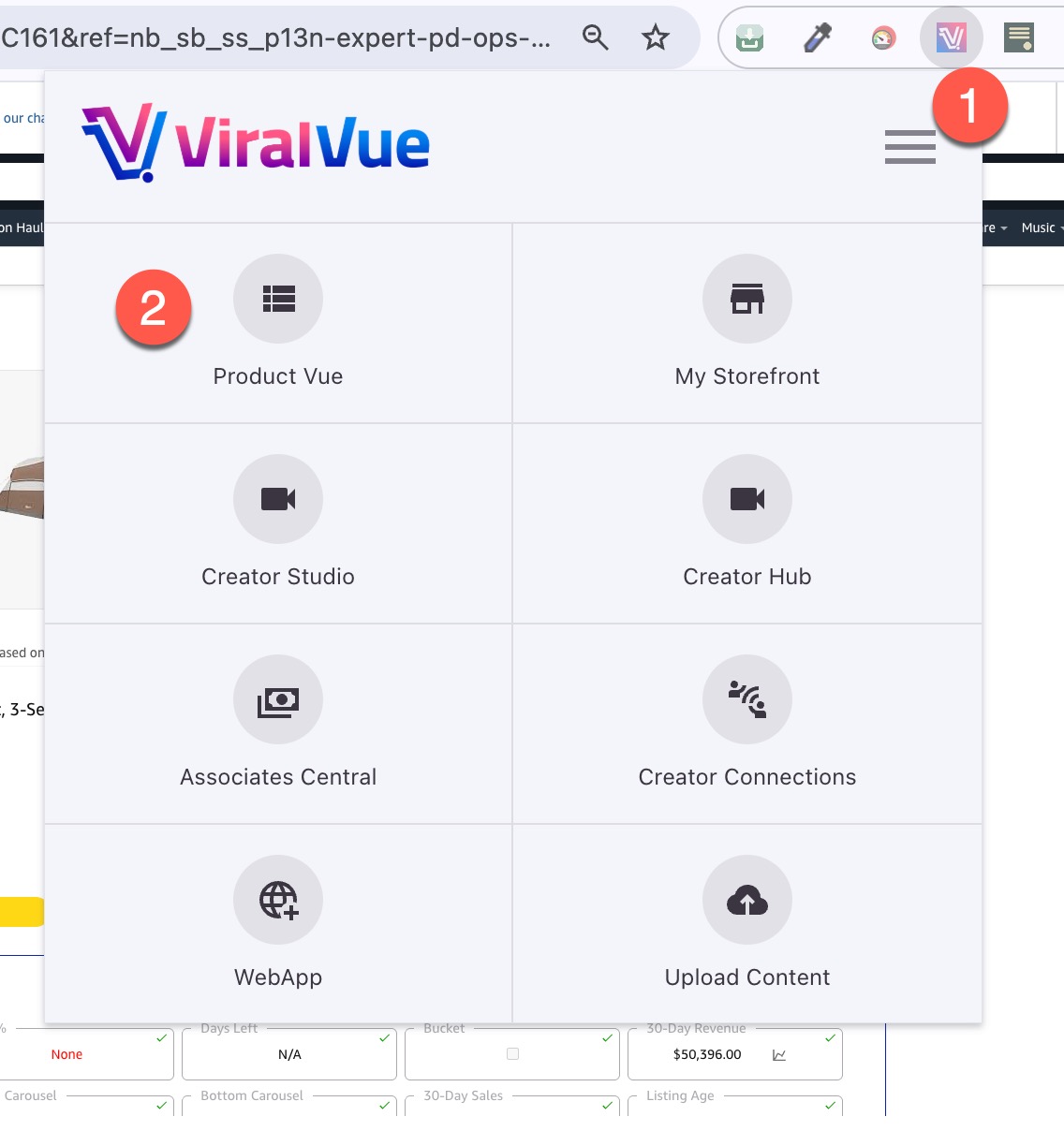
Adjust your filters as you see fit, but mine looks something like this.
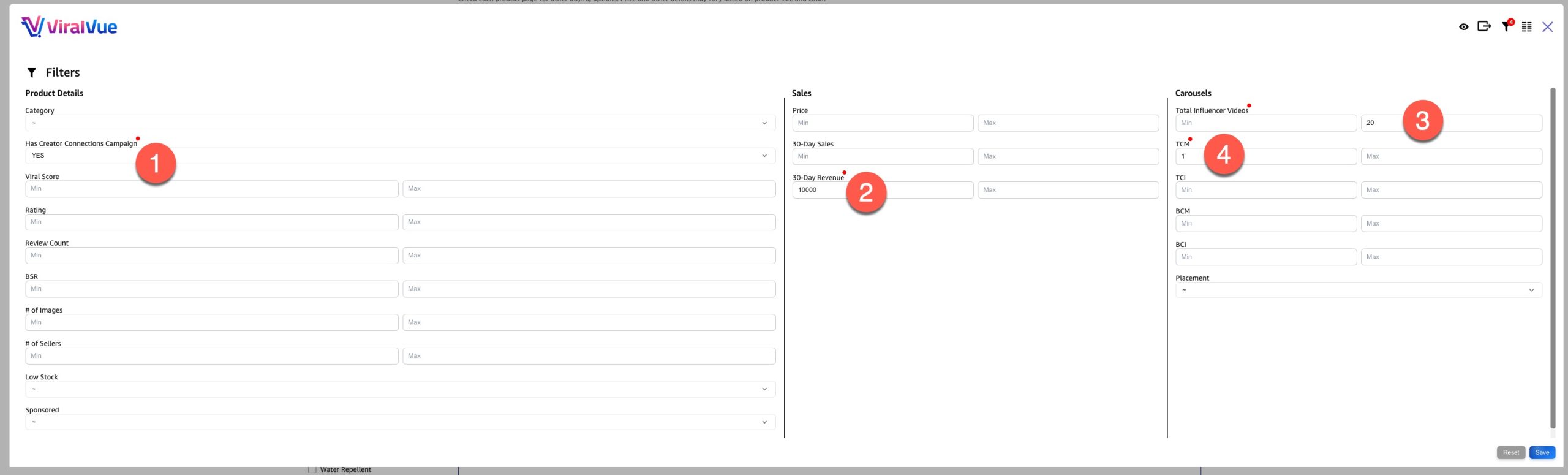
1. Has Creator Connection Campaign: Yes
2. 30 Day Revenue: Minimum $10,000
3. Total Influencer Videos: 20 (I loosen this if I think I can make a video that is next level).
4. TCM (Top Carousel Merchant): This will let me know there is an upper carousel available
Just make sure that your filters aren't too tight and be sure you don't mix up "Min" vs. "Max."
Step #3 Review Competitors
Once you've found a product that seems to fit your criteria, spy on the competitors and current upper carousel.
Do the videos look like you could beat them out? Are they short or long? Are there comparison videos? How many merchant videos appear? Are the thumbnails decent?
Step #4 Consider Comparison Products
Comparison videos are working tremendously well right now. If you have multiple products that meet your criteria, consider buying both.
Comparisons can be between 2 products or more. I've seen creators do as many as 10! I stick to 2-3.
You can then make multiple videos.
- A standalone video for each product
- The comparison video.
Not every buy to review needs ot be a comparison, but whenever possible, I highly suggest buying products that work for comparison videos.
Step #5 Buy + Start Preparing Content Ideas
I'm not an accountant, but I do suggest using a business card for buy to review purchases. Also, it doesn't hurt to start thinking about your script idea.
Be sure to note the product shipping timeline. The break-even calculator factors in shipping time and if the actual shipping time is greater than the time you have put as the default, your earnings estimate might be off.
Step #6 Record and Publish as Quickly As Possible
Again, we aren't rushing the video, but we are prioritizing it. Don't buy something if you can't make the video within the necessary timeframe. Letting low value free samples pile up is one thing, but letting investment products gather dust is like burning money.
That's it.
Now just repeat this process daily (or as often as you want to make money).
Buy to Review FAQs
Let's quickly answer some of the more specific questions I know many of you might have.
#1 What sort of ROI am I aiming for?
I don't have a specific ROI goal that is universal for each investment product. Consider the time and effort required to make the video and lifelong earning potential and ask "is this worth my time?"
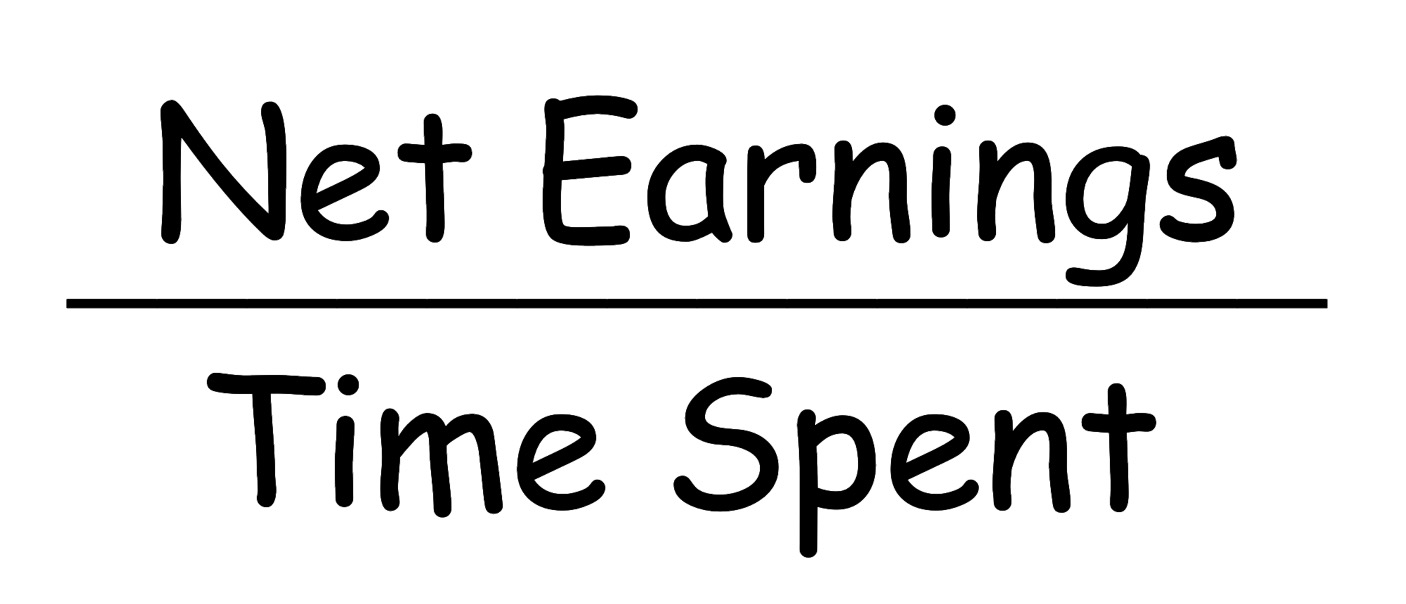
If it takes you an hour to make a video and it can earn $100 profit, is that enough? $50? $25?
I also consider not just time but effort required. Do I need to go out of my way to make this video or is it very natural and can be done without hassle?
#2 How much should I be spending on products each month?
This is totally up to you, but my answer is "as much as you can as long as it's profitable."
Obviously, this doesn't mean spending your life savings on day one. It means investing as much as you can as long as you're remaining profitable at scale.
I suggest reinvesting at least 10% of your monthly net earnings, but do what feels comfortable to you. This can be a big part of your strategy or a small part. There are no rules.
#3 Can I return things after buying and reviewing them to save money?
Ethics aside, this is absolutely not something you should do, especially when buying things from Amazon. I know many people buy things from other retailers and return them once they're done. I don't do this as I find it to be sleazy and don't recommend you do either.
#4 How can I track my profits and losses?
Viral Vue is the best way to do this. In the web app, you can see things like your costs (assuming it was purchased on Amazon) onsite earnings and creator connections earnings over time.
#5 How much time should I spend on product research every day?
Again, it is totally up to you. For perspective, I spend about 30-45 minutes per day on research. The influencer program is not my main business, so don't let that be your own ceiling. As Abraham Lincoln (allegedly) said '“Give me six hours to chop down a tree and I will spend the first four sharpening the axe”
I used to think product research was a waste of time and that I'd be better off just spending all my time shooting videos. Pivoting away from that mentality changed the direction of my results.
Of course, it is in filming and publishing videos that we actually make our money, but the product research part dictates how much we make and how quickly.
#6 Do you think I should only do buy to review?
You could, but I don't suggest it. I regularly still request free samples and review things with good earning potential that I either own or have access to. If your goal is to maximize your earnings, why limit the scope of your product pipeline?
The only variable to consider is your time. Spend it all on the highest value opportunities. I prioritize buy to review but don't limit myself to it.
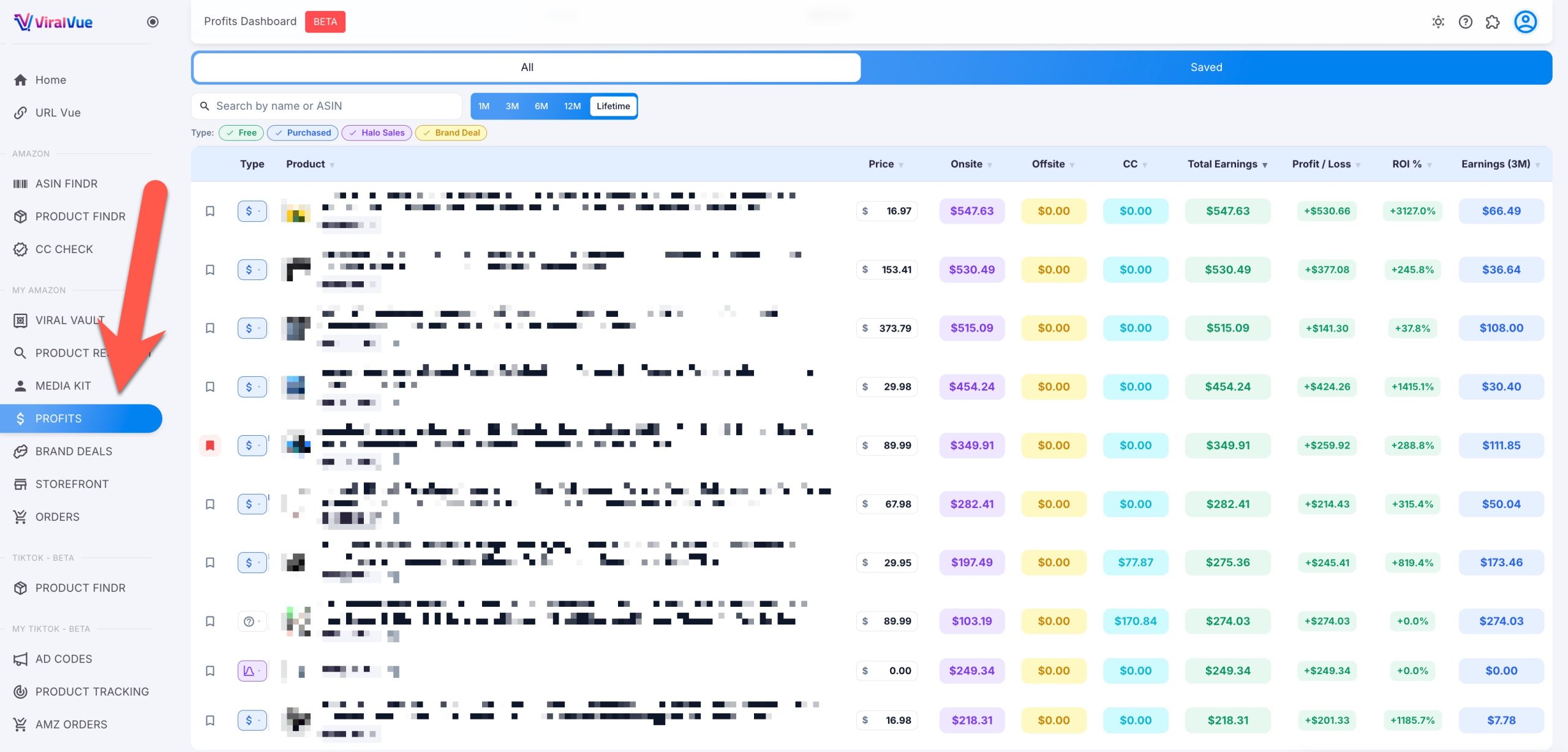
You can save the most important ones as well and monitor them over time.
What's Next?
If you want to learn more about affiliate marketing and the Amazon influencer program, come join me over at my free Skool community, Evergreen Affiliate Marketing.
And of course, don't forget to get started (for free) with Viral Vue if you're serious about making investment products work for you!